Dirty data in HubSpot is rarely one big problem. It is a slow accumulation of duplicate contacts, half-filled forms, free-text where a dropdown should be, and records nobody has touched in two years. On its own each issue looks minor. Together they quietly corrupt your reporting, misfire your automation, and now feed wrong answers to the AI tools layered on top of your CRM. This is the operator's guide to fixing it and keeping it fixed.
Half of data hygiene is won before a record ever lands in HubSpot. If you are still standing up your portal, start with our guide to importing your data into HubSpot the right way. Everything below assumes the data is already in and needs cleaning.
What does "clean" data actually mean in HubSpot?
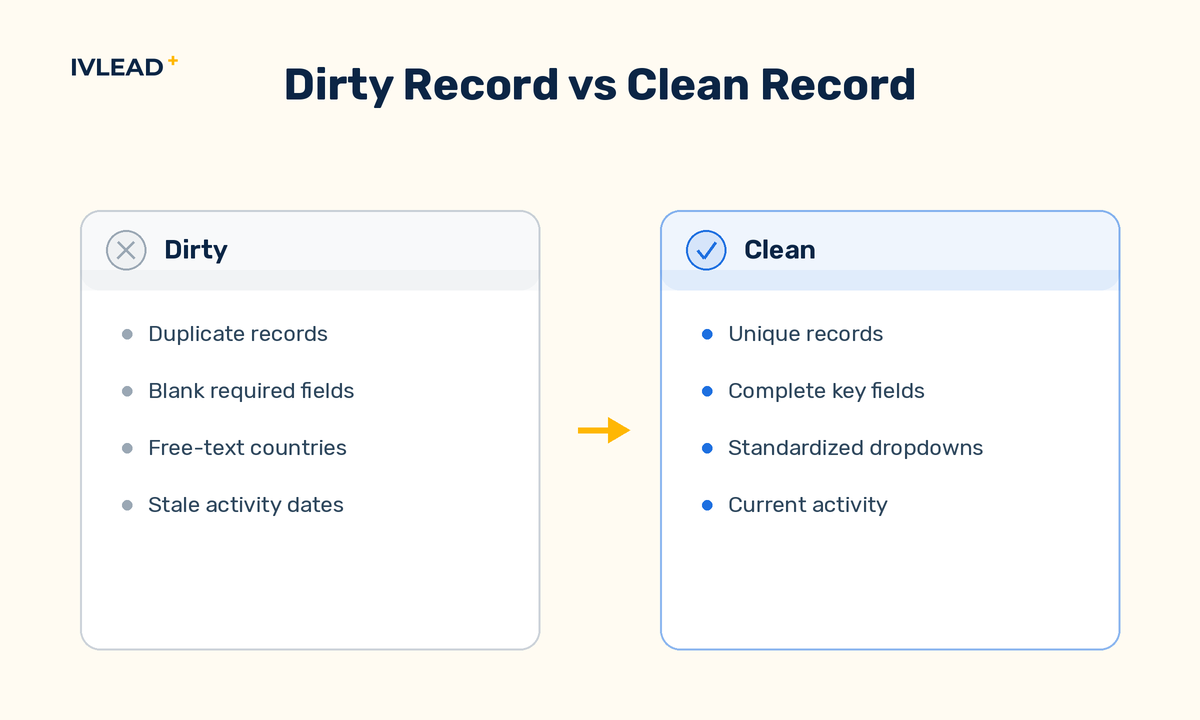
Clean data means every record is unique, complete on the fields you depend on, formatted consistently, and current enough to trust. Those are four separate tests, and a record can pass one while failing the rest. A contact with no duplicate twin can still have a blank lifecycle stage, a country typed five different ways, and a last-activity date from 2023. "Clean" is not a vibe — it is a record that your reports, workflows, and AI tools can read without guessing. If you cannot state the rule a field is supposed to follow, you cannot say whether it is clean.
Why does data clean-up matter more now than it used to?
It matters more because automation and AI act on your data without a human sanity-checking each step. For years a salesperson eyeballed a messy record before sending an email and silently corrected for it. That human filter is gone. A workflow enrolls on a property value exactly as stored. An AI assistant summarizing an account, or a model scoring a lead, reads what is in the field — not what you meant. Feed those systems duplicate records, blank required fields, and inconsistent picklists, and they confidently produce wrong segments, wrong routing, and wrong answers, faster and at larger scale than any human ever could. The cost of dirty data used to be a slightly-off report. Now it is automation that misfires every time it runs.
What are the highest-leverage fixes to start with?
Start with the four issues that corrupt the most downstream systems for the least effort: duplicates, inconsistent dropdown values, missing required fields, and inconsistent formatting. These are the fixes that pay back immediately because every report and workflow reads through them.
- Merge duplicate records. Duplicates split a customer's history across two records, double-count them in reports, and let two reps work the same account. Use HubSpot's built-in duplicate management tool for contacts and companies, review each suggested match before merging, and decide a survivorship rule in advance — which record's values win when they conflict.
- Standardize dropdown and picklist values. When lifecycle stage, lead status, country, or industry are entered as free text, "United States," "USA," and "US" become three different segments. Convert high-stakes free-text fields to dropdowns, consolidate the stray values, and lock down who can add new options.
- Fill the fields your operations actually depend on. Not every blank matters — but a missing lifecycle stage, owner, or email breaks routing and reporting. Identify the handful of fields your workflows and reports rely on, make them required at the point of entry, and back-fill the gaps on existing records.
- Fix formatting and capitalization. Inconsistent phone formats, trailing spaces, ALL-CAPS names, and mixed date formats look cosmetic but break matching, deduplication, and personalization tokens. Normalize them with HubSpot's format-data tools and a few maintenance workflows.
How do you keep data clean instead of cleaning it once?
You keep it clean by treating hygiene as a recurring operating cadence with prevention built into entry, not a one-time project. A heroic weekend cleanup feels great and decays within a quarter because nothing stopped the mess from coming back. The fix is to attack data on two fronts: prevent bad data at the door, and run a scheduled sweep for what slips through.
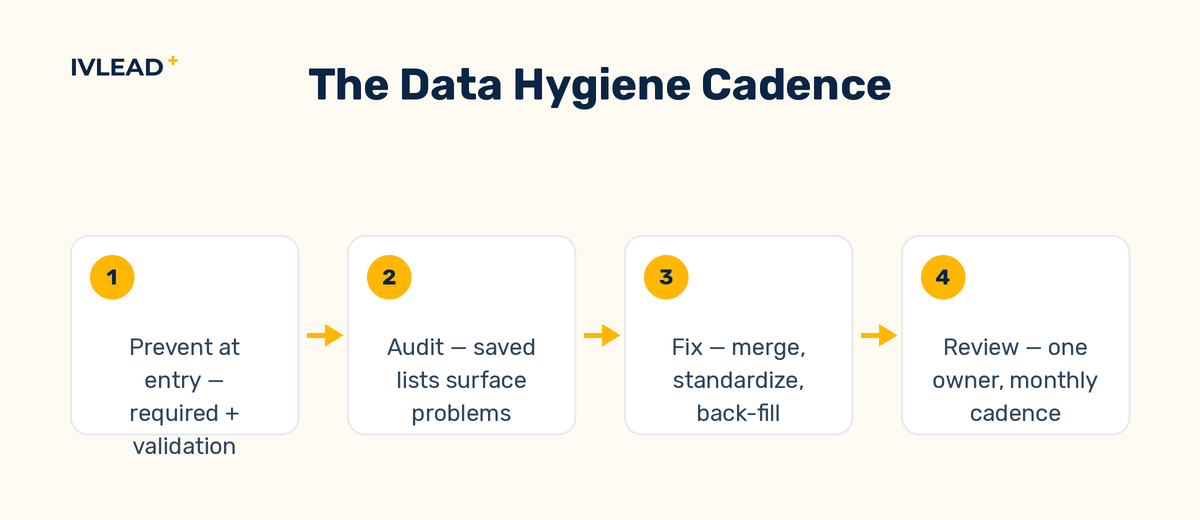
Prevent at entry. Make required fields actually required on forms and manual record creation. Use validation rules on properties so people cannot save garbage. Use workflows to auto-standardize values the moment a record is created or imported — copy and format the value, set the dropdown, normalize the casing — so the data lands clean instead of needing a later fix.
Sweep on a schedule. Build saved active lists that surface the problems — contacts missing a lifecycle stage, companies with no owner, records with non-standard country values, contacts with no activity in a long window. Review the duplicate tool. Run that pass on a fixed cadence — monthly or quarterly depending on how fast your database grows — and assign one owner so it does not fall through the cracks. The list does the finding; the human does the judging.
Train the team. Most dirty data is created by well-meaning people who never learned the conventions. A short, written standard — which fields are mandatory, what the dropdown values mean, how to handle a possible duplicate — prevents more mess than any cleanup tool fixes.
When should you bring in help versus doing it in-house?
Do it in-house when the problems are contained and your team has the time; bring in help when the portal is large, the data feeds revenue-critical automation, or nobody internally owns it. A few hundred contacts and a handful of inconsistent fields is a good internal project. A portal with years of accumulated debt, multiple integrations writing conflicting values, and reporting the leadership team actually relies on is where a structured RevOps approach pays for itself — because the risk is no longer a messy list, it is decisions made on numbers that are quietly wrong.
Frequently asked questions
How often should I clean up my HubSpot data?
Run a scheduled sweep monthly or quarterly depending on how fast your database grows, and prevent bad data at entry continuously. High-volume portals with active forms and integrations need a tighter cadence than a slow-moving database. The goal is small, regular passes — not an annual emergency.
Does cleaning up old contacts hurt my numbers?
Removing or suppressing invalid and long-inactive contacts usually improves your numbers, because email deliverability, engagement rates, and report accuracy all improve when you stop counting dead records. Suppress or archive rather than hard-delete when you are unsure, so you keep the history without letting bad records distort active reporting.
Will HubSpot's duplicate tool catch every duplicate?
No — the built-in duplicate tool catches high-confidence matches but misses duplicates with different emails, typos, or split company names. Combine it with saved lists and manual review for the records that matter most, and standardize formatting first, since clean formatting makes more duplicates detectable.
Why is clean data important for HubSpot AI and automation?
Because AI and automation act on the field exactly as stored, with no human to catch the error. A workflow enrolls on the literal value; an AI summary reads the literal value. Duplicates, blanks, and inconsistent picklists turn into wrong routing, wrong segments, and wrong AI answers — at scale and on every run.
Get a straight read on your portal
If you are not sure how clean your data really is, that is usually a sign it needs a look. IV-Lead works with B2B teams to get HubSpot data into shape and keep it there — deduplication, property standardization, validation, and the workflows that hold the line. See how we approach HubSpot implementation and optimization, or book a 30-minute portal audit and we will tell you straight where your data stands and whether IV-Lead is the right fit. No deck, no pitch.