If you run an Israeli B2B company, your CRM is probably HubSpot and your ERP is probably Priority. The two rarely talk to each other well — and the gap between them is where deals stall, invoices get re-keyed by hand, and sales loses visibility into what finance already knows. This is the definitive guide to closing that gap: the options, what actually syncs, what breaks, and how to roll it out without corrupting either system.
The short answer up front: for most Israeli B2B companies, the right way to connect HubSpot and Priority is an event-driven integration through an Israeli iPaaS layer (Engini.io is the natural fit, given its native Priority connector), with a clearly defined source of truth per field and a one-directional-by-default sync. Zapier is fine for a single trigger; a custom API build is right only when the logic is genuinely complex. Below is how to decide, and how to build it so it holds.
Why integrate HubSpot with Priority ERP at all?
Because the alternative is a manual handoff that quietly taxes every deal. When HubSpot and Priority are disconnected, someone re-types every closed deal into Priority as a sales order, sales can’t see whether an invoice was paid, and finance works from a customer list that’s always a few days stale. Each of those is a small friction; together they slow the sales cycle and erode data integrity.
A working integration does three things: it turns a Closed Won deal into a Priority sales order or invoice automatically, it pushes Priority reality (order status, invoice status, delivery milestones, outstanding balance) back into HubSpot where sales and customer success can see it, and it keeps the customer record consistent across both systems. The result is that sales, account management, and finance all work from the same truth — without anyone re-keying anything.
What are your options to connect HubSpot and Priority?
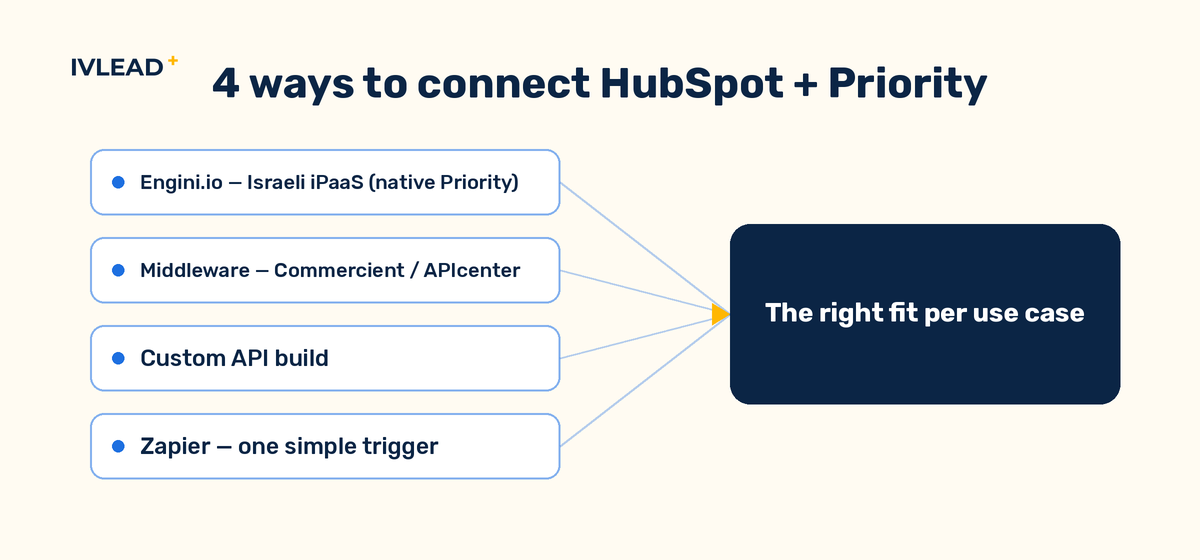
There are four real paths, and choosing well matters more than the build itself.
1. Israeli iPaaS (Engini.io) — the default for most. Engini is a no-code integration platform with a native Priority connector (it’s listed in the Priority Software marketplace) and a HubSpot connector. It uses event-based triggers: you fire a webhook from Priority’s Sales Order BPM (on a status) or a Business Rule, and from HubSpot workflow events, then map fields between them. For a Priority-centric Israeli company, this is usually the fastest path to a reliable, maintainable integration — and support speaks your language and knows Priority’s quirks.
2. Middleware/connector products (Commercient, APIcenter, and similar). Packaged sync products that map HubSpot Deals/Contacts/Companies to Priority Invoices/Shipping/Customers on a schedule. Scalable and quick to stand up, but you’re fitting your process into their model, and Israeli/Priority-specific edge cases can be a stretch.
3. Custom API integration — only when the logic demands it. A real ERP–CRM integration is rarely just field mapping; it’s a business-architecture project. If your sync involves complex conditional logic, multi-step approvals, or objects the packaged tools don’t model, a custom build against HubSpot’s and Priority’s APIs gives you full control — at the cost of ownership and maintenance. Note the 2026 HubSpot platform changes here: API-key auth is deprecated (use a private-app token or OAuth), and the API is now date-versioned. Any custom build must be on the new auth model.
4. Zapier — for one small thing. Good for a single, simple trigger (“new Priority customer → create HubSpot company”). It won’t hold a full bi-directional order-to-invoice flow, and it has no real conflict resolution. Use it to prototype, not to run production.
Rule of thumb: Priority-native Israeli company, standard order–invoice flow → Engini. Genuinely complex logic or objects → custom. One trivial trigger → Zapier. “We’ll figure the source of truth out later” → stop and define it first.
What actually syncs — and which system owns each field?
This is the question that decides whether the integration lasts. Before any tool is configured, write down the source of truth for every field. Ambiguity here is what produces the “which number is right?” arguments six months later.
The defensible default for Israeli B2B: HubSpot owns the sales relationship and marketing activity; Priority owns the financial and fulfilment record. Concretely:
- Company / Customer — HubSpot Company ↔ Priority Customer. HubSpot owns pre-sale; Priority owns the financial customer record and balance. Dedupe on a stable key (company registration number or a Priority customer ID), not on name.
- Contact — HubSpot owns contact and marketing data; push only what Priority needs (billing contact, email) one-directionally.
- Deal → Sales Order / Invoice — HubSpot owns the deal until Closed Won; that event creates the Priority sales order or invoice. Priority owns it from there.
- Order status, invoice status, delivery milestone, outstanding balance — Priority owns these; sync them into HubSpot as read-only properties so sales and CS can see them without touching them.
- Products / line items — Priority is the catalogue source of truth; map to HubSpot line items for deal accuracy.
Default to one-directional per field. Bi-directional sync is seductive and expensive: the moment both systems can write the same field, you need conflict-resolution rules, and most silent-corruption incidents start there. Make a field bi-directional only when there’s a real reason, and write the tie-break rule explicitly.
What does a real HubSpot–Priority integration look like?
Here is the canonical flow, the one most Israeli B2B companies actually need:
- A HubSpot deal moves to Closed Won. A workflow fires the integration event.
- Engini receives it, checks the company has a matching Priority customer (creating one if not, from the HubSpot company + registration-number key), and calls Priority’s Create Sales Order activity with the mapped deal + line-item data.
- Priority creates the sales order / invoice. Its ID is written back to a HubSpot deal property, so the two records are linked forever.
- As the order progresses in Priority — approved, shipped, invoiced, paid — a Priority BPM/Business Rule webhook pushes each status change back to read-only HubSpot properties.
- Sales and CS now see fulfilment and payment status inside HubSpot, and finance never re-keys a deal.
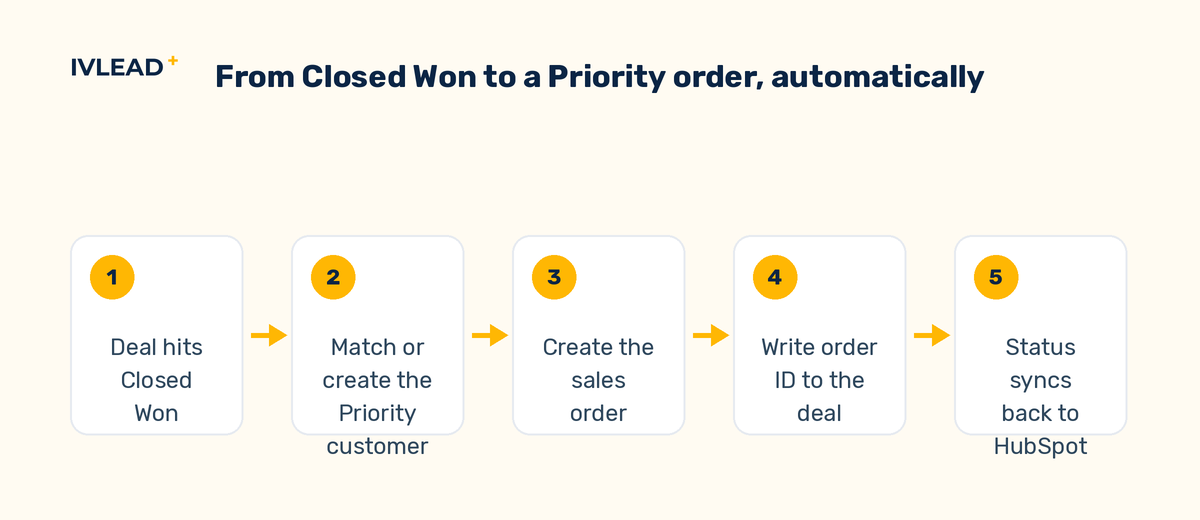
That single loop removes the biggest manual tax in the business. Everything else (customer balance into HubSpot, product history for upsell signals) is an extension of the same pattern.
What breaks — and how do you prevent it?
The failure modes are predictable, which means they’re preventable:
- Duplicate records. The classic cause is a sync that fires on both create and update triggers, or a dedupe key based on name. Fix: one clear unique identifier (registration number / Priority customer ID / email, casing-normalised) and idempotent create-or-update logic.
- Silent failures on missing required fields. Priority rejects a record that’s missing a mandatory field, and if you’re not watching, the sync just... doesn’t happen. Fix: validate required fields before the call, and alert on every failure — silent failures are the worst kind.
- Hebrew field names and labels. Priority fields are often labelled in Hebrew. Document both the Hebrew and English label for every mapped field so the map is readable by whoever maintains it next.
- Date-format mismatches. Align everything to ISO 8601; date drift between the systems is a common, quiet corruption.
- Timeouts on large batches. Big initial or bulk syncs time out. Build retry logic and batch in chunks rather than firing thousands of records at once.
- The 2026 auth change. If you have an older custom integration on a HubSpot API key, it will break — API keys are deprecated. Move to a private-app token or OAuth and pin an API version.
How do you roll it out safely?
Never build ERP–CRM integration straight into production. The sequence that works:
- Map first, build second. Produce a complete field-by-field map (source → target, type, direction, source of truth, notes) before anyone configures a tool. If you can’t fill in the source-of-truth column, you’re not ready to build.
- Test in a Priority sandbox with real data samples — not invented ones. Real data surfaces the missing-required-field and Hebrew-label problems immediately.
- Go live one flow at a time. Start with the Closed-Won→order flow, verify it end to end, then add status-back-sync, then balances. Phasing contains blast radius.
- Instrument it. Failure alerts on day one. A weekly reconciliation check (does HubSpot’s count match Priority’s?) catches drift before it becomes an argument.
Done this way, the integration is boring in the best sense: it runs, finance stops re-keying, sales sees the whole picture, and the data stays trustworthy.
Frequently asked questions
What is the best way to integrate HubSpot with Priority ERP?
For most Israeli B2B companies, an event-driven integration through an Israeli iPaaS with a native Priority connector (Engini.io) is the best balance of speed, reliability, and maintainability. Choose a custom API build only when the sync logic is genuinely complex, and Zapier only for a single simple trigger.
Is the HubSpot–Priority integration bi-directional?
It can be, but it shouldn’t be by default. The safe pattern is one-directional per field: HubSpot owns the sales relationship, Priority owns the financial record, and each field has a single source of truth. Make a field bi-directional only with an explicit conflict-resolution rule.
What triggers a Priority sales order from HubSpot?
Typically a deal reaching Closed Won. A HubSpot workflow fires an event; the integration checks for (or creates) the matching Priority customer and calls Priority’s Create Sales Order activity with the mapped deal and line-item data, then writes the Priority order ID back to the deal.
Why does my HubSpot–Priority sync create duplicates?
Almost always because it fires on both create and update triggers, or because it dedupes on company name instead of a stable ID. Use one unique identifier (registration number, Priority customer ID, or normalised email) and idempotent create-or-update logic.
Will the 2026 HubSpot API changes break my integration?
They will if you’re on a legacy HubSpot API key — those are deprecated. Move to a private-app token or OAuth and pin an API version. No-code platforms like Engini handle this for you; custom builds need updating.
Getting it right the first time
An ERP–CRM integration is a business-architecture decision wearing a technical costume. The tool matters less than the discipline: define the source of truth per field, default to one-directional, test on real data in a sandbox, phase the go-live, and alert on every failure. Get that right and HubSpot and Priority stop being two islands and start being one operating picture.
IV-LEAD builds and maintains HubSpot–Priority integrations for Israeli B2B companies. If you want a second pair of eyes on your field map — or you’re starting from scratch — talk to us.