


To create a product in HubSpot, go to CRM > Products (under More in some accounts), click Create product, and enter a name, SKU, description, price and, for subscriptions, a billing frequency. Whether the pipeline and the finance numbers still agree a year later depends on what you decide before that step. Settle the naming and pricing rules first, then the ERP item codes and who owns the list.
Key takeaways
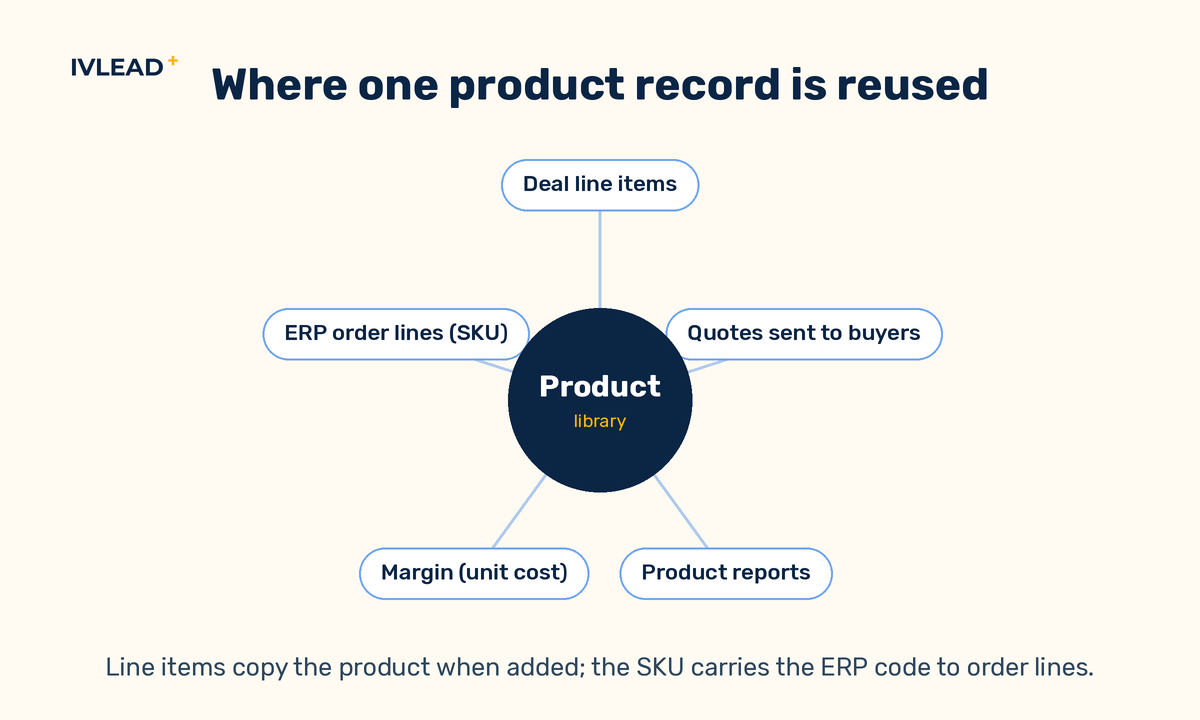
- A product is the reusable catalog record. A line item is what gets placed on a deal or quote, and editing the product later does not change line items already added.
- If you run an ERP, store the ERP item code on each product, either in SKU or in a dedicated property, so the two lists can be matched.
- Set a billing frequency on recurring products. A line item without one is a one-time charge, so it adds nothing to ARR or MRR.
- Give the library one owner, plus a named backup, who are the only people allowed to add or edit products. Turn off the Create custom line items permission once the catalog covers the common cases, so every line item reaches product reports.
Do you need a product library at all?
Build one when you sell repeatable units such as hardware, licenses, subscriptions, service days or support plans. The library pays off once you want any of these:
- quotes that match a price list
- a report on how much of each item you sold
- an integration that pushes won deals into an ERP as order lines
The product library itself is available on all HubSpot plans. Some pricing features are not. Tiered pricing, and importing products with Breeze, need a Revenue Hub subscription. Price books need Revenue Hub Professional or Enterprise.
Keep the library minimal when every engagement is priced from scratch. A single "Professional services" product with a per-deal price still helps reporting. If pricing is being redesigned next quarter, settle the new price list first and build the library in one pass. If finance can list what you sell, build the library from that list, limited to the items sales actually quotes. If finance cannot, fix the list before touching HubSpot.
What should you decide before creating the first product?
These five decisions are hard to change once hundreds of line items reference the catalog.
Source of truth
If an ERP such as Priority holds the item master, the HubSpot library is a subset of it, limited to what sales quotes. Each product should carry the ERP item code exactly, character for character. That code can go in the SKU property or in a dedicated custom property such as "ERP item code". An integration can then match each line item to an ERP item without a hand-kept lookup table.
Granularity
Create one product per sellable unit, as it appears on an invoice line. A useful test: if finance invoices two items under different item codes, they are two products, and a customer-specific price is not a new product.
Price model
Decide which products recur and give them a billing frequency. Decide how volume pricing works. If you have Revenue Hub, a product can carry tiered pricing. Without it, volume prices become separate products or discounts on line items. If margin reporting matters, decide now whether each product carries a unit cost, because margin can only be calculated where cost is recorded.
Naming and classification
Agree a naming pattern such as "Family, variant, unit", for example "AccessPro Cloud Standard, per door, annual". Reps search by name, so the family comes first. For reporting, add a custom "Product line" property with values such as Hardware, Software and Services, because product names are awkward to group on. Custom product properties are also added to line items, so the product line is available in line item reports too.
Ownership
Name the person who may add, edit or retire products. In HubSpot, creating and editing products, including making them inactive, needs Super Admin access or edit permissions for products. Deleting needs delete permissions for products. Give those permissions to the owner and a backup only, and agree how price change requests reach them. Without an owner, the first rep who cannot find an item creates a near-duplicate.
How do you create a product in HubSpot?
For a small catalog, create products one at a time. Go to CRM > Products (under More in some accounts) and click Create product. Enter the name, SKU and a description that reps and buyers will understand, then the price. For recurring items, set the billing frequency. Fill in any custom properties such as product line, check that the Active switch is on, and click Create.
For a larger catalog, prepare a spreadsheet with one row per product and one column per property. On the products page, click Import and map the columns to product properties, as you would for contacts or companies. Tier-priced products cannot be imported this way. With Revenue Hub, Create > Import with AI can import them. Include the SKU column even if the ERP integration is a later phase, because adding codes to hundreds of records afterwards is slow.
How do products connect to deals, quotes and reports?
A rep adds products to a deal from the deal record. They search the library by name, description or SKU, then set the quantity and any discount. Each addition creates a line item on that deal. When the rep saves, HubSpot asks whether to update the deal amount to match the line items. Which figure becomes the amount (TCV, ACV, ARR or MRR) follows the default deal amount set in your account settings, so check that setting before finance reads the pipeline.
When a quote is created from a deal, HubSpot copies the deal's line items into the quote as new, independent line items, so the quote starts from what is on the deal. Product reports are usually built on line items, grouped by product name or SKU. A deal with a typed-in amount and no line items will therefore not appear in those reports, however accurate the amount is.
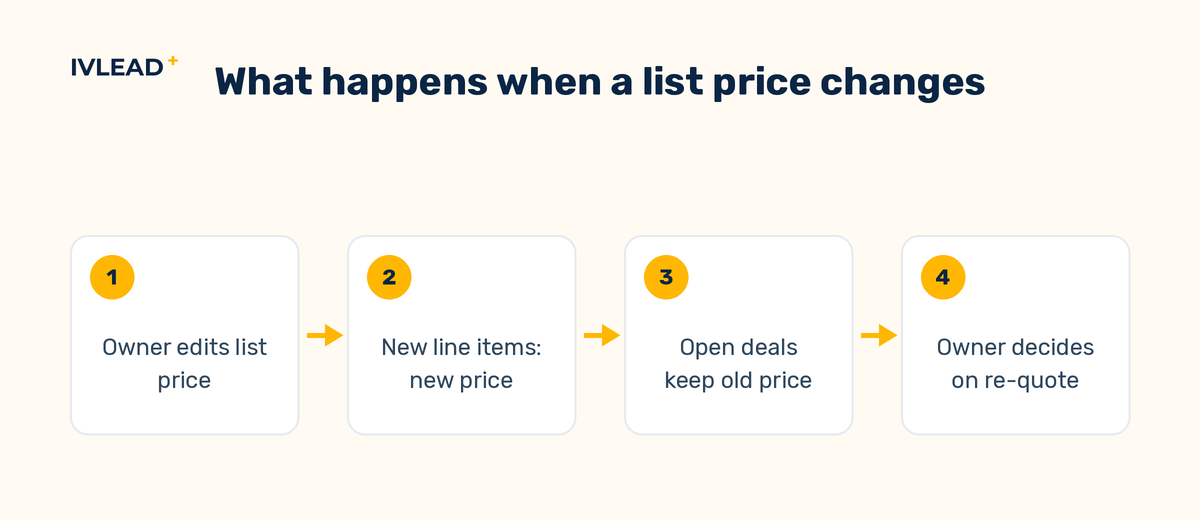
A line item does not stay connected to the library product. A price edit in the library applies to line items added after the edit, while line items already on open deals keep the old price. That protects quotes already sent, but each price change then needs a decision about open deals, made by the catalog owner with sales leadership.
A worked example: hardware, subscription and services in one catalog
For example, take a company that sells access-control hardware with a cloud subscription under a brand we will call AccessPro (fictional), and that runs Priority as its ERP. It might set up its library like this. Each product carries the Priority item code in SKU, and a custom "Product line" property supports reporting.
| Name | SKU | Unit price (USD) | Billing | Product line |
|---|---|---|---|---|
| AccessPro Controller G2 | HW-G2-CTRL | 1,200 | One-time | Hardware |
| AccessPro Cloud Standard, per door, annual | SW-CLD-STD-Y | 480 | Annual, 12-month term | Software |
| On-site installation, per day | SV-INST-DAY | 900 | One-time | Services |
A rep working a deal for a ten-door site adds the controller with quantity 10, the Standard subscription with quantity 10, and two installation days. The line items total 12,000 + 4,800 + 1,800 = 18,600 USD for the first year, and the quote shows the same lines. The subscription has an annual billing frequency, so reporting can separate 4,800 of recurring revenue from 13,800 of one-time revenue.
When the deal is won, an integration can read each line item's SKU, find the matching Priority item and create the order lines. If the controller had been entered as a custom line item called "G2 controller (new)" with no SKU, that step would fail on the first order.
Which trade-offs and limits matter in practice?
The library is a price list, not a stock record. Regional or partner prices can live in price books if you have Revenue Hub Professional or Enterprise. Otherwise they become separate products or discounts on line items. Pick one approach, because a mix makes price reporting unreadable. If you sell in more than one currency, set up your account currencies before you build the catalog, because each product carries a price per currency.
Custom line items erode the catalog. Users with the Create custom line items permission can add line items that are not tied to a library product. That helps while the catalog is incomplete. After that, each custom line item is invisible to product reports and to an ERP integration.
Enter discounts as discounts. Sometimes reps overwrite a line item's unit price instead of entering a discount. When that happens, reports can no longer tell the list price from the concession. By default, any user can edit line items on a deal or quote. Enterprise accounts can set permissions on individual line item properties, so check whether that lets you lock unit price in yours. If it does not, make discount entry part of deal review.
Recurring revenue depends on billing properties. A product called "Annual license" with no billing frequency is a one-time charge, whatever its name says.
Retire products instead of deleting them. Switch a product's Active toggle off. An inactive product can no longer be added to deals, quotes, invoices, payment links or subscriptions, but it still appears in reporting. Deleting removes the record an integration may still look up. A deleted product can be restored from the recycle bin for 90 days, after which it is gone.
What goes wrong, and how do you check?
- Near-duplicate products. "Controller G2", "G2 Controller" and "AccessPro G2" all exist, at slightly different prices. To check, export the library, sort by name and SKU, and look for shared or missing SKUs.
- Deals with no line items, or only custom ones. The deal amount is typed in, so product reports under-count. To check, report on line items with no associated product, and list won deals from the last two quarters that have no line items.
- Price drift. Unit prices for one SKU vary widely, with no discounts recorded. To check, group line items by SKU and show the minimum and maximum unit price. Large gaps mean reps are overwriting prices.
- SKU mismatch with the ERP. HubSpot holds "SW-CLD-STD-Y" while Priority holds "SWCLDSTDY". To check, compare exports of both lists before switching an integration on. Correct the code in the catalog so the integration mapping can stay as designed.
- Recurring items set as one-time. Recurring revenue reports show less than finance has under contract. To check, confirm that every subscription product has a billing frequency.
- A catalog nobody uses. Hundreds of codes were imported, but reps select a handful. To check, report line items by product over the last year and set what nobody selected to inactive.
Once the checks are done, decide what to do with the history. A practical choice is a cut-off date rather than fixing every old deal: from that date, every won deal must carry catalog line items, and product reports start there.
How IV-Lead approaches this
Our view is that the product library should be built for how sales sells and keyed to how finance invoices. Finance might hold several hundred item codes while sales quotes a few dozen. The library should hold the few dozen, each carrying the exact finance item code, so reps find what they need and the ERP receives codes it recognizes. Importing the full item master gives reps hundreds of codes to search for the few dozen they quote.
A sensible default is to turn off custom line items once the catalog covers what reps quote day to day, and to send gaps to the catalog owner. Each custom line item is a report line and an order line someone repairs by hand later.
If you want someone to review how your products, line items and deal amounts are set up before an ERP integration or reporting project depends on them, you can book a 30-minute portal audit. The audit also covers the wider Sales Hub setup around the product library.
Frequently asked questions
Does changing a product's price update existing deals?
No. A line item is not linked back to the product, so open deals and sent quotes keep the old price. With each price change, decide whether open deals should be re-quoted.
Can I import products from a spreadsheet?
Yes. Use one row per product with columns for name, SKU, price, billing frequency and any custom properties, then click Import on the products page and map the columns. Tier-priced products need the Import with AI option, which requires Revenue Hub.
How should recurring subscriptions be set up?
Create each subscription as its own product with a billing frequency. The billing frequency is what makes its line items count toward ARR and MRR. The product name has no effect on that.
Should the HubSpot product library match our ERP item list exactly?
Match the codes, not the count. Every product should carry its ERP item code, and the library should hold only what sales quotes.
What is the safest way to remove a product we no longer sell?
Make it inactive with the Active toggle. Reps can no longer add it to deals or quotes, and it stays in reporting. A product deleted by mistake can be restored within 90 days.