The right growth and customer success stack for a B2B company is small: one system of record, usually the CRM, and one tool for each job the CRM cannot do well. Choose the system of record first, decide which system owns each field, and only then compare vendors. A long vendor list becomes useful only after those decisions are made.
Key takeaways
- Pick the system of record before any other tool. Every platform you add should read customer data from it and write back only the fields it owns.
- Group the market by job and buy at most one tool per job.
- Add a dedicated tool only when the CRM cannot hold the data or the workflow, because each extra system is another copy of the customer that can drift.
- Size the purchase to the next twelve months. Tools bought for a company two sizes bigger often end up half-configured and unowned.
What should you decide before comparing platforms?
Answer four questions in writing before any vendor comparison, because the answers decide which categories you need.
- Which system holds the truth about a customer? For most B2B companies this is the CRM. If sales, success and finance each keep their own account list, no report will reconcile and nobody will trust the health score.
- Which jobs need doing in the next twelve months? Write them as outcomes: fill the pipeline, work the pipeline, onboard new accounts, renew and expand, measure the funnel, keep systems in sync. A job you cannot name does not need a tool yet.
- Who will administer each tool? A platform without a named admin stops matching reality quickly. If the answer is "the HubSpot admin, on top of everything else", that limits how many tools you can run.
- Which system owns each field? Renewal date, contract value, health score, lifecycle stage and support tier each need exactly one owner. Two systems writing the same field produce "the data is wrong" complaints, because the last sync wins and nobody knows which one ran last.
With those answers, most of a 25-vendor list drops away, and the remaining comparison is two or three products per job.
Which platform categories matter for B2B growth and customer success?
The market sorts into a handful of jobs. The table shows what a tool in each category does, example vendors, and the question to ask about your HubSpot portal before buying something separate.
| Job | What the tool does | Example vendors | Question for your HubSpot portal |
|---|---|---|---|
| System of record (CRM) | Holds companies, contacts, deals and tickets that every other tool reads | HubSpot, Salesforce | Is every team willing to work from this record? If not, settle that first. |
| Marketing automation and demand generation | Forms, email, lead scoring, attribution | HubSpot Marketing Hub, Marketo, Salesforce Marketing Cloud Account Engagement (formerly Pardot) | Does Marketing Hub on your subscription cover the job before you add a second email tool? |
| Sales engagement | Sequences, call logging, meeting booking, forecasting | HubSpot Sales Hub, Outreach, Salesloft | Is the gap a missing tool, or how Sales Hub is set up? |
| Customer success and onboarding | Health scores, renewal playbooks, onboarding plans | Gainsight, ChurnZero, Vitally, Planhat | Which customer success features does your HubSpot subscription already include, and can renewals run as a deal pipeline first? |
| Product analytics | Event-level usage: logins, feature adoption, seat activity | Pendo, Mixpanel, Amplitude | Which usage summaries need to land on the company record, and how often? |
| Support and help desk | Tickets, knowledge base, SLAs | HubSpot Service Hub, Zendesk, Intercom | Will tickets live in HubSpot so success sees them next to renewals? |
| Integration, including ERP and billing sync | Moves data between systems | Native connectors, Zapier, Make, Workato, custom API | Which fields flow, in which direction, and who is alerted when a sync fails? |
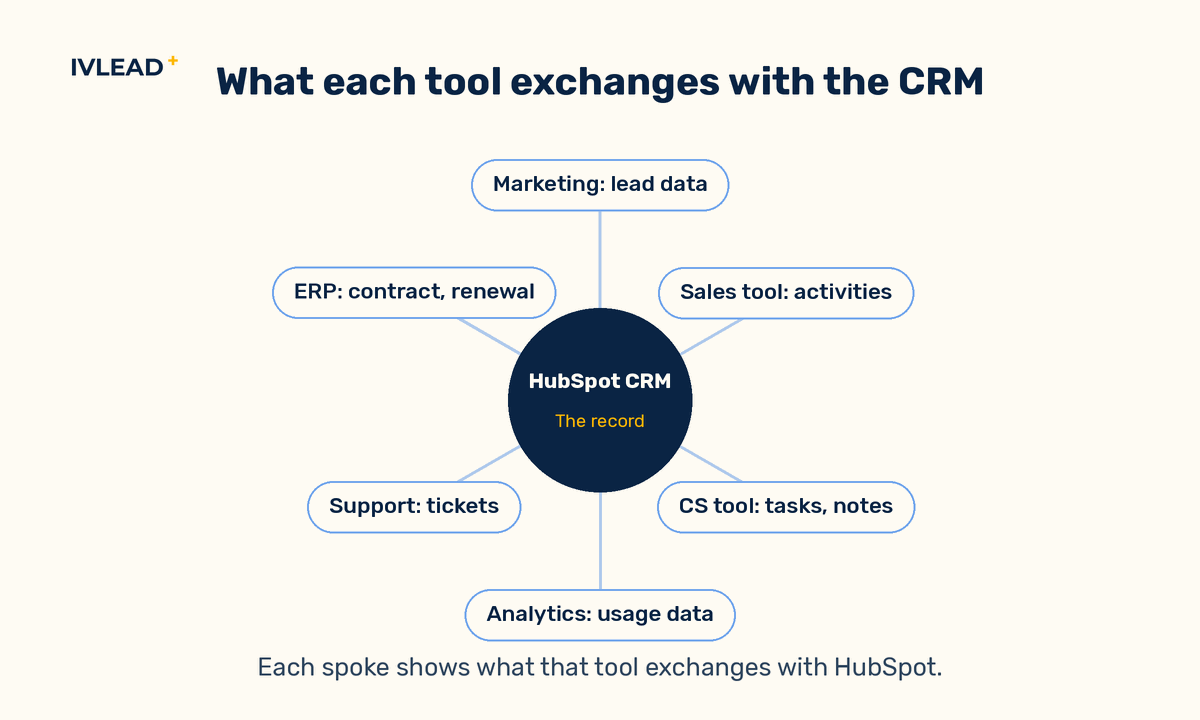
Together these rows name the platforms most B2B teams shortlist; the job column, not the vendor count, is what narrows them. Vendors reposition often, so read the names as examples of the category.
When should you add a dedicated tool instead of using the CRM?
Every extra platform, whatever its price, creates another copy of the customer, and copies drift because syncs fail silently or map fields differently than the admin expected. The question for each candidate is whether the job needs a second system or the CRM is not yet configured for it.
Signs a dedicated tool is justified
- The data shape does not fit the CRM. High-volume event data such as individual logins and feature clicks belongs in a product analytics tool. The CRM should receive summaries, such as active seats in the last 30 days, as company properties.
- The team cannot work inside the CRM. A larger success team running structured playbooks across hundreds of accounts may need the account views and task cadences a CS platform provides. A team of two usually does not.
- The process has compliance or volume needs the CRM does not meet. Billing, contract storage and ERP processes are the usual cases, which is why the ERP or billing integration usually carries the contract and renewal data the rest of the stack depends on.
A dedicated tool is usually not justified when the CRM already has the object but nobody has configured the pipeline or properties for the job. Size the decision to the next twelve months: a few dozen customers and one person doing onboarding need a renewal pipeline and a checklist in the CRM, while several hundred customers, a dedicated success team and usage data nobody can act on probably justify a platform.
How do you compare two tools in the same category?
Once a job is confirmed, judge the finalists mainly on how they will work next to HubSpot. Five checks separate them faster than a feature list:
- Integration type. A native app maintained by the vendor is safer than a third-party connector, and both are safer than a custom job nobody owns.
- What syncs. Which objects (companies, contacts, deals, tickets), whether custom properties are supported, and whether each field syncs one way or both ways.
- How failures surface. Ask where a failed sync is logged and who is notified, because a silent failure leaves the record wrong with nobody aware.
- Total cost of ownership. Licence model (per seat or per account), setup hours, ongoing admin time and the cost of building and maintaining the integration. Per-account pricing grows with your customer base even when the team does not.
- Data terms. Hosting location, privacy compliance, and a contractual right to a full export.
Ask each vendor to answer these in writing before a demo, so the comparison rests on the same five points.
What does a connected stack look like for an 80-person company on HubSpot?
For example, a company that sells a subscription product to mid-sized manufacturers, with 80 staff, around 250 customer accounts, a four-person success team and HubSpot as its CRM, might set things up like this.
Objects and properties in HubSpot
- Company is the customer record, with custom properties "Customer tier" (Starter, Growth, Enterprise), "Renewal date", "Annual contract value", "Purchased seats", "Onboarding stage" (Kickoff, Data loaded, Training done, Live), "Health score" (Healthy, Watch, At risk), "Active seats last 30 days", "Last login date", "CSM owner" and "ERP customer number".
- Deal pipeline named "Renewals" with stages 120 days out, Value review sent, Negotiation, Closed renewed and Closed churned. One renewal deal per account per term, created by workflow when the renewal date is 120 days away.
- Tickets for support, associated to the company so the CSM sees open tickets before a renewal call.
Which system owns which field
| Field | Owner | Direction |
|---|---|---|
| Annual contract value, Renewal date, Purchased seats, Customer tier, ERP customer number | ERP or billing system | ERP writes to HubSpot, never the reverse |
| Active seats last 30 days, Last login date | Product analytics tool | Nightly push to company properties |
| Health score, Onboarding stage, CSM owner | HubSpot | Set by workflow or CSM in HubSpot only; a CS platform added later reads the health score and does not overwrite it |
| Open ticket count | HubSpot | Calculated from associated tickets |
The automation that makes it useful
A company-based workflow runs daily. If "Active seats last 30 days" falls below 60 percent of "Purchased seats" and the renewal date is within 90 days, it sets "Health score" to At risk and creates a task for the CSM owner titled "Usage drop before renewal". A deal-based workflow, triggered by that health score change, moves the account's renewal deal to Value review sent if it has not progressed. A dashboard then reports renewals by stage, health score and CSM.
Workflows, calculated properties and property-level edit restrictions depend on your HubSpot subscription, so check what your tier includes before planning this setup.
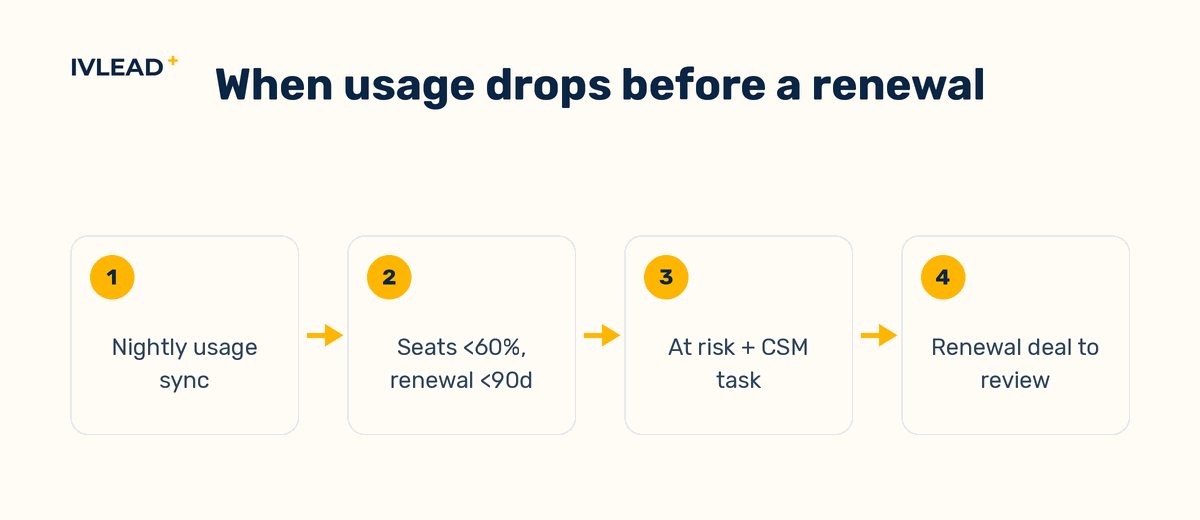
This setup has no standalone customer success platform. If the success team's playbooks outgrow tasks and workflows, a CS platform becomes the next system and reads the same company properties.
What goes wrong, and how do you check for it?
Two systems write the same field
The ERP sends "Annual contract value" nightly while a sales rep edits it by hand after a discount. The next sync overwrites the edit, finance and sales disagree, and the renewal report is wrong in whichever direction the last sync ran. Check: for every synced property, restrict who can edit it where your subscription allows, or set the integration to never overwrite a non-empty value.
Integrations create duplicate companies
The analytics tool matches on company name, the ERP on a customer number, and HubSpot ends up with two records for one account, each holding half the data. Check: store one external ID, usually the ERP customer number, in a company property set to require unique values (check your subscription supports this), and require every integration to match on it.
A health score nobody trusts
The score is a weighted formula inside a CS tool that the account owner cannot see or explain, so nobody acts on it and it stops being maintained. Check: build the score from a few visible inputs, such as usage and days to renewal, that any CSM can recompute from the company record.
Reports assembled by hand from exports
If the quarterly renewal review starts with four CSV exports, the stack is disconnected however many integrations were bought. Check: can the renewal forecast and the churn list each come from one CRM dashboard without editing a spreadsheet?
How does IV-Lead approach the stack decision?
Our view is that the vendor comparison is the last step and usually the least important one. Whether a stack works is settled earlier, by choosing the record and naming which fields each tool may write and who answers for each integration when it fails; with that in place, most reasonable vendors in a category will do the job.
In practice we start from HubSpot as the record and configure what HubSpot can already do (renewal pipelines, onboarding stages, health properties, ticketing) before recommending anything new. We treat the ERP connection as the integration to build first, because contract value and renewal dates usually come from there. When a dedicated tool is justified, we specify field ownership and sync direction before the purchase. The reasoning is cost: adding a tool to a clean record is far cheaper than cleaning a record after three tools have been writing to it.
If you want a second opinion on what your current stack is doing to your customer data, book a 30-minute portal audit and we will map the tools you run against the jobs you need. For how we set up the sales side of the record, see our HubSpot Sales Hub services.
Frequently asked questions
How many growth and customer success platforms does a B2B company need?
One system of record plus one tool for each job the record cannot do well. The count matters less than whether every tool reads from and writes back to the same customer record.
When does a company need a dedicated customer success platform?
When playbooks and renewal cadences no longer fit in CRM tasks and workflows, and a named admin is available to run the platform. Before that point, a renewal pipeline and a health score property in the CRM cover the job with less data drift.
Can HubSpot handle customer success without a separate tool?
For a small or mid-sized success team, often yes: companies as accounts, a renewal deal pipeline, properties for health and onboarding, tickets for support and workflows to flag risk. Also check which customer success features your current HubSpot subscription includes before buying a separate platform. The limit is usually team size and playbook complexity.
How do you retire a tool you no longer need?
List the fields the tool owns, decide which system takes over each one, and move that data into HubSpot properties before switching off the sync. Then compare record counts and a sample of accounts against the old tool, and keep a full export before the contract ends.