


Most explanations of HubSpot marketing contacts describe what they are: contacts you can market to, counted against your tier, billed accordingly. All true, and it leaves out the expensive part.
The expensive part is that the two directions are not symmetrical, and not by a little. Contacts become marketable immediately and start counting against your tier the same day. But HubSpot does not downgrade contact tiers mid-term — once you have crossed into a higher tier, you stay there, and pay for it, until your subscription renews.
That means cleanup is not a way to reduce this month's bill. It is a way to avoid the next upgrade, and to be in the right place when renewal comes. Which makes the whole discipline a preventive one, and most portals treat it as a reactive one.
Three questions follow:
- What makes a contact marketing without anyone deciding? Almost nothing — except forms, which do it on creation and every time afterwards.
- What does setting someone non-marketing actually achieve, and when? It frees capacity on your next update date. It does not lower your tier.
- What does crossing the line cost? A block, not a contact — and you own that block until renewal.
Here is each one with the current numbers.
What actually makes a contact a marketing contact?
A marketing contact is one you can reach with HubSpot's marketing tools. Marketing contacts count toward your contact tier; non-marketing contacts sit in the CRM without adding to the bill. It is a property on the record, not a list.
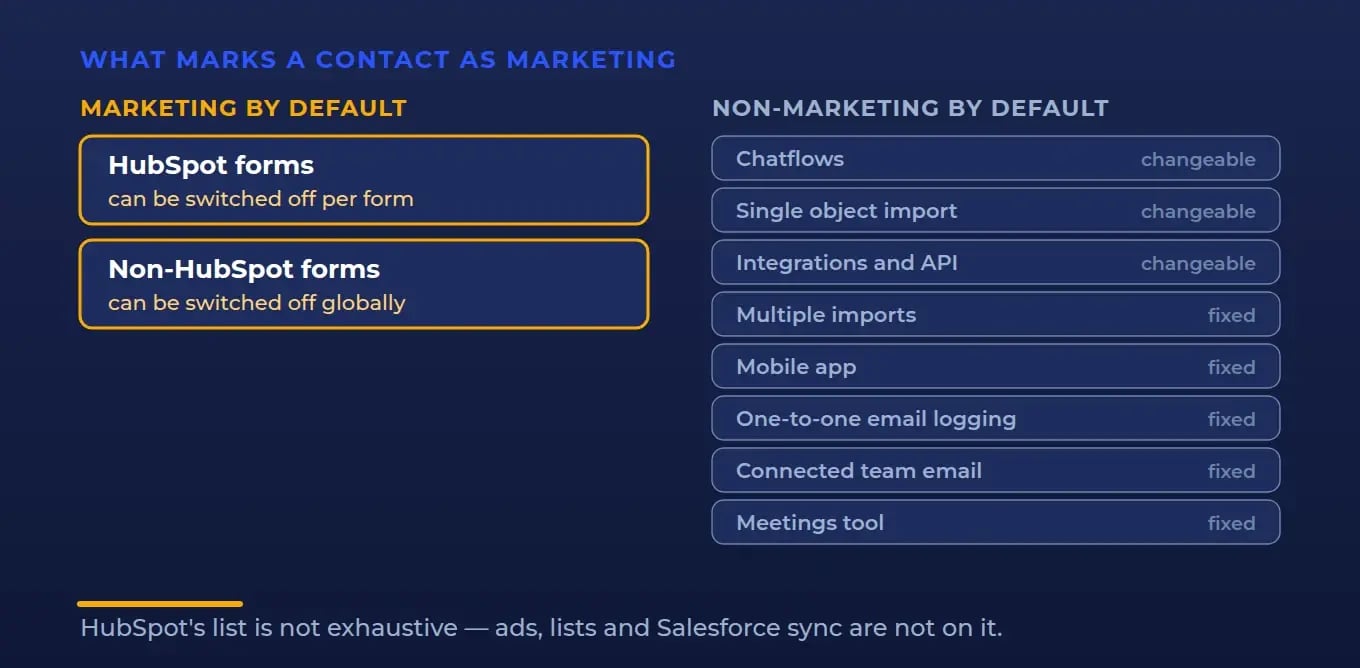
Contacts get that property in several ways — someone sets it manually, a bulk action or import sets it, a workflow sets it through a deliberate Set marketing contact status action, or the tool that created the contact sets it by default.
The documented defaults:
| Source | Default | Changeable |
|---|---|---|
| HubSpot forms | Marketing | Yes, per form |
| Non-HubSpot forms | Marketing | Yes, globally |
| Chatflows, live chat and bots | Non-marketing | Yes, per chatflow |
| Single object import | Non-marketing | Yes |
| Integrations and API | Non-marketing | Yes, per integration |
| Multiple object imports | Non-marketing | No |
| HubSpot mobile app | Non-marketing | No |
| One-to-one email logging | Non-marketing | No |
| Connected team email | Non-marketing | No |
| Document opens | Non-marketing | No |
| Meetings tool | Non-marketing | No |
| Email extensions | Non-marketing | No |
Across the tools HubSpot documents, the pattern is consistent: almost everything defaults to non-marketing, and forms are the exception. Both HubSpot's own forms and non-HubSpot forms create marketing contacts unless somebody turns the setting off. HubSpot's defaults page does not cover every possible source — ads, lists, Salesforce sync and manual creation are not on it — so treat this as the documented set rather than the complete one.
Worth being precise about one thing that gets repeated wrongly: workflows do not silently promote contacts. A workflow can set marketing status, but only when someone has deliberately added that action. It is a choice, not a default.
And now the part that changes how you should think about cleanup entirely.
Does a form only promote contacts when it creates them?
No — and this is the single most useful thing to know about the topic.
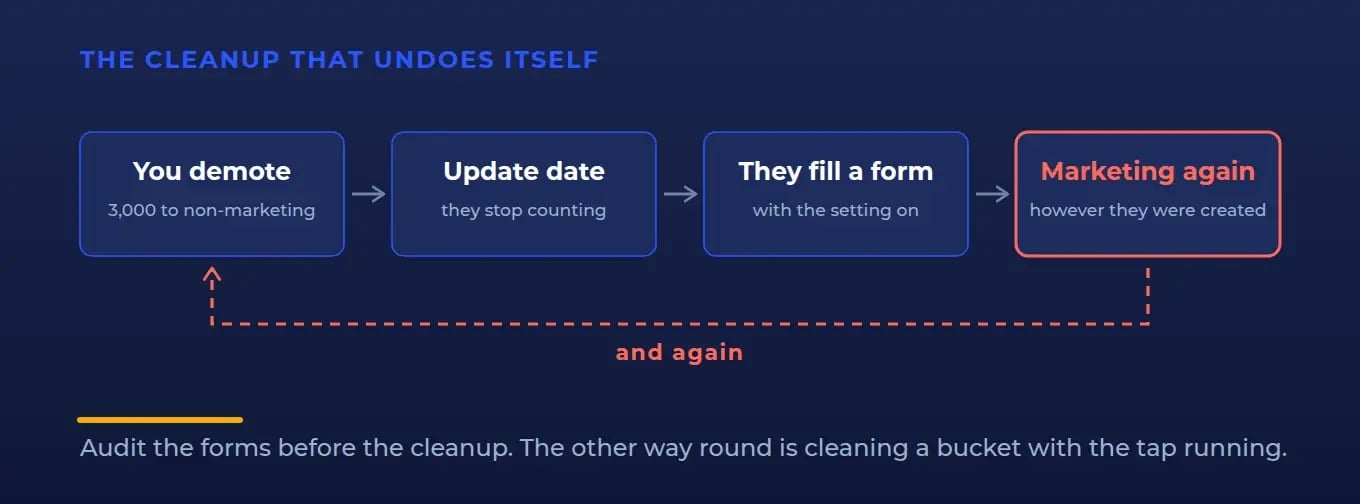
When a form's marketing-contact setting is on, any existing non-marketing contact who submits that form is updated to a marketing contact, regardless of how they were originally created.
Read that against a cleanup project. You spend an afternoon setting three thousand dormant contacts to non-marketing. Some of them are on your newsletter, or come back to download something, or fill in a webinar form next month. Every one who touches a marketing-enabled form goes straight back to marketing.
Cleanup without fixing the forms is not a fix. It is a subscription to doing the same cleanup again.
So the order matters: audit the forms first, then clean up. Doing it the other way round means cleaning a bucket while the tap is still running.
What does setting a contact to non-marketing actually do?
Two separate things happen on two separate clocks, and conflating them is where the money goes.
First clock — the update date. Setting a previously-marketing contact to non-marketing takes effect on your next update date. Until then the contact carries a property HubSpot names with unusual honesty: "Marketing contact until next update" = Yes. Your update date is your renewal date each month on a monthly subscription, and the 1st of each month on an annual one. Changes process at midnight in the time zone of the HubSpot subsidiary on your account.
What that achieves: the contact stops counting toward your marketing contact total, which frees capacity and helps you avoid the next automatic tier upgrade.
Second clock — renewal. What it does not do is move you back down a tier. HubSpot is explicit: if you remove marketing contacts, your contact tier is not automatically downgraded, and you stay in the upgraded tier until your subscription's next renewal date. Mid-term downgrades do not happen at all.
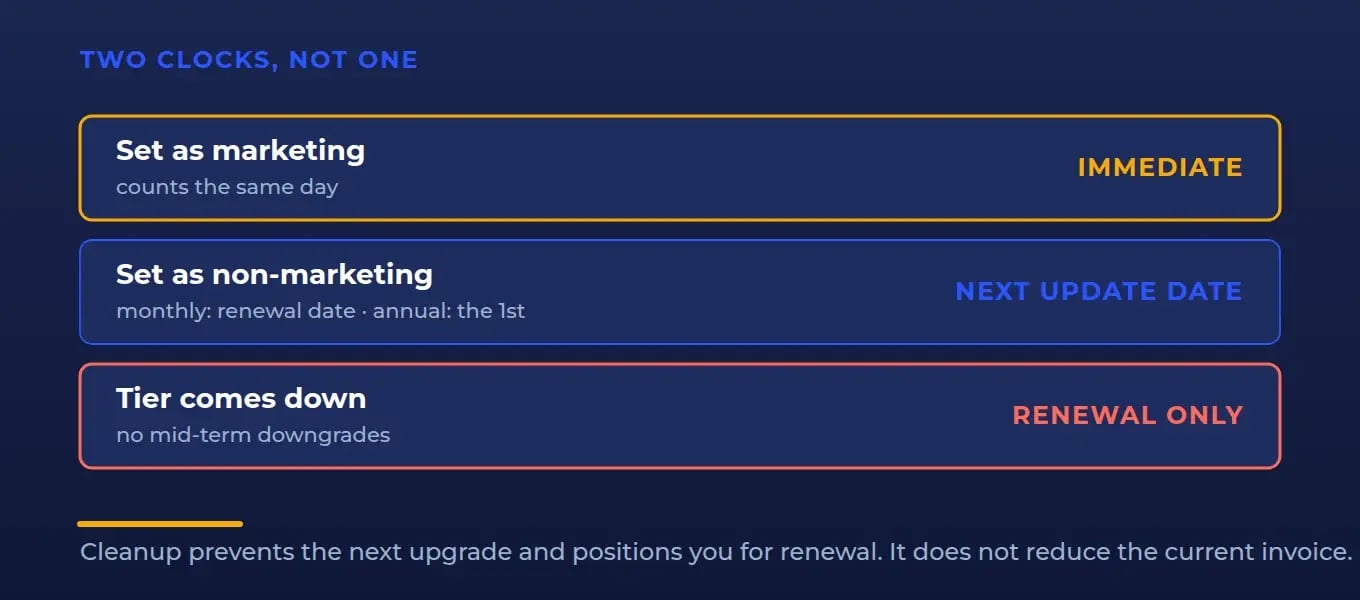
So on an annual subscription, crossing into a higher tier in month two means paying the higher rate for the remaining ten months, no matter how thoroughly you clean up in month three.
That is the asymmetry in full. Up in a day, down at renewal.
What does crossing the line cost?
Not what most people assume, because you do not buy marketing contacts individually. They come in blocks, and the block size changes by tier.
Included at each tier: Starter 1,000, Professional 2,000, Enterprise 10,000.
Beyond that, at HubSpot's published annual-term list rates:
| Tier | Sold in blocks of | Price per block, per month |
|---|---|---|
| Starter | 1,000 | $50, falling to $45 above 3,000 and $40 above 5,000 |
| Professional | 5,000 | $250, falling through $225, $200 and $175 to $150 above 82,000 |
| Enterprise | 10,000 | $100, falling through $90, $80 and $70 to $60 above 500,000 |
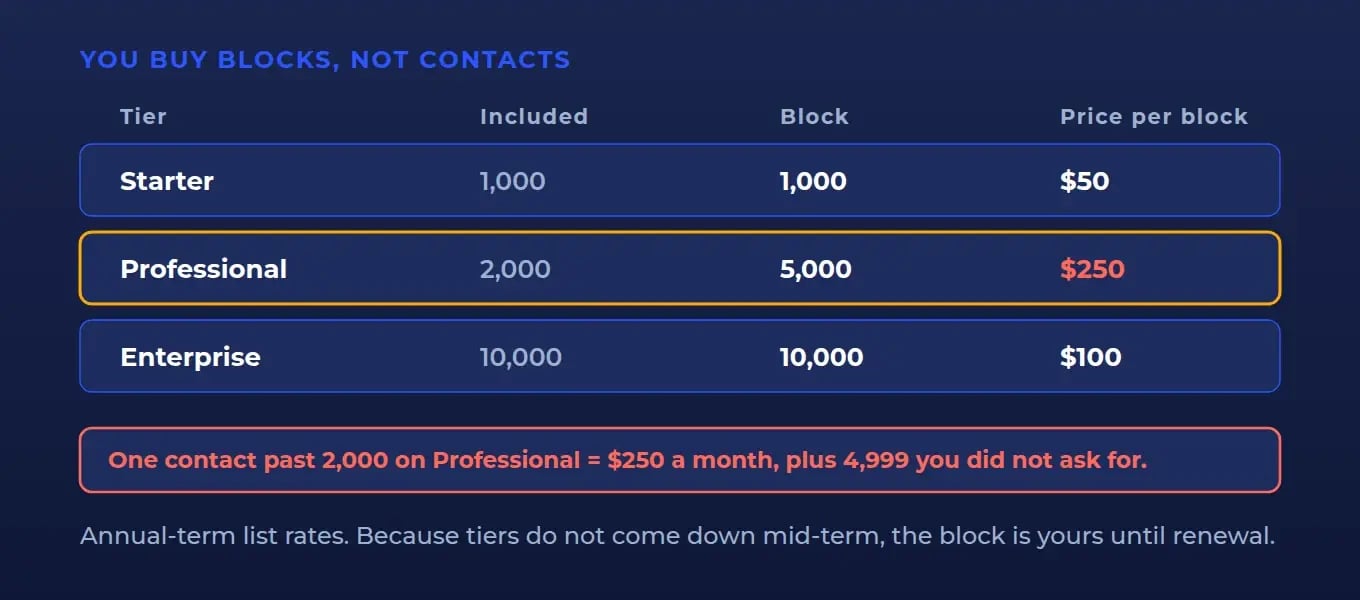
Look at the Professional row again. The smallest available block is 5,000 contacts for $250 a month. One contact past 2,000 is not a rounding error — it is $250 a month, it buys 4,999 contacts you did not ask for, and because tiers do not come down mid-term, you own it until renewal. On an annual subscription bought in January, crossing in February costs roughly $2,500 before you get the chance to undo it.
That is why the cap matters more than the cleanup.
What breaks after go-live?
Four failures, in the order we find them.
The cleanup that undoes itself
Covered above, and it is the most common of all: contacts demoted this month, re-promoted next month by a form nobody changed. Fix the forms first.
The cap nobody set
Super Admins, and users with Modify Billing permission, can set a maximum marketing contacts limit. HubSpot's description is careful and worth reading as written: it helps prevent imports and automated features from setting additional contacts as marketing once the maximum is reached, and contacts from those sources that would exceed the maximum are set as non-marketing instead.
So it is a guard on the automated paths, not an absolute ceiling on every route to marketing status. That is still the single highest-value setting in this whole topic, because the automated paths are exactly the ones that cross a tier overnight without anyone noticing.
It takes five minutes and it is off unless somebody set it.
Cleaning up after you have already crossed
The instinct when a tier upgrade appears on an invoice is to go and clean up. Worth doing — but be clear with whoever asked that it does not reverse the charge. The tier holds until renewal. What the cleanup buys is not a refund; it is not crossing the next line, and being under the threshold when renewal arrives.
Set that expectation before you do the work, not after.
Demoting the wrong people
A contact set to non-marketing cannot be sent marketing email, cannot be targeted in contact-segment ad audiences, and cannot receive marketing actions in workflows. That is right for a job applicant and wrong for a dormant customer you plan to reactivate next quarter.
HubSpot's cleanup tool, under Account & Billing → Marketing Contacts → Clean up contacts, lets you filter by contact group, list membership or advanced properties and schedule the change. Use the filters to make the call explicit rather than sweeping by last-activity date alone.
Who should own this?
Marketing contacts sit where nobody's job description reaches: too billing-shaped for marketing, too marketing-shaped for finance.
| Team | Owns | The rule |
|---|---|---|
| Marketing | Which forms create and re-promote marketing contacts | Every form is a budget decision, so the person who builds it should make one |
| RevOps | The cap, and the audit cadence | Somebody has to own a number that only moves when someone moves it |
| Sales | Nothing here, by design | Logged email, meetings and the mobile app all default to non-marketing. Leave them alone |
| Support | Nothing here, by design | Chatflows default to non-marketing. Turn one on only for a deliberate marketing chat flow |
| Finance | The tier decision and the renewal date | Block sizes make this a step change, and renewal is the only moment it can step back down |
The pattern underneath: every marketing contact was created or promoted by a tool with a default, and defaults are somebody's job. In most portals they are nobody's, which is why the number only travels in one direction.
Old way, new way
Old way. Treat the tier as a consequence. The number grows, someone notices at renewal, a cleanup gets scheduled, and everyone is quietly surprised when the bill does not move. Nobody connects the invoice to the forms, because the forms belong to marketing and the invoice goes to finance.
New way. Treat it as a system with an inflow, a guard and a review. The inflow is the per-form setting, audited on a schedule, remembering that forms re-promote existing contacts as well as creating new ones. The guard is the maximum marketing contacts limit, set once to a number that matches your budget. The review is a cleanup timed to land before renewal, when it can actually change what you pay.
None of that is difficult. All of it is invisible unless someone decides to look.
Where IV-LEAD fits
We audit the inflow: every form and its marketing-contact setting, the global non-HubSpot forms toggle, which integrations create contacts and how, and your actual growth rate against your tier headroom and your renewal date. Then the two things that make it hold — a cap that matches the budget, and a review cadence pointed at renewal rather than at whoever remembered.
Usually a few days of work, against a number that recurs every month.
Talk to us about your HubSpot contact tier
The takeaway
Marketing contacts are not a list you manage. They are a tier you cross in an afternoon and leave at renewal.
Three controls decide what that costs. The form settings, which let contacts in and let them back in after you have cleaned up. The cap, which stops an import or an automation crossing a line overnight. And the timing of the review, which only changes the bill if it lands before renewal. Check all three today, and the number stops arriving as a surprise.
Frequently asked questions
What makes a contact a marketing contact in HubSpot?
A marketing contact is one you can reach with HubSpot's marketing tools; they count toward your contact tier and your bill. The status can be set manually, in bulk, by import, by a deliberate workflow action, or by the tool that created the contact. Across the tools HubSpot documents, most default new contacts to non-marketing — HubSpot forms and non-HubSpot forms are the exception, and both default to marketing unless the setting is turned off.
Do HubSpot forms make existing contacts into marketing contacts?
Yes, and this is the detail that defeats most cleanup projects. When a form's marketing-contact setting is on, any existing non-marketing contact who submits it is updated to a marketing contact, regardless of how they were originally created. So contacts you demoted last month return to marketing status the moment they fill in a marketing-enabled form. Audit the forms before you run the cleanup, not after.
Do HubSpot workflows automatically make contacts marketing?
No. A workflow can set marketing status, but only through a deliberate Set marketing contact status action that someone added. Workflows are not among the tools that set marketing status by default. Forms are.
When does setting a contact to non-marketing take effect?
On your next update date — your renewal date each month on a monthly subscription, or the 1st of each month on an annual one. Until then the contact carries the property "Marketing contact until next update" set to Yes and still counts. Changes process at midnight in the time zone of the HubSpot subsidiary on your account.
Does removing marketing contacts lower my HubSpot bill?
Not mid-term. Removing marketing contacts frees capacity and helps you avoid a further automatic tier upgrade, but HubSpot does not downgrade contact tiers mid-term — you stay in the upgraded tier until your subscription's next renewal date. Cleanup is worth doing; just do it knowing it protects the next threshold and positions you for renewal, rather than reducing the current invoice.
How much do extra marketing contacts cost in HubSpot?
They are sold in blocks, and the block size differs by tier. At HubSpot's published annual-term list rates: Starter buys in blocks of 1,000 from $50 a month, Professional in blocks of 5,000 from $250 a month, and Enterprise in blocks of 10,000 from $100 a month, with the price per block falling as volume rises. On Professional this means a single contact over the included 2,000 costs $250 a month, because 5,000 is the smallest block available.
How do I stop HubSpot from upgrading my contact tier automatically?
Set a maximum marketing contacts limit — available to Super Admins and users with Modify Billing permission. HubSpot describes it as helping to prevent imports and automated features from setting further contacts as marketing once the maximum is reached; contacts from those sources are set as non-marketing instead. It guards the automated paths rather than every route to marketing status, and those are the paths that cross a tier overnight.
Does setting a contact as non-marketing delete them?
No. The contact remains in your CRM. What changes is what you can do with them: non-marketing contacts cannot be sent marketing email, cannot be used in contact-segment ad audiences, and cannot receive marketing actions in workflows. It is a billing and permissions change, not a deletion.


