

HubSpot's default company properties are the fields every company record has out of the box. A handful carry most B2B segmentation and reporting, for example Company domain name, Industry, Employee range, Country/Region, Type and Owner, with Lifecycle stage set by automation. Require the ones your team fills, let HubSpot maintain the derived ones, and create a custom property only for facts with no default home, such as an ERP customer number.
Key takeaways
- Default company properties come in two kinds: fields a person or integration writes, and fields HubSpot sets itself. Most of the second kind depend on correct associations.
- Pick one property per fact. Number of employees and Employee range both exist; segmenting on both produces reports that disagree.
- Create a custom property only for data HubSpot has no field for, such as an ERP customer number or a renewal date.
What are HubSpot's default company properties?
They are the properties HubSpot creates on the company object in every account, on every plan. HubSpot's knowledge base groups them into Company information, Social media information, Company lifecycle stage properties, Web analytics history and Conversion information, and defines each one in its default company properties article. Breeze can fill certain defaults, so a record created with only a domain may gain fields such as Industry without manual entry. The Has been enriched property shows whether enrichment has ever written to a record, which helps you find records whose firmographics were entered entirely by hand.
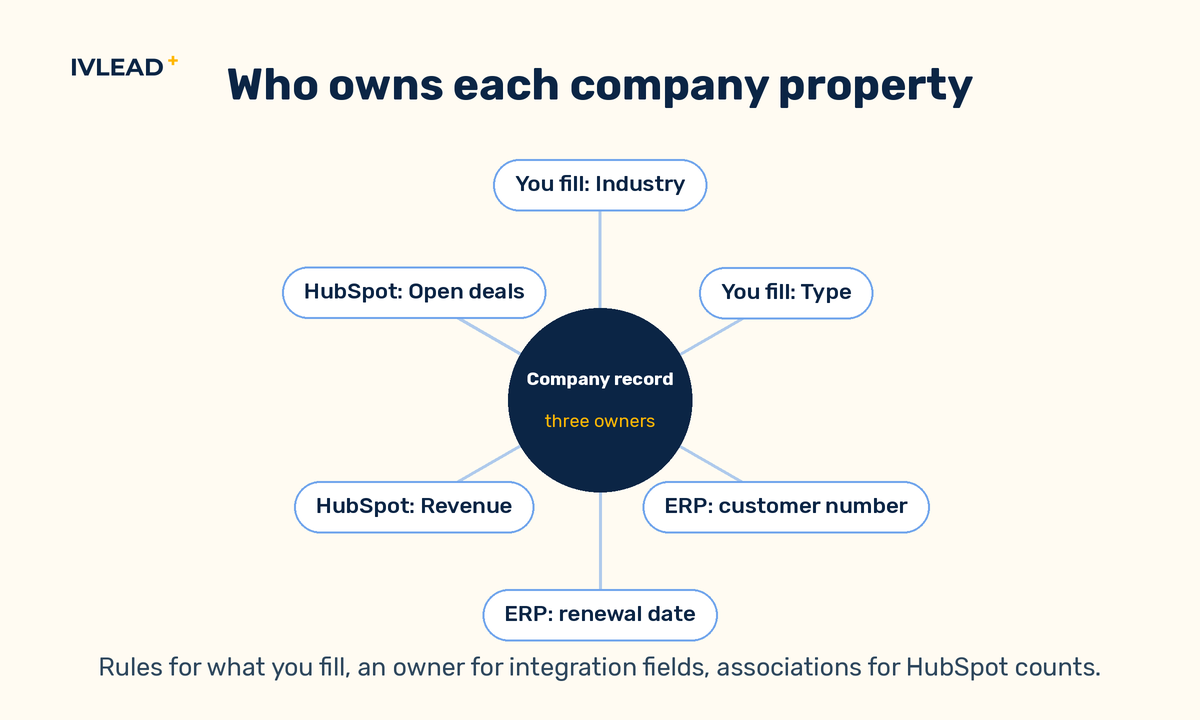
The list is easier to work with when you split it by owner: facts a person or integration writes, such as Industry, Type and Owner, and facts HubSpot sets itself, such as Close date (stamped when Lifecycle stage reaches Customer), Number of open deals and Total revenue (counted from associated deals). The first group needs rules for your team; most of the second needs correct associations.
Which defaults does HubSpot maintain, and why does that matter?
The HubSpot-maintained properties are derived from other records, and the derivation rules decide what you can trust. Number of associated contacts, Number of associated deals and Number of open deals count only records linked to the company. If a deal is not associated with the company (for example, created through an integration that links only the contact), Number of open deals and Total revenue will not count it. Only contacts whose primary company is this one count toward First contact create date. Latest traffic source and Original traffic source are copied from associated contacts, so a company with no contacts shows nothing there.
Three dates look alike and measure different things. Last activity date covers logged notes, calls, sales emails, meetings, messages and completed tasks once their date has passed, and stays empty on a company with no logged activity. Last contacted tracks the latest call, one-to-one email, meeting, chat or manually logged message. Last engagement date tracks what the account did: one-to-one email opens and clicks, meeting bookings, form submissions and lead revisits. A "stale account" list built on Last activity date misses companies that never had an activity at all, and a list that asks when the account last responded should use Last engagement date.
Before building any report on these fields, check association hygiene. A saved list of companies where Lifecycle stage is Customer and Number of associated contacts is 0 shows how much of the derived data is missing.
Which default company properties matter most for B2B?
The table below is the set a B2B sales or RevOps team should decide on deliberately. Everything else can stay available without a rule.
| Property | Who sets it | What it is for |
|---|---|---|
| Company domain name | Your team, import or Breeze | Record identity. Entering a Website URL populates it; a blank or misspelled domain invites a duplicate record. |
| Industry, Industry group | Your team or Breeze | Vertical segmentation. About 150 fixed options; you can add but not delete. |
| Employee range or Number of employees | Your team or Breeze | Size segmentation. Use the range for lists, since buckets absorb small differences between sources; Revenue range and Annual revenue follow the same rule. |
| Lifecycle stage | Automation or your team | Funnel position. Moving to Customer stamps Close date. |
| Lead status | Sales | Outreach state. Five default options, editable. |
| Owner | Routing rules or sales management | Accountability and territory reporting. Owner's main team and Owner assigned date follow automatically; for a second accountable person, add a custom HubSpot user property. |
| Type | Your team | Relationship: prospect, partner, reseller, vendor or other. Set it so partners stay out of prospecting lists and forecasts. |
| Ideal Customer Profile Tier, Target account | Marketing or sales ops | Account-based marketing fields; no custom "ICP fit" property needed. |
| Parent company, Number of child companies | Your team | Group structures. The child count reflects only companies linked to the parent, so multi-site rollups depend on those links. |
Industry
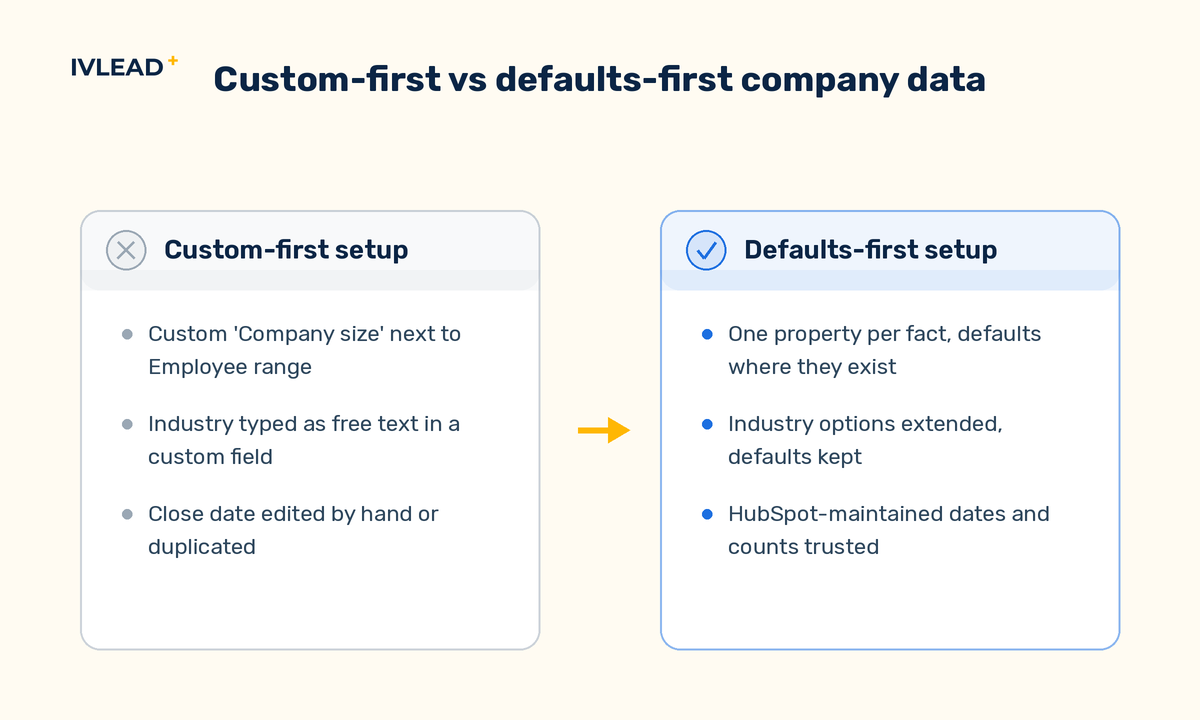
Industry ships with about 150 predefined options that cannot be deleted, though you can add your own. The long list suits enrichment, but a sales team that thinks in eight verticals will pick inconsistently from it. Either add your own options and train people to use only those, or keep Industry for enriched data and create a short custom property such as sales_vertical for the values sales works with.
Lifecycle stage, Close date and Days to close
When a company moves to the default Customer stage, HubSpot stamps Close date with that day, and Days to close is calculated from Create date and Close date. If a rep updates the stage three weeks after the contract was signed, the close date is three weeks late and every time-to-close report inherits the error. Turning on HubSpot's setting to set lifecycle stage when a deal is won ties Close date to the deal. HubSpot can also sync a company's lifecycle stage to its associated contacts, so decide whether contact and company funnels should agree automatically. On Professional and Enterprise, the calculated date entered, date exited and time-in-stage properties are the right basis for funnel velocity.
When should you create a custom company property instead?
Create a custom property when the fact has no default home. The clearest cases are identifiers and dates from other systems: an ERP customer number, a contract start or renewal date, a support plan level, the product lines a customer owns. Record ID is HubSpot's own key for updates through import or the API, but an ERP such as Priority has its own customer key, and that needs a dedicated property so the integration can match records reliably in both directions.
Create one when a default's option set cannot be shaped to your taxonomy. Industry's options can be extended but never trimmed, and Web technologies' options cannot be edited at all. A custom select with your own eight values is cleaner than training everyone to ignore most of a long list.
Do not create one when a default with the same meaning exists. A custom "Company size" beside Employee range will drift from it, because enrichment and imports update the default and nobody updates the custom one. A custom "Became customer date" beside Close date loses the automatic stamping. A duplicate property adds upkeep and no new information.
Worked example: a sensor vendor selling to manufacturers
For example, a company selling industrial sensors to manufacturers in Israel and Germany, with a dozen salespeople and a Priority ERP, might settle on the following.
Required on the create-record form: Company name, Company domain name, Industry, Employee range, Country/Region, Type and Owner. Imports and integrations bypass that form, so the same columns are mapped in every import template. Industry gets three added options for the core verticals, for example "Industrial Automation", "Food Processing" and "Packaging", and reps pick only from those unless Breeze has already filled a standard value.
Set by sales ops or automation: Lifecycle stage moves to Customer when a deal is won, through HubSpot's setting; Ideal Customer Profile Tier, where Tier 1 means a manufacturer in Germany or Israel with Employee range in the 201–500 or 501–1,000 options (check the values in your own portal); Target account set to true for accounts the ABM programme is actively working.
Custom properties, and only these: priority_customer_number (single-line text, written by the Priority integration once Lifecycle stage reaches Customer), contract_renewal_date (date, written from the ERP contract record) and product_lines_owned (multiple checkboxes: Sensors, Gateways, Analytics).
Reporting then needs no further fields. Target lists filter on Employee range, Country/Region and Ideal Customer Profile Tier. Account reviews read Total revenue, Recent deal close date, Number of open deals and Last engagement date, all maintained by HubSpot. Renewal risk filters on contract_renewal_date within the next 90 days and Last engagement date more than 60 days ago.
What goes wrong with default company properties?
Each failure below breaks a specific report and has a check you can save as a list; run them monthly, and use Record source on whatever they flag to trace the import or integration that produced it.
- Blank or malformed domains. Duplicates follow, and contacts attach to the wrong record. Check: companies where Company domain name is unknown, and companies where Number of associated contacts is 0 but Lifecycle stage is beyond Lead.
- Two properties for one fact. Number of employees and Employee range, Annual revenue and Revenue range, or a custom field beside either. Check: companies where one is known and the other unknown; a large count means different people fill them by different rules.
- Close date set late or edited by hand. Days to close and customer cohort reports shift. Check: companies where Lifecycle stage is Customer and Close date is unknown, and companies where Close date is earlier than Create date, which points to a backfilled import.
- Deals not associated with companies. Number of open deals and Total revenue stay empty on the company. Check: a deal list where the associated company is unknown.
- Lead status used as a mini pipeline. It has no calculated entered and exited properties, so keep it to the outreach state and use deals for anything that needs timing. Check: companies where Lead status still holds an active value but Lifecycle stage is Customer.
- Annual revenue in mixed units. One source writes full amounts, another writes thousands, a rep types an abbreviation. Check: sort companies by Annual revenue descending and ascending and look at both ends.
- Type left blank. Partners and vendors appear in prospecting sequences and forecast reports. Check: companies where Type is unknown, then bulk-edit by domain pattern or owner.
After the first run, fix the sources: import templates, integration mappings and the required fields on the create form. Once the sources are fixed, the monthly lists stay short.
How IV-Lead approaches this
Our view is that a company record should have six to eight defaults required on the create form, a named owner for every field an integration writes, a monthly blank-field check and a quarterly comparison of the HubSpot-maintained fields against a known sample of accounts. Association rules get attention first, because the derived fields are free reporting only while associations are right. The required set stays short because every required field has to be defensible to the rep who fills it, and a long list gets filled with placeholder values that hide the gap. When an ERP such as Priority is involved, the ERP owns the facts it is the source for, including the customer number and anything contractual, and HubSpot owns engagement and pipeline; mixing those ownerships is how two systems end up disagreeing about who is a customer.
On Industry, we usually keep the default and extend it, because enrichment keeps writing to it. The decision is part of how we set up and operate Sales Hub for B2B teams, and it gets written down so the next admin does not reopen it.
If you would like a second pair of eyes on your company properties and the associations behind them, book a 30-minute portal audit and we will go through which defaults to require, which custom fields to retire and where derived fields are missing data.
Frequently asked questions
What are HubSpot's default company properties?
They are the properties HubSpot creates on every company record in every account: identity, firmographics, funnel position, ownership, and fields HubSpot sets itself such as Close date and Total revenue. The full list is in HubSpot's knowledge base.
Can I delete or edit default company properties?
You can edit the options of some defaults, for example Lead status, and you can add options to Industry, but Industry's predefined options cannot be deleted and Web technologies' options cannot be edited. Fields HubSpot sets automatically, such as Close date and the association counts, are best treated as reporting fields and left for HubSpot to maintain.
Should I use Number of employees or Employee range?
Use Employee range for lists and reports, because buckets absorb small differences between enriched, imported and typed values. Keep Number of employees as supporting detail and avoid building reports on both.
Why is Close date wrong on some of my companies?
Close date is stamped on the day the company moves to the default Customer lifecycle stage, so a late stage change produces a date that reflects the move rather than the contract. HubSpot's setting to set lifecycle stage when a deal is won ties the date to the deal.
When is a custom company property the right choice?
When the fact has no default home, such as an ERP customer number, a renewal date or the product lines a customer owns, or when a default's option list cannot be shaped to your taxonomy. It is the wrong choice when a default with the same meaning exists, because the duplicate will drift.
Do I need a paid subscription to use these properties?
The default company properties are available on all HubSpot products and plans. The calculated lifecycle stage properties, such as date entered and time in each stage, require a Professional or Enterprise subscription.