


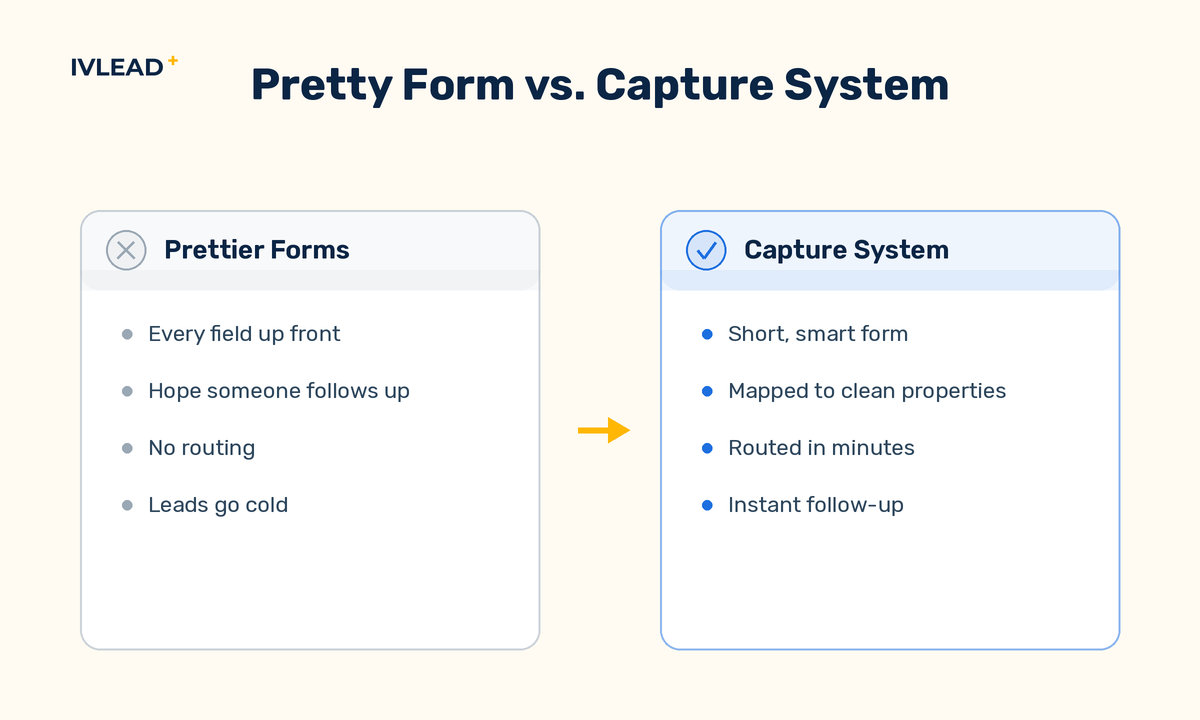
A form is only as good as what happens after someone submits it. Strong lead capture is not about prettier forms. It is about asking for the right fields, writing every submission straight into the CRM as a usable record, and routing it fast enough that the lead is still warm. Most teams lose leads not at the form but in the gap between submission and follow-up. This is the practitioner's guide to closing that gap with HubSpot forms and the CRM working as one system.
How many fields should a HubSpot form actually have?
Ask for the fewest fields you can act on, because every extra field costs you completions and most early fields are not needed yet. The instinct is to collect everything up front. Resist it. Each field you add lowers the share of visitors who finish, so ask only for what you need to route and follow up first contact: usually email, name, and maybe company. You can enrich the rest later from the CRM or from progressive profiling.
A practical rule of thumb: top-of-funnel forms (a blog subscribe, a guide download) should be as short as possible, while a demo or contact form can ask for one or two qualifying fields because intent is higher. Match the form length to the moment, not to your wish list. Cutting a seven-field demo form down to three, email, name, company, typically lifts completions, and the missing details get filled in by enrichment and the first sales call anyway.
What is progressive profiling and when should you use it?
Progressive profiling shows a returning visitor new questions instead of ones they have already answered, so you gather more over time without a wall of inputs on day one. HubSpot's progressive (or "queued") fields swap in the next unanswered question once a known contact submits. It is the answer to the tension every form designer feels: short forms convert better, but sales wants more data.
Use it whenever the same person is likely to fill in more than one form over their lifecycle, which is most B2B journeys. The first form asks email and name. The second, perhaps for a deeper guide, asks company and role. The third asks team size or current tooling. By the time a prospect books a call, the record is rich, and no single form ever felt long.
How do you make sure a submission becomes a usable CRM record?
Map every form field to a real CRM property, so a submission creates or updates a clean record instead of a loose note. A HubSpot form is wired to the CRM by design, but the value comes from the mapping. Each field should point to a defined contact or company property so the data lands somewhere reports and workflows can read, not in a free-text blob nobody can filter.
Confirm the field types match: a dropdown to a dropdown property, a date to a date property, a number to a number property. Typed data is filterable, segmentable, and usable in automation; the same answer pasted into a text note is invisible to routing. When a known contact submits, HubSpot updates the existing record rather than creating a duplicate, which keeps the database clean. A form that writes "company size" into a properly typed property lets you auto-route enterprise leads to a senior rep. The same data in a text note would never trigger that rule.
What should happen the instant a form is submitted?
Route the lead, notify the owner, and follow up automatically, because speed to first response is one of the biggest levers on conversion. The moment a usable record exists, automation should take over. A workflow can set the lifecycle stage, assign an owner by territory or product interest, notify that owner, and send the contact an immediate, useful confirmation, ideally one that lets a high-intent lead book time right away.
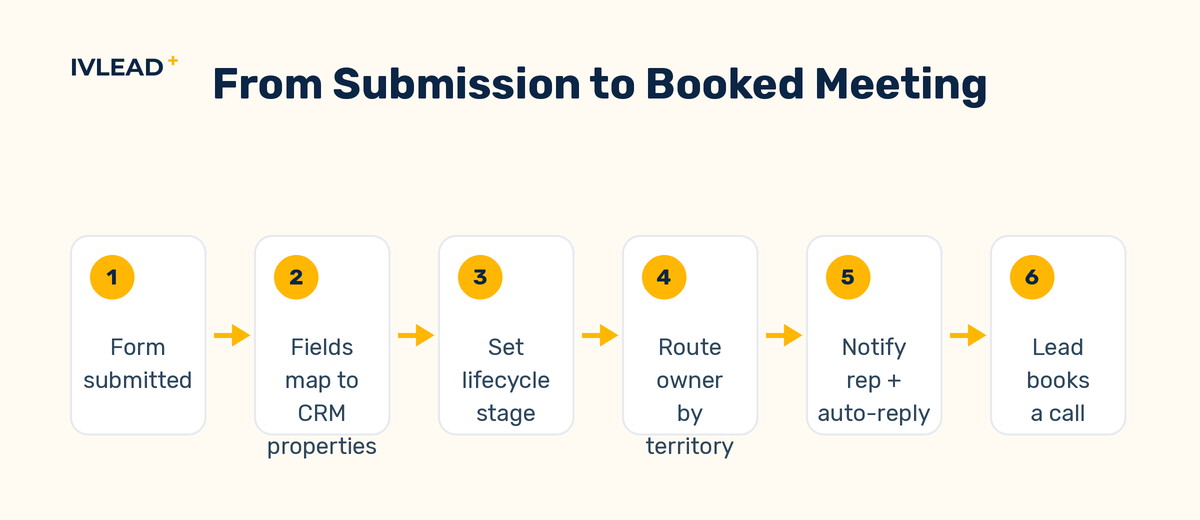
The point is to remove the human delay. A lead that waits hours for a first touch is far colder than one that gets a reply in minutes, and the prospect has usually moved on to the next vendor. Build the routing once and it runs forever. A submission that instantly assigns the lead, posts a notification to the rep, and sends the prospect a calendar link turns a passive form into a booked meeting before interest has time to fade.
What are the most common mistakes that lose leads?
The mistakes that quietly cost the most pipeline are unglamorous: forms too long for the moment, fields that write to free text instead of typed properties, no immediate follow-up, and no one watching the report. A few more worth naming. Asking sales-qualifying questions on a top-of-funnel form scares off early visitors. Leaving form notifications off means a lead sits unseen for a day. Creating a brand-new form for every campaign instead of reusing mapped ones spreads your data across inconsistent fields. And skipping bot protection lets junk submissions pollute the database and waste rep time.
None of these are flashy, and that is exactly why they persist. The fix is a short checklist applied every time you build a form: right length for the stage, every field mapped to a typed property, a workflow that routes and replies, and a report you actually read.
How do you keep improving capture over time?
Watch the report, not your gut, because the CRM tells you which forms convert and which leads go cold. Because forms feed the CRM, you can measure the whole path: submissions, which forms produce real opportunities, and where leads stall. Use that to cut weak fields, retire forms that draw low-quality leads, and double down on the ones that produce pipeline.
The advantage of forms and CRM as one system is that capture becomes a measurable, tunable process instead of a hopeful one. This is the order we follow with clients: design lean forms, map them cleanly, automate routing, then read the data and tighten. If you want a hand wiring the whole loop, our marketing automation work is built around exactly this.
The IV-Lead take
Lead capture is a system, not a form. The teams that win do not have prettier forms. They have shorter forms wired to clean properties, instant routing, and a habit of reading what the CRM tells them. The biggest gains almost always come from two moves: cutting fields and removing the delay before the first human reply. Do those two things and your existing traffic produces more pipeline without a single new visitor.
Want more usable leads from the traffic you already have? Book a 30-minute portal audit and we will review your forms and routing for the quick wins. For the full build, see how we approach HubSpot implementation and optimization.
Frequently asked questions
How many fields should a lead form have?
As few as you can act on, often just email, name, and company. Every extra field lowers completion. Use progressive profiling to gather more from returning visitors over time instead of asking everything up front.
Do HubSpot forms automatically update the CRM?
Yes, when fields are mapped to CRM properties. A submission creates or updates a contact record, and if the contact already exists, HubSpot updates them rather than creating a duplicate.
How do I follow up on form submissions automatically?
Use a workflow triggered by the form submission to set the lifecycle stage, assign an owner, notify that owner, and send the contact a useful confirmation. Fast first response is one of the biggest levers on conversion.
How do I avoid duplicate contacts from forms?
HubSpot matches submissions to existing contacts by email and updates that record rather than creating a new one, so duplicates are avoided as long as your fields map to real properties.


