A workflow in HubSpot is an automation that watches for a trigger — a form submission, a deal stage change, a property update — and then runs a sequence of actions: assign an owner, create a task, send an internal alert, update a field. The right ones remove the manual steps that quietly leak revenue: leads that sit unassigned, follow-ups that never happen, deals that go stale because nobody was reminded. This guide covers the few workflows that actually move sales numbers, how to build them, and the mistakes that make them backfire.
For a real example, see how Brenmiller Energy optimized its sales operations on HubSpot CRM.
What is a HubSpot workflow, and how is it different from a sequence?
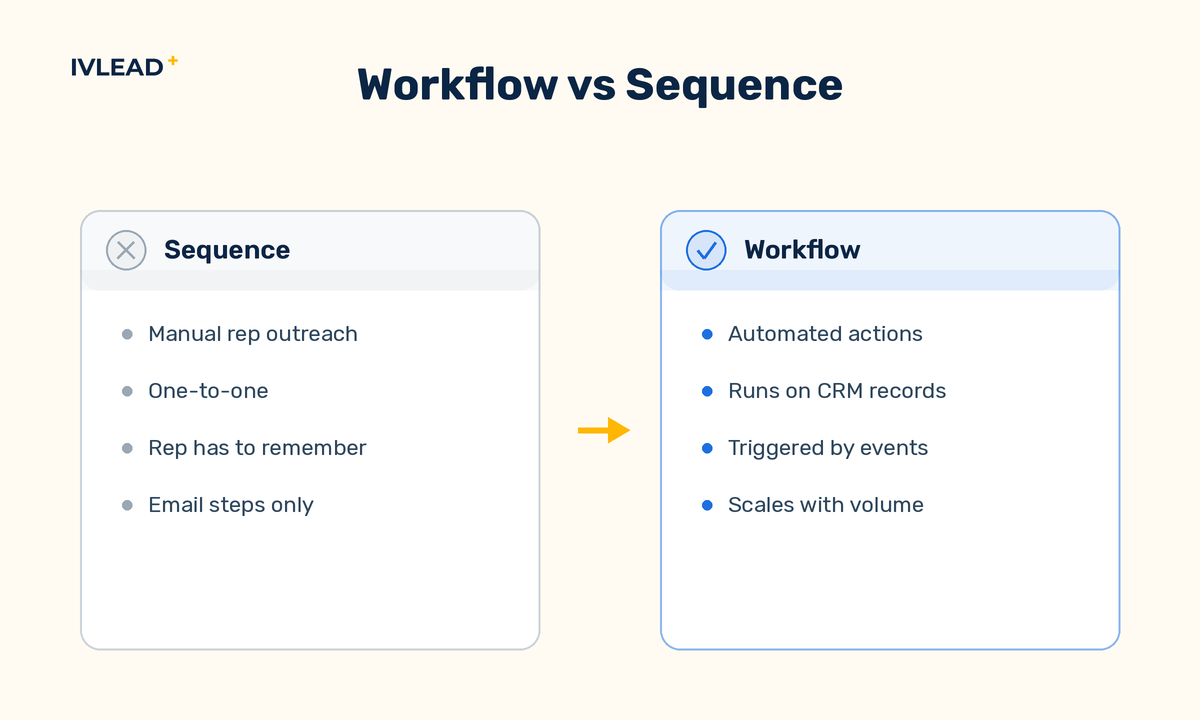
A workflow is a background automation in HubSpot that fires on a trigger and runs actions on records — contacts, companies, deals, or tickets — without anyone clicking anything. A sequence, by contrast, is a one-to-one series of sales emails and tasks a rep enrols a single prospect into manually. Use sequences for personal rep outreach; use workflows for the operational plumbing that should never depend on a human remembering. The workflows below are the operational kind, and they are where most of the revenue leverage lives.
What is the single best workflow to increase sales in HubSpot?
The highest-leverage workflow is automated lead rotation paired with a follow-up task — it makes sure every inbound lead lands on a named rep with a deadline, instead of waiting in a shared inbox. Speed-to-lead is one of the most reliable predictors of whether a B2B inbound deal ever gets a real conversation, and the most common reason it fails is mundane: nobody was assigned, so nobody followed up. A workflow closes that gap on every single lead, day or night, with no human in the loop.
The build is straightforward. Trigger it when a contact's lifecycle stage becomes Lead (or a specific form is submitted), rotate the contact owner across your sales team, then create a task for that owner due within a set window. Add an internal notification so the rep knows immediately. From the rep's side, the experience is simple: a new lead shows up in their queue with a clock on it.
Which HubSpot sales workflows actually move revenue?
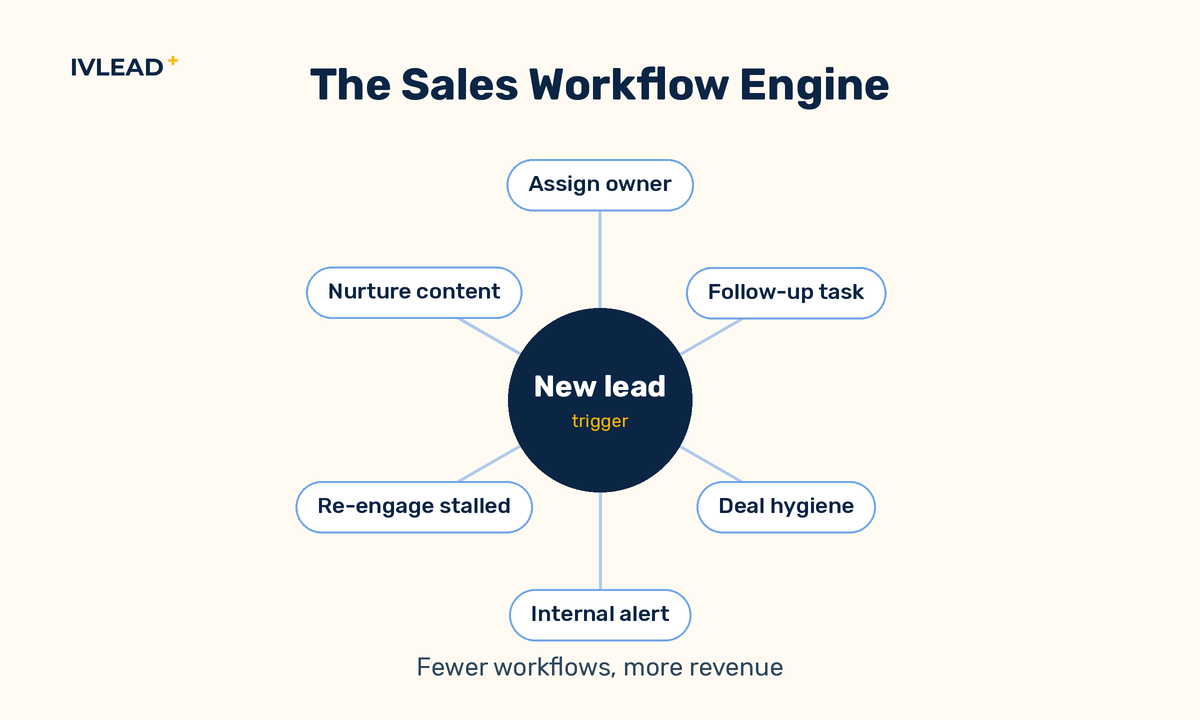
A small set of workflows does most of the work; the rest is noise. These are the ones worth building first, roughly in order of impact for a B2B team:
- Lead rotation and assignment. Auto-assign every new lead to an owner so nothing sits unclaimed. This is the foundation — automation downstream is pointless if leads never get an owner.
- Follow-up task creation. When a lead is assigned (or a meeting ends, or a quote is sent), create a dated task so the next step is never left to memory.
- Deal-stage hygiene. When a deal enters a stage, set required properties, create the stage's standard task, and update the close date. This keeps the pipeline trustworthy enough to forecast from.
- Internal notifications. Alert the right person the moment something matters — a high-fit lead, a deal gone quiet, a re-engaged contact — so action happens in minutes, not at the next pipeline review.
- Stalled-deal re-engagement. When a deal has had no activity for a set number of days, flag it and task the owner. Stalled deals are the quiet killers of a forecast.
- Lead nurturing. For leads that aren't sales-ready, drip relevant content until a behaviour signals intent, then hand them back to a rep.
Notice what's not on the list: clever multi-branch automations that look impressive and break silently. Start with these, get them reliable, then expand. This is the core of what we build in our sales automation work.
How do you build a sales workflow in HubSpot, step by step?
You build a workflow by choosing a trigger, adding ordered actions, and testing it on a real record before turning it on. The mechanics are the same whether it's a simple assignment rule or a multi-step deal automation. The pattern:
- Define the outcome first. Write one sentence: "When X happens, the result should be Y." If you can't say it plainly, the workflow isn't ready to build.
- Set the enrollment trigger. Go to Automation > Workflows, create a workflow, and pick the trigger — a property value, a form submission, a deal-stage change. Keep the criteria tight so only the records you intend get enrolled.
- Add actions in order. Assign owner, create task, send notification, update property. Use branches only when a real decision changes the path — every extra branch is something else to maintain.
- Decide re-enrollment. Should a contact be able to enter again later? For a one-time welcome, no. For a recurring "deal went stale" check, yes. Getting this wrong causes duplicate tasks or missed records.
- Test on a real record, then turn it on. Use HubSpot's test feature with an actual contact or deal, confirm each action fires as expected, then enable it and watch the first live enrollments.
What mistakes break HubSpot sales workflows?
The failures are almost always operational, not technical — workflows that fire on the wrong records, create noise reps ignore, or quietly do nothing. The recurring ones:
- Triggers that are too broad. Loose enrollment criteria sweep in records you never meant to touch, then create tasks and emails nobody wanted. Tight criteria beat clever criteria.
- Notification fatigue. Alert reps on everything and they'll mute all of it. Notify only on things that genuinely need a human in the next few minutes.
- No owner on the record. Tasks and notifications routed to "the contact owner" go nowhere if the record has no owner. Assignment must come first.
- Re-enrollment set wrong. The single most common cause of duplicate tasks and runaway emails. Decide it deliberately, never by default.
- Build once, never review. Teams, stages, and properties change. A workflow that was right last year can be silently misfiring now. Review the active ones on a schedule.
- Automating a broken process. Automation makes a bad process fail faster and at scale. Fix the process on paper first, then automate it.
How many workflows should a B2B sales team run?
Fewer than most teams think — a handful of reliable workflows beats dozens of half-trusted ones. The goal isn't coverage, it's trust: every active workflow should do something a rep or manager can name and rely on. When you can't remember what a workflow does or why it exists, that's the signal to audit and prune, not to add another. A lean, well-documented set is far easier to maintain and far harder to break than a sprawling library nobody fully understands.
Frequently asked questions
Do I need a paid HubSpot plan to build sales workflows?
Workflow automation lives in HubSpot's paid tiers (Professional and above). Free and Starter give you basic tools like form follow-up and simple task creation, but the full trigger-and-action workflow builder — lead rotation, deal-based automation, multi-step logic — requires a Professional plan or higher.
What's the difference between a contact, deal, and company workflow?
Each is built on a different record type and triggers on that type's properties. Contact workflows handle lead routing and nurturing; deal workflows handle pipeline hygiene and stage-based tasks; company workflows handle account-level logic. Most sales automation combines contact and deal workflows — leads get routed, then deals get managed.
Should I use a workflow or a sequence for follow-up?
Use a workflow when the follow-up should be automatic and operational — a task created the moment a lead is assigned. Use a sequence when a rep is personally working a specific prospect and wants a tailored series of emails and reminders they control.
How do I stop workflows from creating duplicate tasks?
Set re-enrollment deliberately and keep enrollment criteria tight. Duplicates almost always come from re-enrollment left on when it should be off, or from a trigger broad enough that the same record qualifies more than once. Test on a real record before going live.
Want these built right the first time?
Most HubSpot portals don't need more workflows — they need the few that matter to actually be reliable. We do HubSpot implementation and automation for B2B teams every day, and we'll tell you straight which workflows are worth your time and which are just noise. Book a 30-minute portal audit — no deck, no pitch, just a look at your setup and an honest read on what to fix first.