

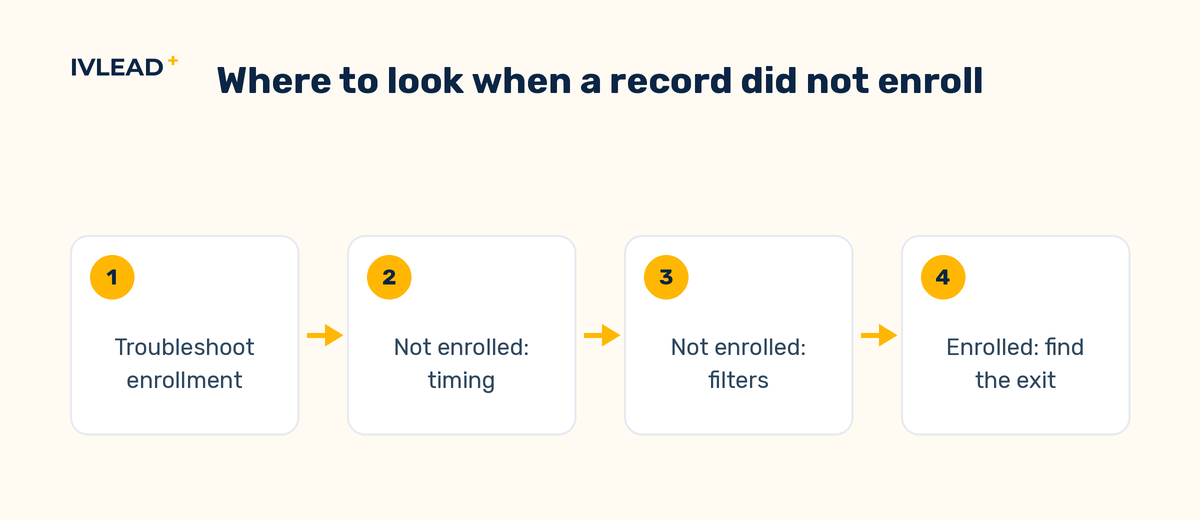
A HubSpot workflow that "does nothing" usually failed at, or just after, enrollment. Four causes cover most cases. The record never newly met the trigger, or it had already been through once and could not re-enroll. A filter may have blocked it, or it enrolled and was removed at once by a goal, a suppression list or an unenrollment rule. Start with the workflow's Troubleshoot enrollment tool, then check trigger timing, re-enrollment and filters in that order.
Key takeaways
- Start with Troubleshoot enrollment (Help in the workflow editor). It separates records that never enrolled from records that enrolled and then left.
- A record enrolls when it starts to meet the trigger. Records that already matched when the workflow went live are skipped unless you chose to include existing records or enroll them manually.
- Re-enrollment is allowed per trigger. Allow it only for a business event that should repeat, because it can also create duplicate tasks and emails.
- When an integration writes fields a few seconds apart, a branch can be tested before the data is complete, and the record is not looked at again.
What should you decide before you open the workflow?
Settle two questions first, because the answers tell you where to look.
- Is this a workflow problem or a data problem? If the trigger property is blank on half your records, or holds "USA" on some and "United States" on others, no workflow setting will fix it. Check the property's values across the object before opening the editor.
- Should a record ever go through twice? A second form submission, a deal that drops back a stage and advances again, a reopened ticket. If so, re-enrollment has to be designed in.
Why didn't the record enroll in the first place?
A record enters a workflow when it goes from not meeting the trigger to meeting it, so a record that already matches is not picked up. For example, a company builds a workflow that sends a welcome email when lifecycle stage becomes Marketing Qualified Lead, switches it on, and asks why its existing MQLs got nothing. They crossed the line before the workflow was live. With a filter-based trigger, you choose at activation whether to enroll only new records or existing ones too. With an event-based trigger, such as a form submission, existing records cannot be enrolled by the trigger at all. In both cases you can enroll the backlog manually.
Before enrolling a backlog, check who was already contacted another way, such as a one-off email sent while the workflow was being built, and exclude them so nobody gets the same message twice.
Two other causes leave the record absent from the enrollment data. The workflow may have been off when the record changed, and records only enroll while it is on. Or the workflow is built on a different object from the record you are checking, for example a company workflow when the change happened on a contact, so the contact itself can never appear in its history.
List-membership triggers follow the same rule: records enroll when they join the list, so members already on it at launch are skipped unless existing records were included. Date filters such as "is more than 30 days ago" are checked at the start of each day, so they can enroll a record up to a day later than you expect.
To check, open the trigger property's history on the record. If the value changed before the workflow was active, the trigger works as built, and the fix is to enroll the backlog deliberately.
Is re-enrollment turned off for the trigger you need?
By default a record enrolls only the first time it meets the triggers. If a contact fills in the same form twice, the second submission does nothing unless re-enrollment is allowed for that trigger, which is the usual explanation for "it worked the first time and never again." Check that re-enrollment is on and that the trigger you care about is selected. For form re-enrollment, confirm the specific form is selected.
Re-enrollment carries a cost, so treat turning it on as a decision. An "is known" trigger with re-enrollment on can enroll a record again each time the property is edited, so a field an integration rewrites on every sync can create a task on every run. Two workflows that each set a property the other uses as a re-enrollment trigger create a loop.
Is a filter or goal quietly blocking it?
Read the trigger criteria literally, one condition at a time. An AND condition fails if any single property fails, and the failure is silent. Four traps are easy to miss.
- Blank values. "Country is United States" is false for a contact with no country. Negative filters work the other way: "is not equal to any of" and "does not contain any of" also match records where the property is blank. If you mean "has a value, and it is not Canada", add "Country is known" to the same condition.
- Labels versus stored values. Dropdown properties have a display label and an internal value. Text arriving from an ERP or an import can look right on screen and match neither.
- Goals and suppression. A contact who already meets the workflow goal, or who is on the workflow's suppression list, enrolls and leaves at once. So does a record that meets an unenrollment trigger, or one that another workflow is set to unenroll. Check the workflow's settings, especially when a goal or suppression list was added after launch.
The fix is in the data: make trigger fields dropdowns, validate the forms that fill them, and run a cleanup workflow that rewrites "USA" as "United States". The corrected value then newly meets the main trigger and enrolls the record.
To test filter logic, build a saved list with exactly the trigger's criteria. If the record you expected is missing, remove conditions one at a time until it appears; the last one removed is the cause.
How do you confirm what actually happened?
- Troubleshoot enrollment. In the workflow, click Help > Troubleshoot enrollment, choose the record and set the time range. It covers property, list and form submission filters. If there is no enrollment data, test the record against the triggers in the editor, and check the workflow's version history in case the triggers changed. If the record enrolled and left, find the exit: a goal, the suppression list, an unenrollment trigger, another workflow, a merge or a deletion.
- Action results. If it enrolled and "nothing happened", check whether an action failed or was skipped, for example an email blocked by subscription status or a task with no owner to assign it to.
- Enrollment details and property history. For a record that enrolled, the Details link in the enrollment information shows the property values at the moment it enrolled. For each trigger and branch property, read the timestamps and sources in the property history alongside the record timeline to see the order in which things happened.
Testing a record in the editor checks it as it is now, so it cannot reproduce a condition that failed in the seconds between two updates. For timing problems, trust the property history.
Worked example: a deal workflow fed by an ERP sync
A company that sells industrial equipment creates its quotes in Priority, the Israeli ERP. An integration creates and updates HubSpot deals from those quotes. Sales wants a follow-up task three days after a quote goes out, so the admin builds a deal workflow:
- Trigger:
Deal stagebecomes "Quote sent". - First step: an if/then branch on whether
Priority quote numberis known. - Yes branch: wait 3 days, create a task for the
Deal ownertitled "Follow up on quote", setFollow-up scheduledto "Yes". - No branch: set
Quote data statusto "Missing quote number", a property nobody has added to a view yet.
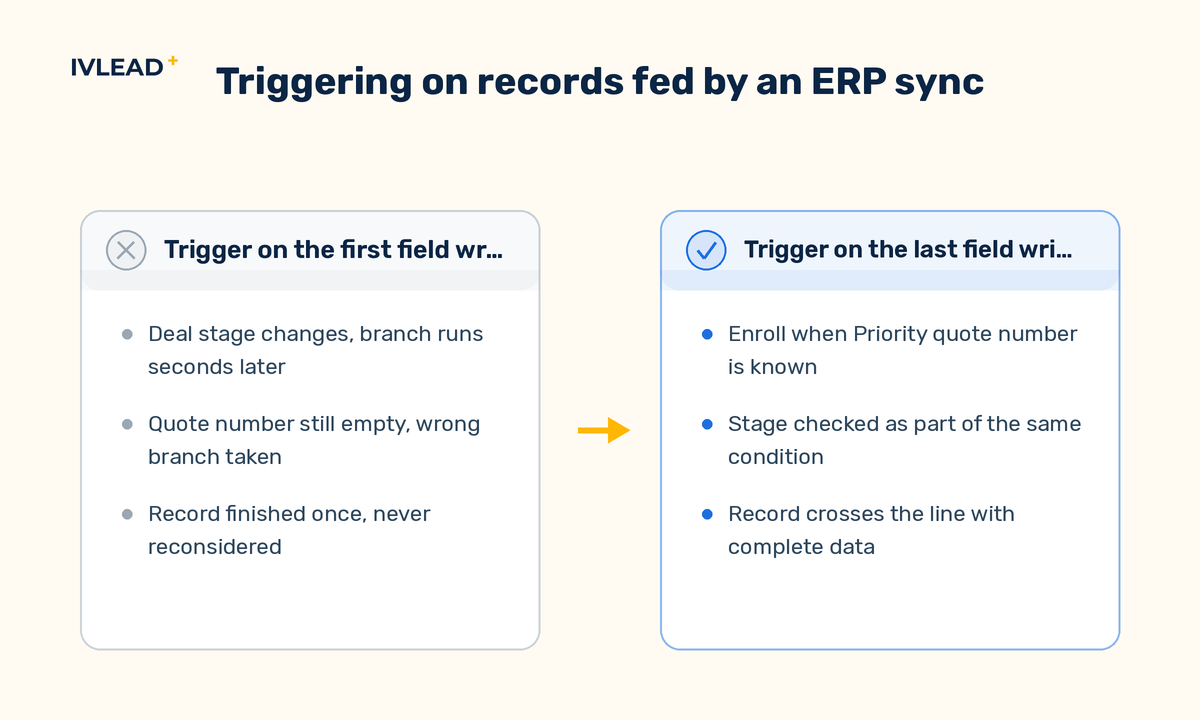
Within a week, sales reports that most deals get no task. The admin opens a deal, sees "Quote sent" and a quote number, and concludes the workflow is not enrolling. The workflow history shows that the deal enrolled when the stage changed, reached the branch at once, found Priority quote number empty and took the "No" branch. The property history shows why: the integration writes Deal stage first, Amount next, and Priority quote number last, a few seconds later. With re-enrollment off and the stage unchanged, the deal was never reconsidered.
The same failure appears when the integration creates the deal first and associates the company afterwards. HubSpot notes that association properties can populate after enrollment, so a branch on a company property may find no company yet.
There are two sound fixes. A short delay before the branch works, but it hides the dependency on sync timing inside the workflow. The better fix changes the trigger: enroll when Priority quote number is known AND Deal stage is "Quote sent". Because the quote number is the last field written, the deal only crosses the line once its data is complete. If quotes are sometimes reissued with a new number, do not turn on re-enrollment for the "is known" condition, because it re-enrolls on any edit. A "property value changed" trigger on the quote number reacts to the new number itself. Test it with a reissued quote before relying on it, and include the number in the task title.
What goes wrong most often, and how do you check for it?
| Symptom | Likely cause | How to check |
|---|---|---|
| Old records never enrolled after activation | They matched before the workflow was on | Compare the property's change date with the activation date |
| Works once per record, never again | Re-enrollment off, or not allowed for this trigger | Confirm the exact trigger is selected for re-enrollment |
| Some records enroll, similar ones do not | A blank or mismatched value in an AND condition | Build a list with the same criteria, remove conditions one by one |
| Enrolled, but took the wrong branch | Branch tested before the integration wrote a field or association | Read timestamps and sources in the property history |
| Matching record never shows as enrolled | Workflow was off, or the record is on the suppression list | Check the workflow's status and settings, then Troubleshoot enrollment |
| Enrolled, then disappeared | Goal met, unenrollment trigger, another workflow, merge or deletion | Find the exit in Troubleshoot enrollment |
| Enrolled, but the action never happened | Action failed or skipped: unsubscribed, exclusion list, missing owner | Check the action results and the contact's subscription status |
The workflow editor shows settings, not outcomes, so start with the enrollment data.
How IV-Lead approaches this
A sound rule is to treat enrollment criteria as a contract with the data, and to make the data keep the contract rather than make the workflow forgive it. Where records come from another system, prefer a trigger on the single property the integration writes last, or a dedicated "ready" property the integration sets on purpose. Avoid an AND condition across fields the integration writes at different moments, because the seams between systems are where fields change at different times.
Turn re-enrollment on only with a written reason in the workflow description, because duplicate tasks and emails reach customers before anyone notices. Before activating, build a list with identical criteria and look at the count and a sample: a trigger that matches zero records or ten thousand is telling you something about the data.
If you want to see how we set up and run HubSpot day to day, our Sales Hub implementation and operation page describes the work.
If you have a workflow that fires for some records and not others and want a second pair of eyes on the histories, book a 30-minute portal audit and we will trace it to the cause with you.
Frequently asked questions
Why doesn't my workflow enroll contacts that already match the criteria?
Records enroll when they start to meet the trigger. With a filter-based trigger you can include existing records when you turn the workflow on; otherwise, enroll them manually.
Why does my workflow only run once for each record?
Re-enrollment is off by default, so turn it on and select the specific trigger you want to repeat, after confirming that property changes only when the real business event happens.
How can I see exactly what happened to a record?
Open the workflow and use Help > Troubleshoot enrollment for that record. Then read the record's timeline and the history of each trigger property to see what changed its values.
Can an ERP sync stop a record from enrolling?
Yes, usually through timing. If the integration writes the trigger field first and other fields or associations seconds later, a branch can run before they exist, and the record is not reconsidered. Trigger on the field written last.
Why did a contact enroll but never receive the email?
Enrollment and sending are separate checks. A contact who is unsubscribed from that email type, or on an exclusion list, can enroll and still be skipped at the send step, so check the contact's subscription status and the action results.
Does a workflow goal affect enrollment?
Yes. A contact who already meets the goal enrolls and leaves at once, and one who meets it partway through leaves then. If the goal was added after launch, check which records now match it.