


You connect WhatsApp in Settings → WhatsApp, on Marketing Hub or Service Hub Professional and above, and the whole flow runs under 20 minutes. What those 20 minutes actually do is commit one phone number, one 24-hour clock and two separate meters to whichever inbox you pointed them at.
None of that is in the setup wizard. All of it shows up in month two.
What does connecting WhatsApp to HubSpot actually mean?
It means attaching a WhatsApp Business Platform number to the HubSpot conversations inbox, where the conversation becomes a record on the contact timeline instead of a thread on someone's phone. That is a different product from the WhatsApp Business app, and the difference is the whole point: the app puts the conversation in a person's hand, the platform puts it in your CRM.
The requirements are short and worth reading twice before you start:
- Subscription. Marketing Hub Professional or Enterprise, or Service Hub Professional or Enterprise. Sales Hub is not on that list. If your SDRs are the reason you want WhatsApp, the portal still needs one of those two subscriptions behind them.
- A Meta Business Manager account you administer. Verification is required once you go past 50 business-initiated conversations a day, so treat it as required rather than optional.
- A phone number that can receive voice calls, sits outside any IVR, and is not connected to another WhatsApp account, the WhatsApp Business app, or another integration. Most main business lines fail at least one of those three.
Have the legal company name, the WhatsApp display name, the company website and the business email ready. Meta asks for all four.
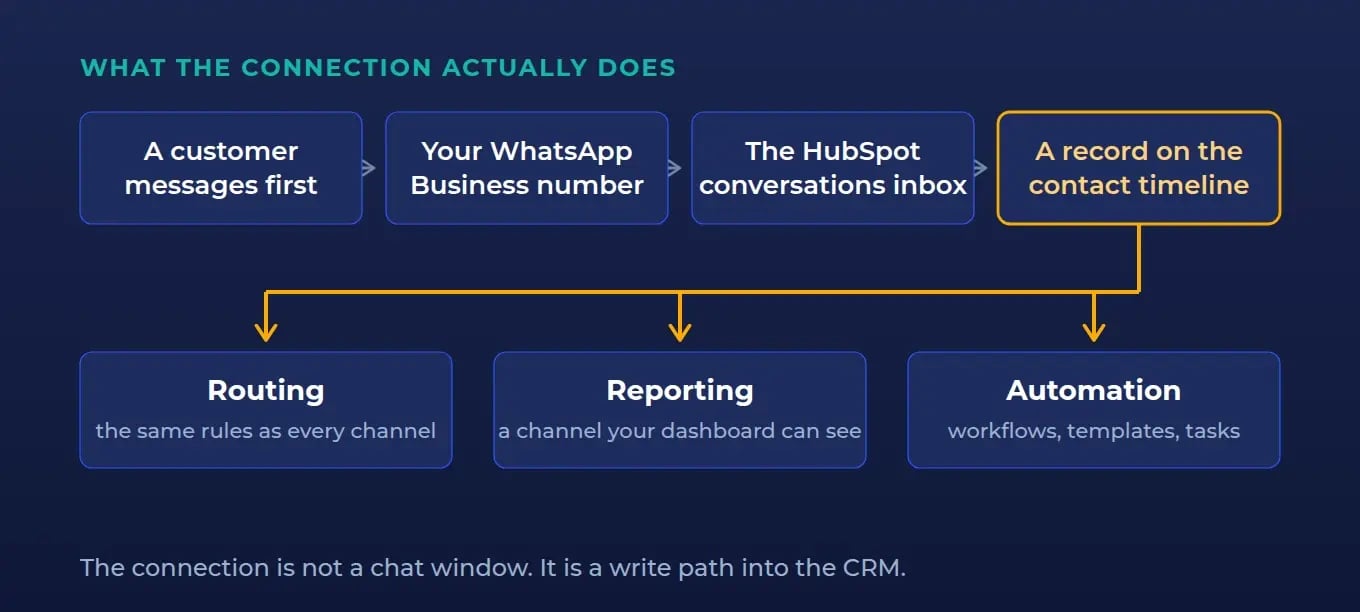
How do you connect a WhatsApp number to the HubSpot inbox?
Eight steps, once the prerequisites are true:
- Go to Settings → WhatsApp in HubSpot.
- Choose Connect a WhatsApp phone number (or Reconnect, for a number that was connected before).
- Click Continue with WhatsApp, which accepts the terms.
- Pick the business portfolio and the WhatsApp Business account.
- Select a new number or an existing one.
- Review and approve the permissions HubSpot requests.
- Click Finish, then Connect to Inbox.
- Choose the target inbox and save.
One WhatsApp Business Account holds up to 25 phone numbers, so a company can run separate numbers for support and for sales inside one account. Whether it should is a routing decision, not a technical one, and it belongs further down this page.
What breaks after go-live?
Four things, and every one of them is a decision you already made during setup without knowing it.
The number is close to a one-way door
A number connected to HubSpot must first be disconnected from anything else it lives in, and once it is connected, messages appear in the HubSpot inbox and not in the WhatsApp apps. The number your support team currently answers on a phone stops being answerable on that phone.
That is the right outcome. It is also the moment someone discovers the number printed on your website has been sitting in one employee's personal WhatsApp for three years. Sort out who owns the number before you migrate it, not during.
The 24-hour window changes what "follow up" means
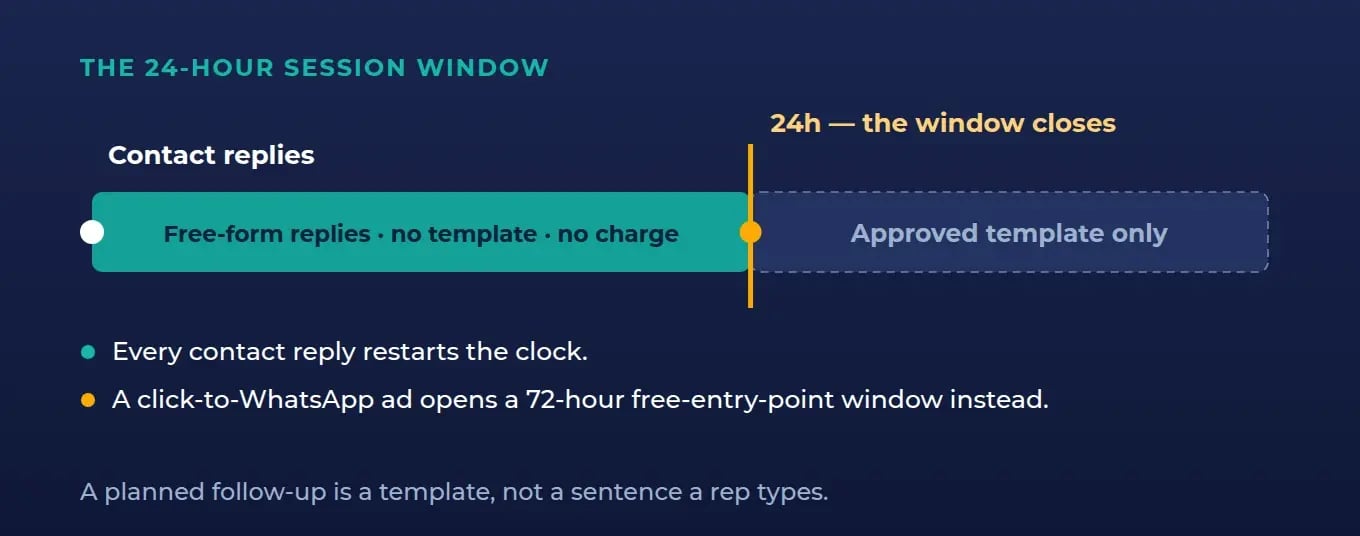
A WhatsApp session stays open for 24 hours after the contact's last reply. Inside the window your team writes freely. Outside it, the only way back in is a template that Meta approved in advance.
Email has no equivalent of this. A rep who is used to "I'll circle back Thursday" has to learn that Thursday is outside the window, and the Thursday message is now a pre-approved template rather than a sentence they type. Teams that skip this training send nothing for a week and conclude WhatsApp doesn't work.
There are two meters, not one
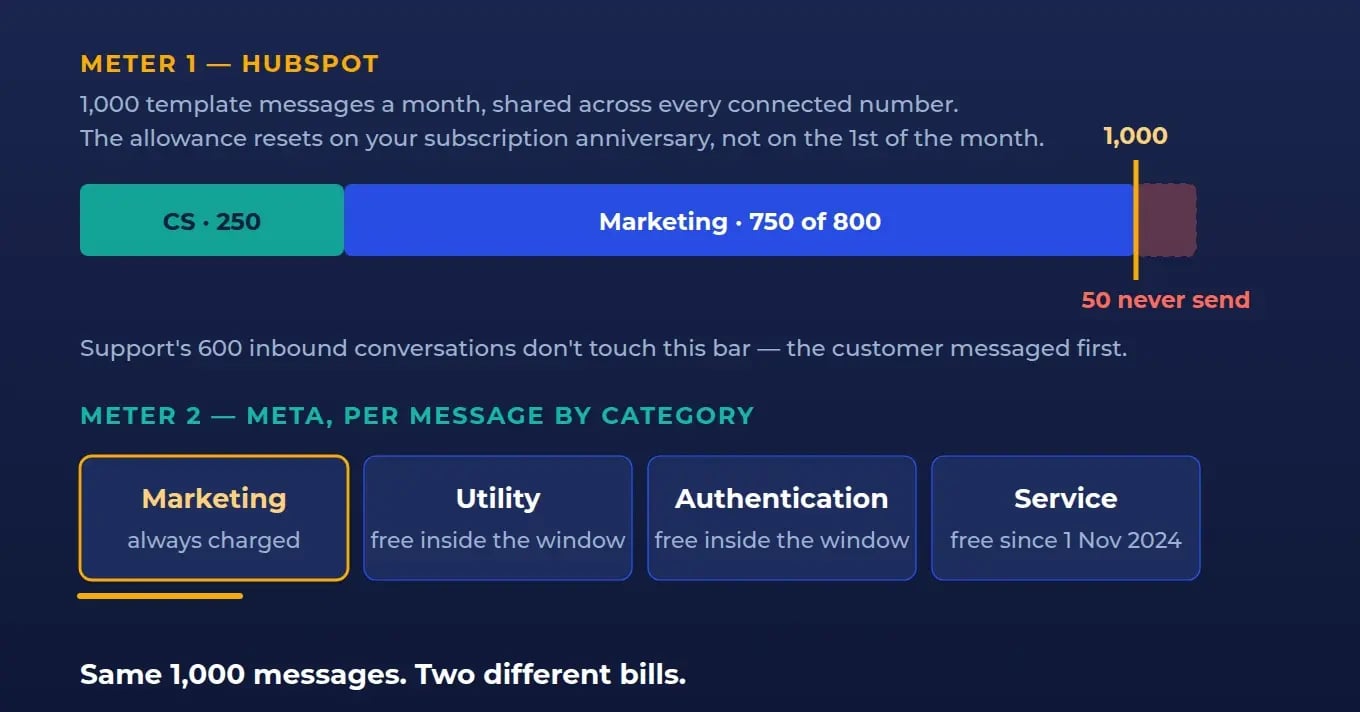
HubSpot allows 1,000 template messages a month, shared across every connected WhatsApp account, resetting on your subscription anniversary rather than on the first of the month. That is HubSpot's ceiling.
Underneath it, Meta bills per message, by category. Marketing templates are always charged. Utility and authentication templates are free inside an open customer service window and charged outside it. Service messages have been free for all businesses since 1 November 2024, and replies within the 72-hour free-entry-point window that follows a click-to-WhatsApp ad carry no charge either.
So the same 1,000 template messages can cost you very little or a lot, depending entirely on which category they fall into and whether the window was open. Two ceilings, two different logics, one channel.
Templates cannot see your deals
Templates are created and approved in Meta, then sync into HubSpot where you add personalisation. The tokens available are contact and company only. Deal, ticket and custom object tokens are not supported. Location headers and flow buttons don't come across, and WhatsApp's sample templates don't sync at all.
For a sales team that plans to send "your quote for {deal name} is ready", that is a hard stop discovered late. Plan the personalisation around contact and company fields, or push the specifics into a tracked link that lands on a HubSpot page.
Who should own the WhatsApp channel?
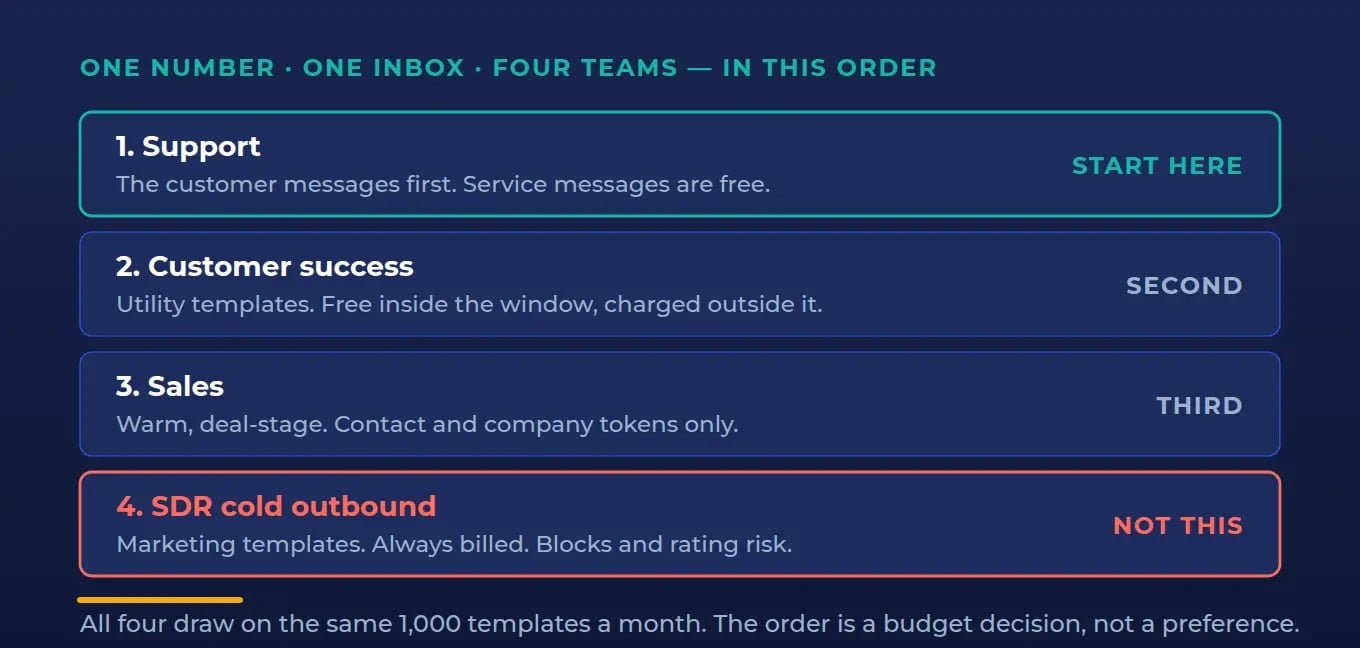
All four teams can use one number. They should not use it the same way, because the window and the categories treat them differently.
| Team | Message reality | Start here? |
|---|---|---|
| Support | Customer messages first, so the window is open and service messages are free. Templates barely needed. | Yes. Cheapest to run and the fastest to show value. |
| Customer success | Onboarding and renewal nudges are utility templates — free inside the window, charged outside it. Timing is the lever. | Second. |
| Sales | Warm, deal-stage conversation inside an open window. Constrained by contact and company tokens only. | Third, with template design done up front. |
| SDR / outbound | Cold outreach is a marketing template. Always charged, drawn from the shared 1,000, and the fastest route to blocks and a quality-rating problem. | No. Not as a cold channel. |
The honest answer on SDRs is the one nobody wants: WhatsApp is not an outbound prospecting channel. It works after a person raises their hand — an inbound form, a click-to-WhatsApp ad, an event scan — and it works extremely well there, because that first user-initiated message opens the window for free. Point your SDRs at the second conversation, not the first.
What does WhatsApp in HubSpot actually cost?
Here is the arithmetic, using illustrative volumes for a mid-market team. The volumes are an example to show the shape of the maths, not a benchmark. The limits are real.
Support handles 600 inbound conversations in a month. All user-initiated, all inside the window, so nothing touches the template allowance. Customer success sends 250 onboarding and renewal templates. Marketing then plans an 800-contact re-engagement send.
250 + 800 = 1,050 template messages against a shared ceiling of 1,000. The campaign stops mid-send, and it stops on the day of your subscription anniversary rather than a date anyone has in a calendar.
The Meta side is separate and market-specific. Rates are per message, set by category and by the recipient's country, with volume tiering on utility and authentication. Pull your own market's rate card before you commit to a send volume, because a marketing template to a mixed international list is not one price.
None of this makes WhatsApp expensive. It makes WhatsApp a channel with a budget, which is a different planning exercise from email, and one most teams do after their first overrun instead of before.
Old way, new way
The old way: a business number lives in the WhatsApp Business app on a phone, one or two people answer it, the history sits on the device, and nothing about those conversations reaches the CRM. When the person who owns the phone leaves, so does the relationship.
The new way: the number is an asset in your WhatsApp Business Account, the conversation is a record on the contact timeline, routing follows the same rules as every other channel, and the reporting is the same reporting. The cost of the new way is discipline — templates approved in advance, categories understood, ownership decided before migration. The return is that WhatsApp stops being a shadow channel your revenue reporting cannot see.
Architecture before automation. Decide the ownership model, the window discipline and the template library first. The connection itself is the easy 20 minutes.
Where IV-LEAD fits
We're a HubSpot Solutions Partner, and the integrations we take on are the ones most partners route around — HubSpot to ERP, to billing, to the routing layer — because that is where the coherence problem actually lives. A WhatsApp channel is a small version of the same problem: the connection is trivial, the object model and the ownership decisions are not.
What we look at on a WhatsApp build: which number and who currently controls it, which inbox receives it and how routing maps to real teams, the template library and its categories, how the conversation writes back to contact and company records, and what your reporting will show once messages arrive from a channel your dashboards have never seen.
The takeaway
Connecting WhatsApp is a 20-minute task sitting on top of four decisions that are much harder to reverse: which number, which inbox, who owns the window, and which team's messages get the shared template allowance. Make those four in the open, in that order, and the channel behaves. Skip them and you'll be renegotiating them live, in front of customers, at your subscription anniversary.
If you want a read on your own portal before you connect a number, book a HubSpot audit. We'll look at where your inbound conversations currently land, what routing would need to change, and whether WhatsApp is the right next channel for you at all. We'll tell you straight. No deck, no pitch.
FAQ
What do you need to connect WhatsApp to HubSpot?
Four things. A Marketing Hub or Service Hub Professional or Enterprise subscription. A Meta Business Manager account you have admin rights in, verified if you'll exceed 50 business-initiated conversations a day. A phone number that can receive voice calls, is not part of an IVR, and is not connected to any other WhatsApp account, the WhatsApp Business app or another integration. And your legal company name, WhatsApp display name, website and business email, which Meta asks for during setup.
Can you use WhatsApp in HubSpot with Sales Hub?
Not on Sales Hub alone. The WhatsApp channel requires Marketing Hub Professional or Enterprise, or Service Hub Professional or Enterprise. Sales teams can use a WhatsApp channel that a Marketing or Service subscription provides in the same portal, but a Sales Hub subscription by itself does not give you the channel.
How many WhatsApp messages can you send from HubSpot?
HubSpot allows 1,000 template messages per month, shared across all connected WhatsApp accounts, resetting on your subscription anniversary date rather than on the first of the month. Replies inside an open 24-hour session window are not templates and do not draw on that allowance. Separately, Meta bills per message by category, so the HubSpot ceiling and the Meta invoice are two different limits.
What is the WhatsApp 24-hour window in HubSpot?
The session window is the 24 hours following a contact's most recent reply, during which your team can send free-form messages. Once it closes, the only way to reopen the conversation is a template message pre-approved by Meta. This is why a WhatsApp channel needs a template library built before launch, not after the first missed follow-up.
Does WhatsApp in HubSpot import past conversations?
No. Only new messages sync after the connection is made; existing conversation history stays where it is. Once the number is connected, messages appear in the HubSpot inbox and not in the WhatsApp apps, so plan the migration for a moment when losing visibility of live threads on a phone is acceptable.
Can you personalise WhatsApp templates with deal information in HubSpot?
No. Templates in HubSpot support contact and company personalisation tokens only — deal, ticket and custom object tokens are not supported. Location headers and flow button types don't sync either. Work around it by keeping template personalisation at the contact and company level and putting deal-specific detail behind a tracked link to a HubSpot page.
Is WhatsApp a good channel for cold outbound?
No. Cold outreach falls under marketing templates, which Meta charges for on every send, draws from HubSpot's shared 1,000-message monthly allowance, and carries real risk of blocks and a lowered quality rating. WhatsApp performs best as the second conversation — after an inbound form, a click-to-WhatsApp ad or an event, where the contact messages first and opens a free 24-hour window.
Which team should own the WhatsApp inbox?
Start with support, because their conversations are user-initiated and service messages are free, then add customer success, then sales. Each additional team draws on the same shared template allowance, so decide the priority order before connecting rather than discovering it when a campaign stops mid-send.


