Also in Hebrew: העדכונים החשובים של HubSpot בעברית
To the marketing, sales and service leaders who run their teams on HubSpot: this is the one page to read about HubSpot's October 2026 release.
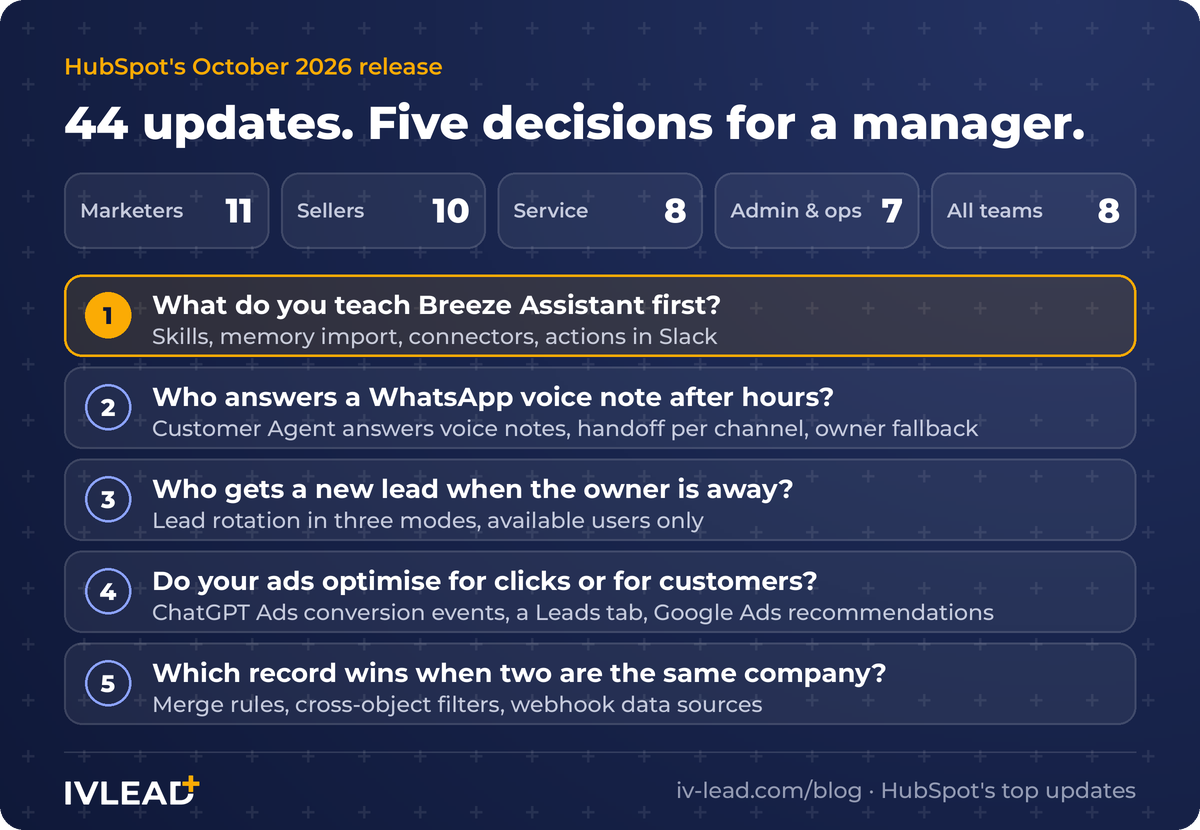
HubSpot presented the release to partners on 10 November. The deck has 44 updates. We went through all of them and kept the ones that ask a manager to decide something. There are five. The biggest change is to Breeze Assistant. It can now learn how your company works once, and keep it. The other four are about WhatsApp, new leads, ads and duplicate data.
For each one we say what shipped, which plan it needs, and what we would do first. Plans and limits are as HubSpot states them in its partner deck and help articles, read on 11 November 2026. Where the two disagree, we say so.
The 60-second version
| The decision | What shipped | Plan | Who decides |
|---|---|---|---|
| What do you teach Breeze Assistant first? | Custom skills, memory import, connectors, actions in Slack, PowerPoint decks | All plans | Each team lead |
| Who answers a WhatsApp voice note after hours? | Customer Agent answers voice notes, handoff per channel, owner fallback, batch testing | Professional and above | Head of service |
| Who gets a new lead when the owner is away? | Lead rotation with three modes and "available users only" | Professional and above | Head of sales |
| Do your ads optimise for clicks or for customers? | ChatGPT Ads conversion events, a Leads tab, Google Ads recommendations | Starter and above (events); all plans (the rest) | CMO |
| Which record wins when two are the same company? | Merge rules, cross-object filters, webhook data sources | Data Hub Professional and above (merge rules, webhooks); all plans (filters) | Operations |
What should you teach Breeze Assistant first?
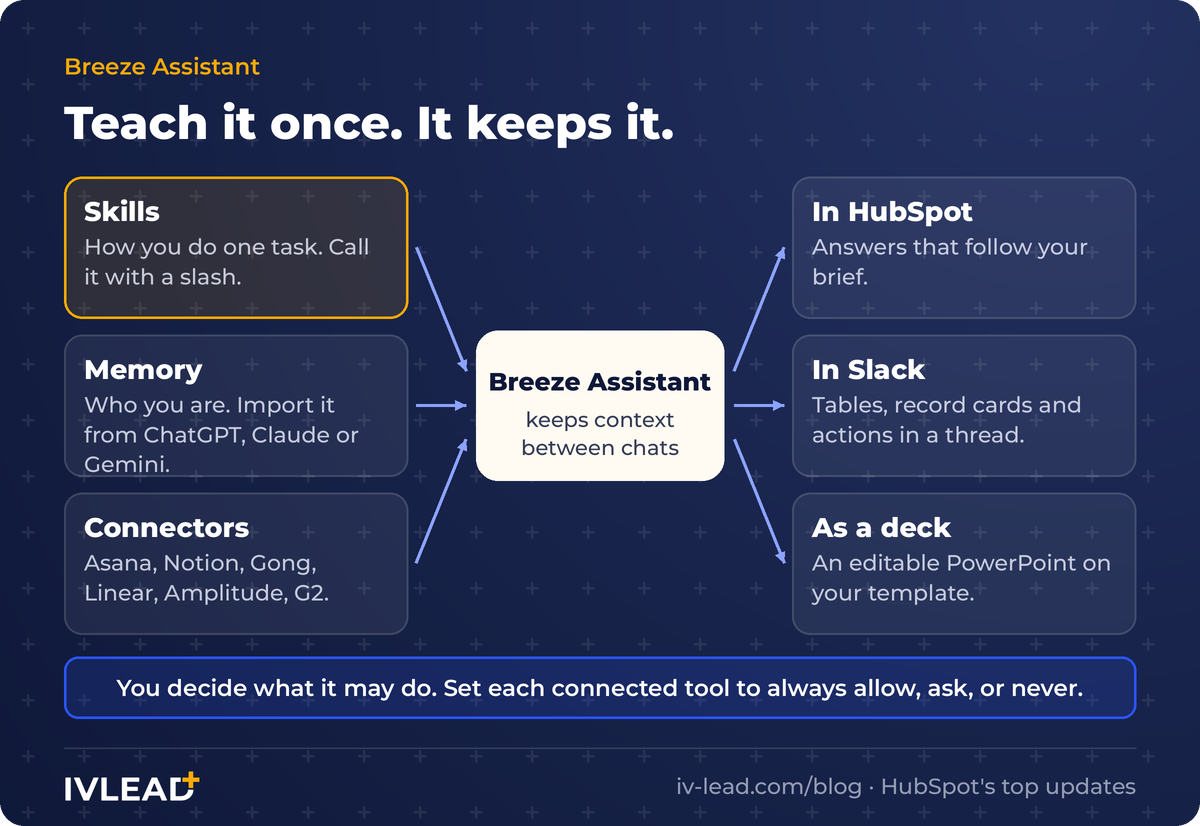
Breeze Assistant already knew your CRM. It did not know how your team does its work, so you explained the steps and the format again in every chat. Four updates change that.
- Custom skills. A skill is a saved set of instructions for one repeat task: how you prepare for a customer meeting, how you write a weekly pipeline summary. You type
/, pick the skill, and Breeze follows it. You can share a skill with your team. - Memory import. If ChatGPT, Claude or Gemini already knows how you work, you can bring that knowledge over. HubSpot gives you a prompt to run in the other assistant. You review the result and paste it in.
- Connectors. A Breeze project can now read from Asana, Notion, Gong, Linear, Amplitude and G2. So an answer can use the project plan and the call notes, not only the CRM.
- Actions in Slack. Breeze Assistant in Slack can now update records, enrol them in workflows and log calls. For a bulk change it shows a card with every affected record, and waits for your yes.
It also builds editable PowerPoint decks from CRM data, on your template. All of this is on every plan.
Our take. Two limits matter. A skill is text only: it cannot run code or call another system. And Breeze never chooses a skill by itself. Someone has to call it. So the value depends on which skills you write and whether the team uses them.
Start with one skill per team, for the task people repeat most. Write it the way you would brief a new hire. Then decide which actions in connected apps need a person to confirm. HubSpot lets you set each tool to always allow, ask first, or never. Slack actions need the HubSpot app connected to your Slack workspace, and in a channel Breeze answers only when it is mentioned.
We wrote a separate guide with a full example: how to write your first Breeze Assistant skill.
Want one short HubSpot AI update a day? Join our WhatsApp group, HubSpot AI in Israel.
Who answers a WhatsApp voice note after hours?
In Israel, customers write to companies on WhatsApp, and many of them record instead of typing. Until this release, a voice note sent to the AI agent went unanswered, or the customer was asked to type.
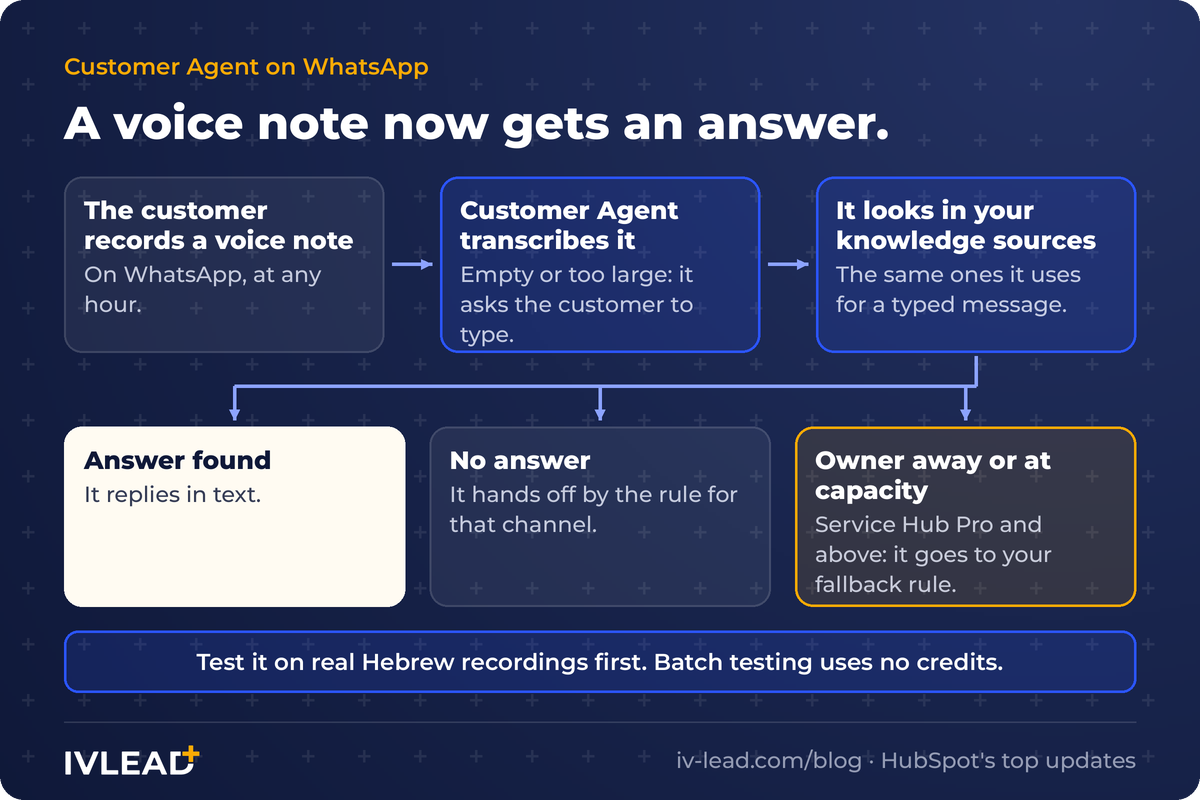
Now HubSpot's Customer Agent transcribes the voice note and replies in text. It uses the same knowledge, actions and handoff rules it uses for a typed message. If the recording is empty or too large, it asks the customer to type. The agent has to be assigned to your WhatsApp channel, and you need a Professional or Enterprise plan.
Three more updates make this safer to switch on:
- Handoff per channel. You can write one handoff instruction for messaging channels, such as live chat, and a different one for email and forms. A live chat and an email do not need the same rule. HubSpot marks this one as requiring credits.
- Owner fallback. On channels that route to the contact's owner, a conversation now goes to your fallback rule when that owner is away, at capacity or no longer active. Before, the fallback applied only when a contact had no owner. Service Hub Professional and above.
- Batch testing. You can run a set of real questions through the agent before a change goes live, mark each answer good or bad, coach it and run the set again. Testing does not use credits.
Our take. HubSpot's sources say nothing about how well the transcription handles Hebrew. Do not assume. Build a test set from twenty real questions your customers ask, send a few real Hebrew voice notes to a test number, and read every answer. Then decide which hours the agent covers alone. Friday afternoon and Saturday are the obvious place to start.
Who gets a new lead when the owner is away?
A lead that reaches a salesperson on holiday is a lead nobody calls. HubSpot's lead workflows could assign an owner, but with little control over how.
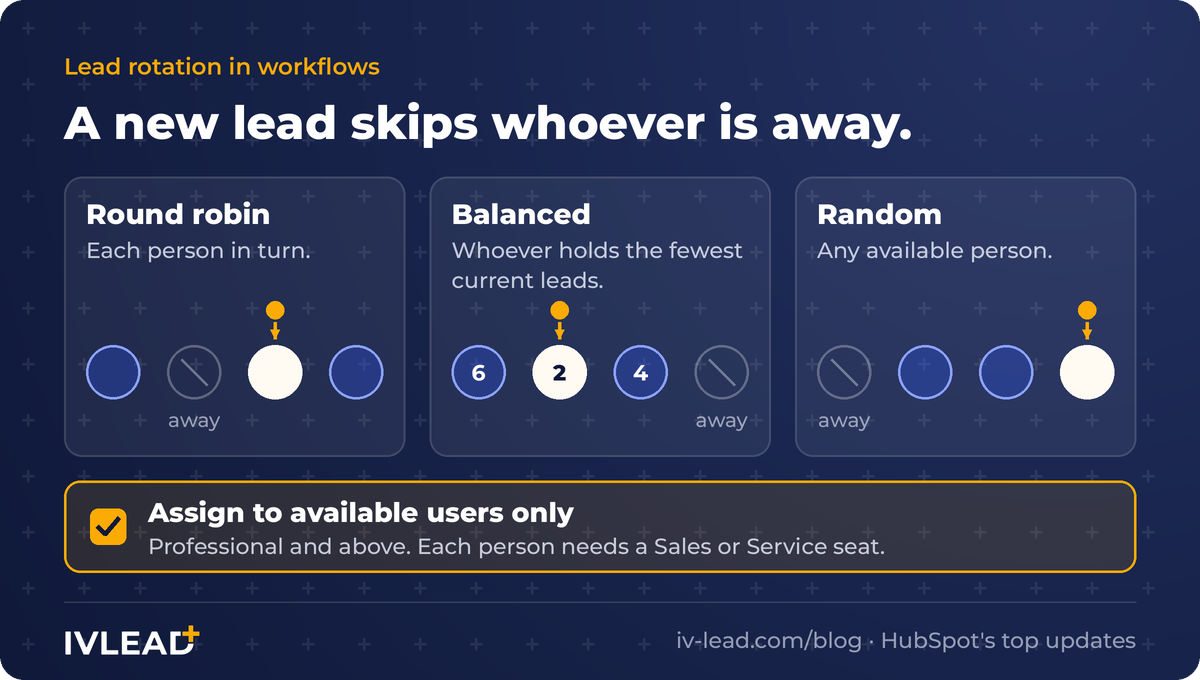
The "Rotate record to owner" action for leads now has three modes: round robin, balanced (whoever holds the fewest current leads) and random. And one option that matters more than the modes: assign to available users only. A lead skips anyone marked away.
This needs a Professional plan or higher, and each person in the rotation needs a Sales or Service seat. HubSpot's help article still labels lead rotation as beta and lists Sales Hub Professional or Enterprise, so check that it is on in your account.
Two smaller updates close the same gap. When you change owners in bulk, you can now move the open tasks with the records. And a connected personal email account can create a contact from an email sent by someone who is not in your CRM yet.
Our take. The rotation only works if "away" is true. Agree with the sales team who sets their status, and when. If your team works Sunday to Thursday, decide what happens to a lead that arrives on Friday: it waits for Sunday, or it goes to whoever is on call.
Do your ads optimise for clicks or for customers?
An ad platform optimises for the signal you give it. If the only signal is a click, it finds people who click.
HubSpot can now send conversion events back to ChatGPT Ads. An event is a form submission or a lifecycle stage change, such as a lead becoming a customer. You set a value for each event, and you choose which contact details are sent for matching. This is on Marketing Hub Starter and above.
Two more ad updates are on every plan. A new Leads tab shows every lead from your lead-generation ads, with whether it synced and why not. And Google Ads recommendations now appear inside HubSpot, where you can apply or dismiss them in bulk.
One rename is worth knowing: Markets are now called ICPs, ideal customer profiles. This is on Marketing Hub Professional and above. Breeze can suggest your ICPs from your deal history, your website and the open web. Creating an ICP does not use credits. Adding new companies from it to your CRM does.
Our take. Sending contact details to an ad platform is a data-sharing decision. Before you create the first event, agree on three things: which event counts, what it is worth, and which fields leave HubSpot. We covered the checks in ChatGPT Ads and Microsoft Advertising in HubSpot.
Which record wins when two are the same company?
Every CRM that receives data from more than one system collects duplicates. Merging them by hand means someone decides, record by record, which value is right.
Merge rules let you decide once. You set up to five conditions, in order, for which record wins. Then you say which fields always come from which source. HubSpot's own example: always take annual revenue from Salesforce. This needs Data Hub Professional or Enterprise.
Two more updates help you see and move data:
- Cross-object filtering. You can filter a list by something on a related record: companies by their open tickets, contacts by their deals. The deck lists it as live on all plans. HubSpot's help article still calls it a public beta, so check your account.
- Webhook data sources. Any system that can send a web request can now push a record into HubSpot's Data Studio. It takes one record per request, so it suits single changes, not a nightly bulk load. Data Hub Professional or Enterprise.
Our take. A merge rule is a written answer to "which system do we believe?". If your ERP owns the customer's legal name and credit terms, say so in the rule. Most teams have never written that down. This is the reason to do it.
Where is HubSpot heading?
Read together, the 44 updates point in four directions. This part is our reading of the release, not a statement by HubSpot.
- The assistant is becoming the front door. Ten of the 44 updates name Breeze Assistant, and five more are about Customer Agent. Breeze now works inside HubSpot and inside Slack, and every one of its new abilities is on all plans.
- HubSpot is opening up. You can import memory from ChatGPT, Claude or Gemini. Skills follow a spec that other AI tools use. Connectors read from Asana and Notion. HubSpot is positioning the CRM as the place your AI tools get their context from, whichever tool you prefer.
- AI is being built to be managed. You can test an agent on a set of questions before it goes live, see which records it changed, and review a bulk change before it is written.
- Half the release is on every plan. 22 of the 44 updates are on all plans. The paid layer is the operational one: agents, routing and data tools on Professional and above.
What this means for you: the assistant comes with the plan. What makes it useful is your data and your written process, and both stay yours.
What else shipped?
- Quote to cash. In Revenue Hub, an accepted quote can now create a contract, with flexible billing schedules and recurring-revenue reports.
- Video. Start a video from a blank project, cut clips inside the social composer, add word-by-word captions, and record a video inside an email or a support thread. Professional and above.
- Approvals. Approvers can ask for changes with a note, and approvals can run in stages. Marketing Hub and Content Hub Enterprise.
- ChatGPT connector. The HubSpot connector for ChatGPT can now create and edit marketing emails, blog posts and website pages.
- Spam in forms. Each form has a Spam tab that shows what was blocked and why.
- Help desk. One page for team availability and capacity, and replies that go to the Reply-To address.
What should an Israeli B2B team do this month?
- Write one Breeze skill per team. Pick the task people repeat most. Share it. Check next month whether anyone used it.
- Test Customer Agent on Hebrew voice notes. Twenty real questions, a few real recordings, every answer read by a person. Then pick the hours it covers.
- Turn on "available users only". And agree who sets their status to away, and when.
- Decide your conversion event. One event, one value, a short list of fields. Then connect it.
- Write down which system wins. One line per field that matters. Then turn it into a merge rule.
Frequently asked questions
What is a skill in Breeze Assistant?
A skill is a saved set of instructions that tells Breeze Assistant how to do one task for your business. You create it by describing the task, writing it yourself, or uploading a file. You use it by typing a slash and choosing its name. Skills are available on all HubSpot plans. They hold text instructions only and cannot run code.
Can HubSpot's Customer Agent answer WhatsApp voice notes?
Yes. As of the October 2026 release, Customer Agent transcribes a WhatsApp voice note and replies in text, using its knowledge sources and handoff rules. It needs a Professional or Enterprise plan and must be assigned to the WhatsApp channel. HubSpot does not state how accurate the transcription is in Hebrew, so test it on real messages first.
How does lead rotation work in HubSpot now?
In a lead-based workflow, the "Rotate record to owner" action can use round robin, balanced or random distribution, and can skip users who are not available. It needs a Professional plan or higher, and each user needs a Sales or Service seat. HubSpot's help article still labels lead rotation as beta.
Can I move my ChatGPT or Claude memory into HubSpot?
Yes. In Breeze Assistant, open Memories and choose Import. HubSpot gives you a prompt to run in the other assistant. You review what it returns, delete anything you do not want, and paste the rest back. Imported memories can be reviewed or deleted later.
Do these updates use HubSpot Credits?
HubSpot's deck marks one of them as requiring credits: handoff by channel for Customer Agent. It also says that adding net-new companies from an ICP uses credits, while creating an ICP and batch testing do not. For anything else, check the HubSpot Credits tab in your account.
Get the next update before your competitors read it
We post one short, practical HubSpot AI update a day in our WhatsApp group. Join HubSpot AI in Israel on WhatsApp.
If you would rather go through these five decisions in your own portal, book a 30-minute HubSpot portal review.
Sources: HubSpot, "October Partner Product Updates" deck, EMEA partner product session, 10 November 2026; HubSpot Knowledge Base, "Create and use skills in Breeze Assistant" (updated 2 November 2026), "Import memories to Breeze Assistant" (updated 20 October 2026), "Connect apps to Breeze Assistant" (updated 1 October 2026), "Use Breeze Assistant in Slack" (updated 19 October 2026), "Test and improve your customer agent with batch testing", "Connect a WhatsApp channel to help desk", "Assign and rotate record owners using workflows", "View and filter records". Read on 11 November 2026.