Also in Hebrew: העדכון החודשי בעברית
HubSpot's September 2026 release reached partners on 13 October, at the monthly EMEA partner product session. The partner deck runs to 53 updates, and HubSpot's full September list is longer still. For a B2B team in Israel, the ones that matter sit in three places. In automation, Agent Builder is now live, and custom agents reach the Starter tier for the first time. In billing, a spend cap and a pay-as-you-go default changed how HubSpot Credits are spent from 16 September. In service, Customer Agent picked up the pieces it was missing to run a help desk rather than sit beside one.
At IV-Lead we spend our weeks inside client portals, so we read each release through one filter: does it clean up a handoff, close a data gap, or save someone real clicks? This month we added a second, because more of the release costs money per run: does it change what the portal spends? Below is our read, grouped by the decision each update forces rather than by HubSpot's product line. Availability is as HubSpot states it in its release notes; where something is in beta, we say so. Tier and credit details come from the deck, the notes and HubSpot's knowledge base, read on 27 October.
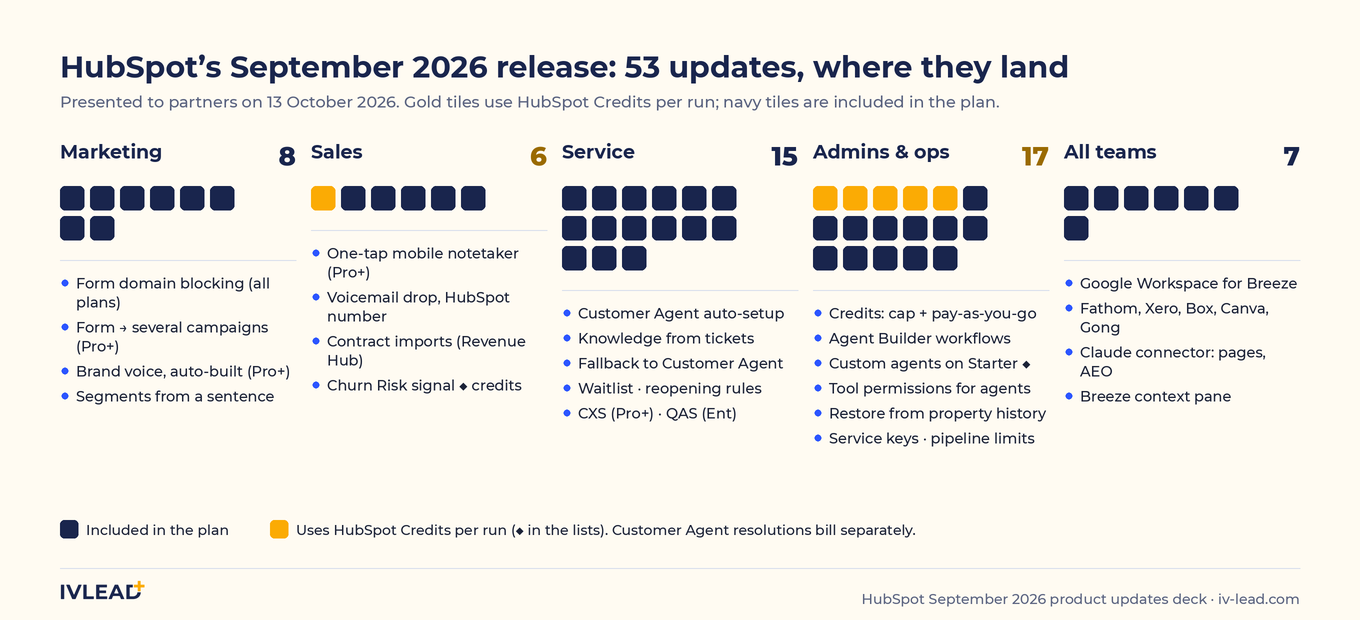
The 60-second version
Ten updates we would act on, in the order we would act on them. The rest of the release is covered further down, and HubSpot's complete list is on its September 2026 product updates page.
| Update | Who it is for | Tier | Credits | The decision it forces |
|---|---|---|---|---|
| Spend cap and pay-as-you-go default for credits | Finance, admins | Starter+ | Governs them | Who owns the credits tab, and what the monthly ceiling is |
| Tool permissions for AI agents | Admins | All plans | No | Which write actions an agent may take without a human |
| Agent Builder workflows, custom agents on Starter | RevOps, ops | Starter+ (workflows Pro+) | Yes | Which one process gets an agent step first |
| Customer Agent auto-setup, knowledge from tickets, fallback routing | Support | Pro+ (fallback: all plans) | Per resolution | Which channel the agent covers, and the hours it covers alone |
| Restore data from property history | Admins | All plans | No | Who holds Super Admin, since only they can run a restore |
| Account service keys | Integrations | All plans | No | Which integrations move off private apps, and when keys get rotated |
| Unified pipeline limits | Admins | All plans | No | Whether a ticket pipeline replaces a spreadsheet you run outside Service Hub |
| Ticket reopening rules, omnichannel waitlist | Support | Service Hub Pro+ | No | How many days a closed ticket stays reopenable |
| Global email domain blocking for forms | Marketing | All plans | No | Whether free-mail domains are blocked at all (check your own submissions first) |
| New capabilities for the Claude connector | Marketing, RevOps | All plans (AEO tools: Marketing Hub Pro+) | No | Whether page publishing from Claude is allowed, and by whom |
Should you build an agent or a workflow now that Agent Builder is live?
Both, and the release finally makes the split clear. A workflow is for a decision you can write down as a rule. An agent is for a decision that needs something read first: a free-text form field, a support thread, a note from a call. Until now, the reading part either waited for a person or got forced into a rule, and a rule that reads free text is only as good as the field it reads.
Agent Builder workflows are live
Agent Builder now combines triggers, actions and custom agents on one canvas. An automation can start from a schedule, a webhook, a third-party event or a CRM record, hand one decision to an agent, and resume once the agent returns a result. Eligible legacy workflows show a Convert to new builder button. Workflows on the new canvas need Professional or Enterprise of Sales, Service, Marketing, Data Hub or Smart CRM.
Custom agents reach Starter
Custom agents in Agent Builder are now available on Starter plans for Marketing, Sales, Service, Data and Content Hub; Smart CRM and Revenue Hub still need Professional or Enterprise. Starter accounts run their agents from simple automations rather than the workflow builder. Two controls ship with it and both matter: a monthly run limit per agent, which stops the agent at the count you set, and a test mode that simulates a run without consuming credits and shows the estimated credits per run. You can also call an agent by name from Breeze Assistant, which shows the estimated credit cost before it runs.
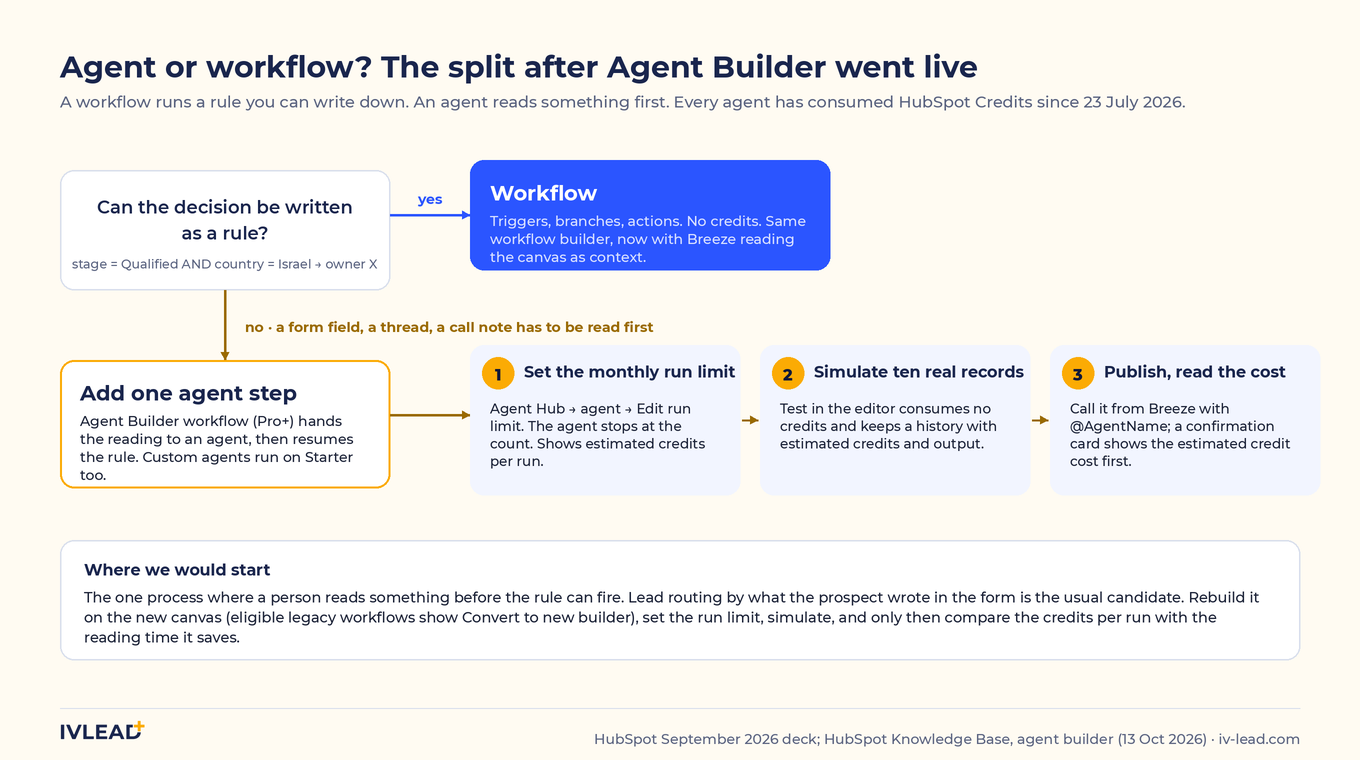
Our take. Since 23 July every HubSpot agent consumes credits, so an agent step is a line item, not a feature toggle. Pick one process where a person currently reads something before the rule can fire. Lead routing by what the prospect wrote in the form is the usual candidate. Rebuild that one on the new canvas, set the run limit before you publish, and run the simulation on ten real records. Then look at the estimated credits per run and decide whether the saved reading time is worth the meter.
What changed in how HubSpot Credits are spent on 16 September?
Three things, and the date matters because it sets a different default for accounts on either side of it.
First, when you buy additional credits for the first time, HubSpot now sets an account-level spend cap automatically, by default 50% above your total monthly credits: an account with 8,000 monthly credits gets a 12,000 ceiling. Second, credits bought on or after 16 September 2026 default to pay-as-you-go for usage beyond the monthly allowance, billed monthly in arrears at $0.010 per credit in increments of ten. Credits bought before that date keep auto-upgrade as the default. A default is only a starting point: an admin may have changed it since, so read the current overage setting and the maximum monthly credits in the HubSpot Credits tab; the purchase date only tells you where it started. Third, you can now set monthly limits per feature from the same tab, and per action inside Buyer Intent.
One rule did not change and is the one most teams get wrong: if you have never bought extra credits, usage-based features pause when the included credits are used up, and stay paused until the next reset date or until additional credits are bought. They do not bill. We wrote up the full behaviour in HubSpot credits don't run out into a bill, and the numbers behind a typical team are in the HubSpot pricing calculator. A new playground also runs Data Agent against live CRM records at no credit cost, so you can see what it would do before it costs anything.
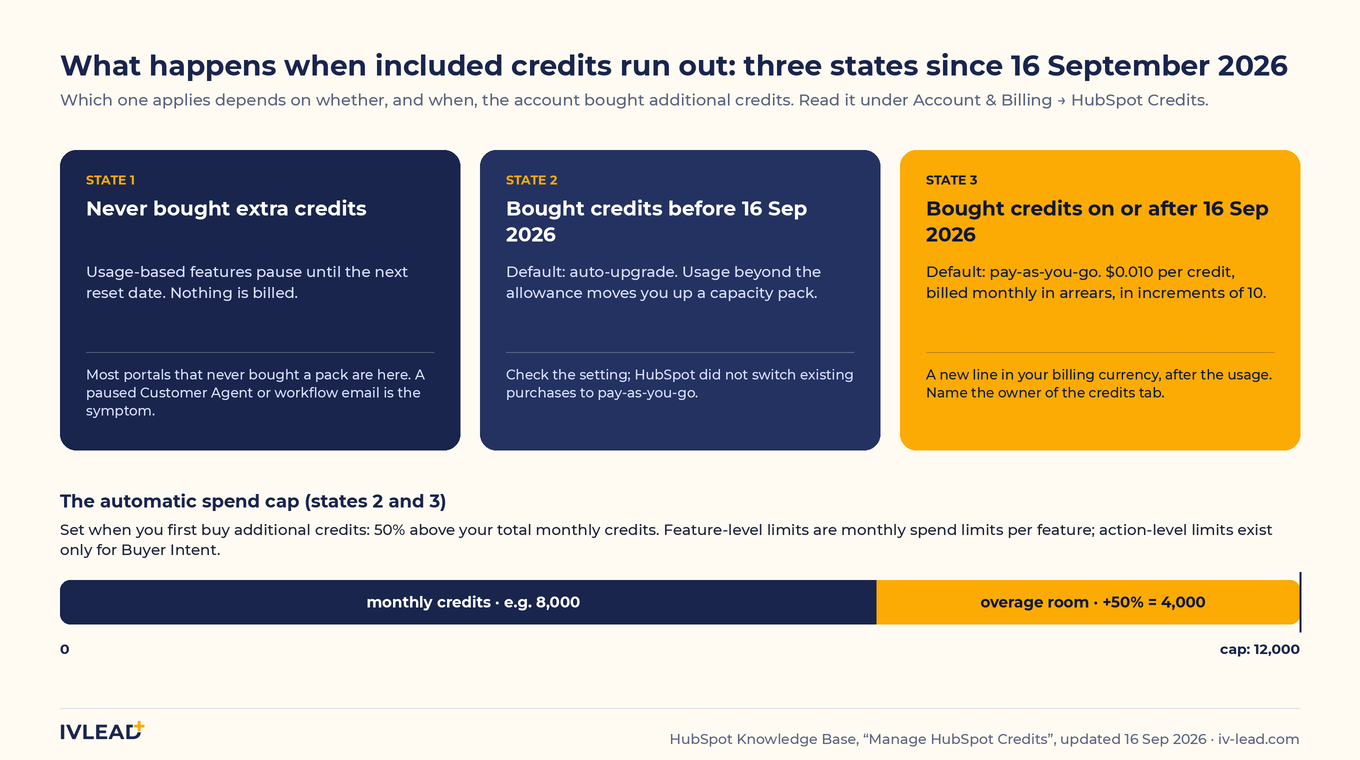
Our take. If your finance team budgets HubSpot as one annual invoice in shekels, a pay-as-you-go meter billed monthly in arrears is a new line, in your HubSpot billing currency, not shekels, and it arrives after the usage. Decide who owns the HubSpot Credits tab this week, write down the ceiling, and set a feature-level limit on the one or two features you actually run. The setting takes five minutes. Explaining an unplanned overage to a CFO takes longer.
Who decides what your AI agents are allowed to touch?
In the same release that lets the Claude connector publish pages to your website, HubSpot gave admins tool-level permissions for the agents that run inside HubSpot. They are two separate controls, and a portal needs both set.
Tool permissions for AI agents
Inside HubSpot, admins can now set tool-by-tool permissions for each connector used by agents and Breeze Assistant. Write tools can be blocked with one click, which keeps an agent read-only where you need it, and permissions can be batch-set to require confirmation, always allow or never allow. This is available on every plan, and the list of connectors it governs grew this month: Google Drive, Calendar, Chat and Gmail, plus Fathom, Xero, Box, Canva, Gong and Slack, each needing admin approval to install. Breeze also gained a context pane that shows which CRM records, memories and brand details it used while answering. None of this governs what an outside assistant such as Claude may do inside HubSpot.
New capabilities for the Claude connector
The HubSpot connector for Claude can now retrieve buyer intent signals, AEO performance and any saved report; create, edit, publish and unpublish website pages; and set up pipelines, stages and custom properties from a conversation. AEO tools require Marketing Hub Professional or Enterprise. The controls for this connector sit elsewhere: a Super Admin approves which data permissions it gets and who may install it, each user only sees what their own HubSpot permissions allow, and HubSpot recommends setting the connector's write tools to Needs Approval in Claude so every edit is confirmed before it lands. That setting governs the Claude connector; another assistant built on HubSpot's MCP server has its own approval controls, so check each one you connect. Reconnecting picks up scopes an admin has already approved; it does not grant anything on its own. We showed the connector in practice in our HubSpot CRM + Claude live demo.
Our take. Make two lists. One of every connector HubSpot's agents and Breeze can use, with write tools set to require confirmation for thirty days and then allowed by exception, one tool at a time, with the person who asked for it named in the change. One of every outside assistant connected to the portal, Claude included, with write tools on Needs Approval and the approved scopes reviewed by the Super Admin who granted them. The context pane is the audit trail for the read side: when Breeze gives an answer that looks wrong, the pane tells you which record it believed.
Can Customer Agent now run a help desk, not just answer first questions?
This is the largest group in the release, fifteen service updates, and together they close the gaps that kept Customer Agent on the edge of a support operation.
Setup and knowledge from your own conversations
Customer Agent auto-setup builds the agent's identity, tone, knowledge and handoff rules from your Help Desk and Inbox history, tests it, and ends with a deployment recommendation per channel: coverage, after-hours traffic, estimated resolutions, hours saved and cost, before you switch anything on. Customer Agent can also cluster your resolved tickets by topic and draft a short answer for each; you accept, edit or decline each one, personal data is scrubbed automatically, and approved items go live immediately. Both are Professional and above.
Routing: fallback, waitlist and workflows
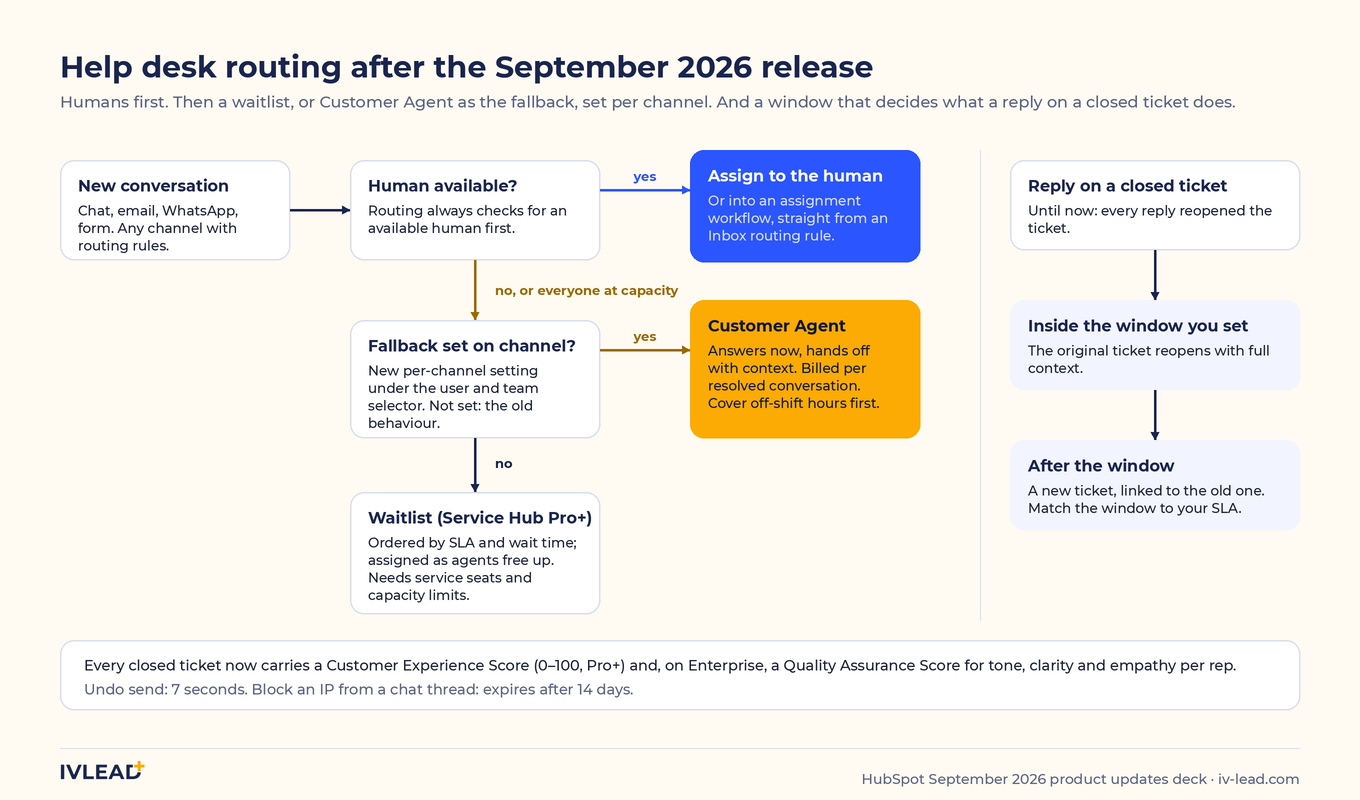
When no human agent is available, or everyone is at capacity, conversations can now be assigned to Customer Agent instead of sitting unassigned. The fallback is set per channel, routing checks for an available human first, and it is available on all plans. For teams that keep humans first, Help Desk now holds new tickets in a Waitlist view when every agent is at capacity, prioritised by SLA and wait time, with wait limits, hold messages and callbacks; it needs service seats and ticket capacity limits. Inbox routing rules can also enrol a conversation into a workflow instead of a fixed agent or team.
Rules for reopened tickets
Admins set a time window that decides what a reply on a closed ticket does. Inside the window, the original ticket reopens with its context. After it, HubSpot creates a new ticket, linked to the old one. Until now every reply reopened the ticket, which is how a March issue ends up carrying an October conversation.
Two scores for every closed ticket
A Customer Experience Score from 0 to 100 is now calculated by AI for each closed ticket, with a short explanation of the signals behind it, and reported in Help Desk Coaching, Analyze and Summary. It covers the tickets that a survey never reaches. On Enterprise, a Quality Assurance Score rates tone, clarity and empathy per ticket and per rep, and managers can review and add feedback in Help Desk Coaching. Both are switched on under Help Desk settings > AI tools, and the Quality Assurance Score requires Customer Agent.
Smaller: undo send in Inbox and Help Desk (seven seconds), IP blocking from a live chat thread, and a redesigned Guidelines page with several named guidelines per category; assigning them to audience segments is in private beta.
Our take. Customer Agent is billed per resolved conversation, so every routing change above is also a spend decision. If your support team works Sunday to Thursday and serves customers abroad, the fallback setting has a specific first use: the Friday afternoon and Saturday hours when nobody is on shift. Cover those hours with the agent before you cover the whole week. Run auto-setup on one low-traffic channel, read every generated answer before you accept it (in Hebrew, check the terms against your own glossary), set the reopening window to match your SLA, and only then turn fallback on.
Which admin updates fix a problem you already have?
Restore data from property history
The redesigned property history table has a Restore all from this source action on any CRM edit, import or workflow row. A preview shows the scope before you confirm, read-only properties are excluded, and it needs Super Admin. Anyone who has unwound a bad import record by record knows what this is worth. It also makes the Super Admin list a real question: that permission is now the undo button.
Pipeline limits are unified
One shared pipeline limit now covers all object types, and every hub can create deal and ticket pipelines without a specific hub subscription: 15 on Starter, 100 on Professional and 350 on Enterprise on seat-based plans, excluding each object's default pipeline (350 on both Professional and Enterprise under the Flexible Seats and Credits pricing that applies to net-new EMEA business since 1 October). For a Marketing Hub-only portal this means an onboarding or request pipeline on tickets without buying Service Hub.
Account service keys replace private apps for system integrations
Service keys are scoped API credentials for connecting HubSpot to tools like Tableau, Power BI and data warehouses, created under Settings > Integrations > Service Keys with only the permissions each integration needs. They do not leave with an employee, every request is logged, and a key rotates with a seven-day grace period. Creating one needs the Developer tools access permission or a Developer Seat. For the ERP integrations we build, the Priority and SAP Business One integrations included, this is the credential we expect to standardise on. The timing is not optional: HubSpot stopped new legacy private apps in existing accounts on 26 October 2026 (new accounts on 28 September). The ones you have keep working for now, but HubSpot's timeline says legacy private apps must move to Projects-based apps by September 2027. The next integration gets a service key or a developer-platform app; the existing ones go on a migration list.
Global email domain blocking for forms
Admins can block up to 1,000 domains from every form at once under Settings > Marketing > Forms > Submission Settings. Blocked submissions are not processed, create no record and trigger no workflow. A caution before you block free-mail providers portal-wide: check your own submissions first. If a meaningful share of your real enquiries arrive from Gmail or Outlook.com addresses, a global block removes buyers along with the noise. Block the specific spam domains you can see in your submissions, and keep free-mail blocking per form, for the gated assets where it earns its keep.
Also in this group: dashboards can cache loaded data for five minutes to seven days, with a Last updated stamp and a Refresh button (off by default; turn it on for the dashboard twelve people open on Monday morning, not the one a sales manager works from); custom events from a webhook or API can use No Object as their type, so an ERP or billing event with no CRM record yet can still trigger automation; and calculation properties can output dropdown values (Professional+), which replaces the one-workflow-per-condition setups many portals run for tiering and scoring bands. Number porting added six countries; Israel is not one of them.
Integration watchlist
Three items from the release notes that matter if anything writes to your portal from outside.
- The contact property
hs_customer_agent_lead_statusis read-only for everyone except Customer Agent, enforced since 13 July 2026 and restated in the September notes. Any workflow, Make scenario or API payload that writes to it fails with an error; move the write to a custom property. - HubSpot's developer platform now ships on a March and September schedule, with date-versioned APIs supported for 18 months. Legacy API versions and legacy apps begin to sunset in March and September 2027.
- New public APIs for sequences, sales templates, payment links and conversation recaps shipped this month, which opens routes that used to need a workaround.
What's new for sellers and marketers this month?
The sales and marketing updates are smaller this month and mostly about speed.
- One-tap mobile notetaker (Sales and Service Hub Professional+). Tap the microphone on the mobile home screen to record an in-person meeting or a voice note, offline if needed, then review the summary and accept or reject suggested CRM updates. Notetaker with Smart Deal Progression also reaches Starter, where it suggests CRM updates from the transcript and deal context.
- Breeze drafts emails on mobile (all plans), and manual voicemail drops (Professional+) let a rep drop a pre-recorded message after the beep in two clicks. Voicemail drops need a HubSpot-provided number, so check availability for your country first.
- Churn Risk in Buyer Intent (all plans, uses credits). A signal that reads your logged conversations and flags at-risk accounts on the company timeline, with the conversations that triggered it cited. It works from what is logged in HubSpot, so a team that runs its customer conversations on WhatsApp without connecting WhatsApp to the CRM will get very little from it.
- Forms, segments, brand voice. A form can now sit in several campaigns at once (Marketing Hub Professional+). Breeze builds segment filters from a plain-language description of the audience, on all hubs and tiers. HubSpot generates a baseline brand voice from your existing content (Professional+ across several hubs); uploaded guidelines still override it.
- Ads. An ad account health pill in the Manage tab gathers disconnections, tracking issues and lead-sync failures in one place with fix links, TikTok Smart+ Traffic ads can be created from HubSpot, and Microsoft Ads now reports next to your other channels (we covered the three checks before you spend earlier this month).
- AI Growth Bundle. For new HubSpot customers only: Starter seats at 65% off on annual billing, plus buy-one-get-one ChatGPT Business seats. It is a promotion, so confirm the terms on the day you read this.
What should an Israeli B2B team do with this release?
- Open the HubSpot Credits tab and read which state you are in. Pause, auto-upgrade or pay-as-you-go. Name an owner, write the ceiling down, and add a feature-level limit on the features you run.
- Set every write tool to ask first. Inside HubSpot: connectors used by agents and Breeze on require confirmation for thirty days, then allow by exception. Outside: the Claude connector on Needs Approval, scopes reviewed by the Super Admin who approved them.
- Rebuild one workflow with an agent step. The one where a person reads something before the rule can fire. Run limit first, simulation second, publish third.
- Give support the hours nobody covers. Auto-setup on one channel, review the generated knowledge, set the reopening window, then enable fallback for those hours only.
- Three admin settings, one afternoon. Dashboard caching on the heaviest dashboard, a service key for your main integration, and a domain block list built from the spam you actually receive, not from a list of free-mail providers.
Frequently asked questions
Is Agent Builder available on HubSpot Starter?
Custom agents are, as of the September 2026 release, for Marketing, Sales, Service, Data and Content Hub Starter. They use HubSpot Credits, and Starter runs them from simple automations rather than the full workflow builder. Agent Builder workflows on the new canvas need Professional or Enterprise, and custom agents for Smart CRM and Revenue Hub do too.
What happens when my HubSpot Credits run out after 16 September 2026?
If you have never bought additional credits, usage-based features pause until your next reset date or until you buy more. If you bought additional credits on or after 16 September 2026, the default is pay-as-you-go, billed monthly in arrears at $0.010 per credit under an automatic spend cap 50% above your monthly credits; credits bought before that date default to auto-upgrade. These are defaults an admin may have changed, so read the current setting and maximum in the HubSpot Credits tab under Account & Billing.
Should I replace my private app with a service key?
For a new system-to-system integration that only makes REST API requests, such as a BI tool, a data warehouse or an ERP sync, a service key is the credential to start with. For an existing private app, inventory first: which endpoints and scopes it uses, whether it relies on webhooks or UI extensions (those still need an app), and whether the vendor on the other side supports the change. Since 26 October 2026 existing accounts can no longer create new legacy private apps; the ones already built keep working until the September 2027 migration deadline. Service keys are scoped per object, do not leave with an employee, are logged, and rotate with a seven-day grace period.
Does Customer Agent work in Hebrew?
It answers in the language the visitor writes in, and knowledge generated from Hebrew tickets comes out in Hebrew. The thing to check is terminology: review the generated answers against the terms your team uses before you accept them, because a fluent draft and a correct one are not the same thing.
Which September updates use HubSpot Credits?
Custom agents in Agent Builder and the agent recommendations in Agent Hub, calling an agent from Breeze, Churn Risk in Buyer Intent, and Customer Agent resolutions. The Data Agent playground is free. Tool permissions, property history restore, service keys, pipeline limits, dashboard caching and the form domain block list do not use credits.
Want to know which of these updates fits your HubSpot setup?
IV-Lead helps teams check configuration, data structure and operating process before adding new automation or AI workflows. If you want a read on which of these updates is worth pursuing in your portal, book a 30-minute HubSpot portal review with us.
Sources: HubSpot September 2026 Product Updates deck, EMEA partner product session, 13 October 2026; HubSpot Community, "September 2026 Product Updates" (release notes); HubSpot Knowledge Base, "Manage HubSpot Credits" (updated 16 September 2026), "Set up and manage object pipelines" (updated 29 September 2026), "Create and customize agents in the agent builder" (updated 13 October 2026), "Test and control agent credit usage" (updated 29 September 2026), "Set up and use the HubSpot connector for Claude" (updated 19 October 2026); HubSpot developer documentation, "Make API requests using a service key"; HubSpot developer changelog, "Legacy APIs and legacy apps: what's going unsupported and when" (15 September 2026) and the hs_customer_agent_lead_status notice (effective 13 July 2026). Read on 27 October 2026.