
May brings a clear theme at HubSpot: They are closing the gap between what teams plan and what their CRM actually executes. From measuring brand visibility inside ChatGPT and Gemini, to workflows that generate quotes, contracts, and follow-up emails automatically, this month’s updates are about turning manual handoffs into native automation.

There’s also a strong AI layer running through the release. Breeze Assistant arrives in Slack, the Customer Agent learns to switch languages mid-conversation, and the HubSpot MCP server is officially generally available - unlocking real read and write CRM access for any compatible AI tool.
Below we’ve picked the updates we believe will matter most across marketing, sales, service, and operations, and unpacked what each one means in practice.
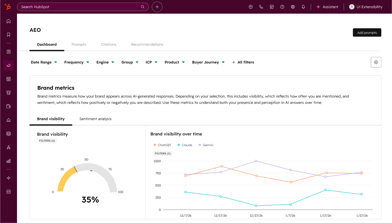
Answer Engine Optimization (AEO)
Utilize HubSpot's content tools to measure and improve your brand's visibility in AI-powered search engines such as ChatGPT, Perplexity, and Gemini.
- Track your brand's visibility across multiple answer engines and how it changes over time.
- Personalized content recommendations based on prompt data, with links to take action in HubSpot.
- In addition to industries and competitors, HubSpot auto-suggests prompts based on your CRM data.

Reddit in HubSpot Social
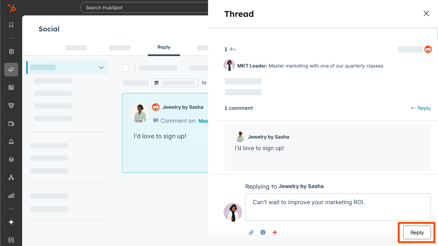
Publish, track, and monitor Reddit content directly in HubSpot Social alongside your other channels.
- Publish posts to subreddits, schedule them, and reply to comments from the same place you manage other social channels.
- Monitor brand sentiment, competitor mentions, and share of voice using the new Insights tab in Marketing > Social.
- Monitor post performance, including comments and scores, and review engagement-tagged posts.

Video Editor for Marketing Hub
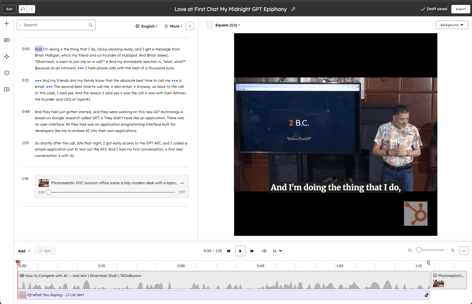
Marketing Hub Professional and Enterprise customers now have access to HubSpot's video editor within the social composer.
- Trim videos, add text and image overlays, apply branded backgrounds, and export entirely in HubSpot.
- When connected to a TikTok account, you can add trending TikTok audio tracks directly to the editor.
- Using the Breeze icon, you can use AI tools such as voice isolation and multilingual caption translation.
HubSpot Connector for Claude: Campaigns and Team Context
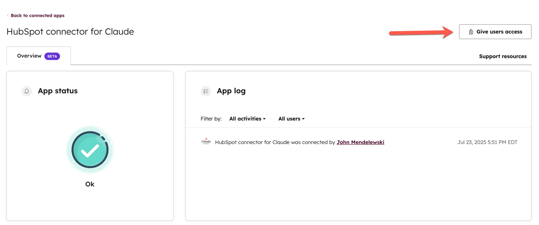
The HubSpot connector for Claude now includes marketing campaign data and team context so you can ask questions about performance and org structure directly in Claude.
- Use Claude's plain-language questions to access campaign metrics and published content.
- Get information about team memberships and reporting structures, including user roles and seat assignments.
- Your existing HubSpot user permissions are respected for all data access.

Multi-campaign reporting
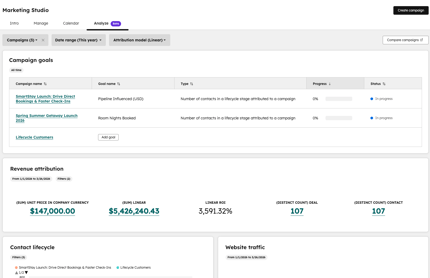
With no need for custom dashboards or spreadsheet exports, you can view influenced contact, attribution, and asset data across multiple campaigns in aggregate.
- Select campaigns via bulk actions, folders, or the campaign filter in the Analyze tab to see combined performance data.
- Use folders to create parent/child campaign structures and analyze an entire folder's campaigns in one view.
- Share a filtered multi-campaign view via URL with teammates so they can see the same data.
Automate Workflows with Campaign Data
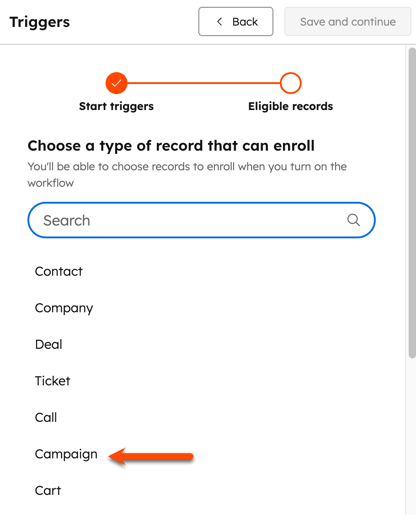
Automated responses to campaign activity now replace manual monitoring with workflow triggers and criteria based on campaign properties and events.
- Assign enrollment criteria based on campaign properties such as budget, spend, revenue, owner, and date range.
- A new Influenced Contact event fires when a contact is touched by a specific campaign, enabling automated follow-up.
- Use Breeze Assistant to create campaign-based workflows directly.
Prospecting Agent now available in Sales Hub Starter
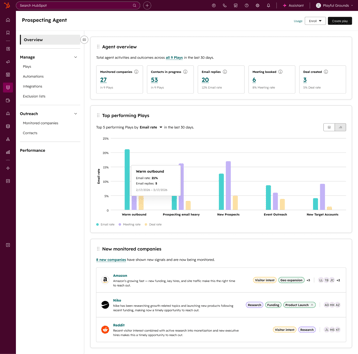
For 28 days, Sales Hub Starter customers can try Prospecting Agent free - with full access to buying signals, contact sourcing, and personalized outreach.
- You can begin your trial by publishing your first Play without any credits required.
- Identify companies with buying signals, source contacts, and send them personalized emails and calls.
- After the trial, Plays pause automatically. The starter plan includes 500 credits per month at 100 credits per recommendation.

Prospecting Agent: Buying Signals and Contact Sourcing
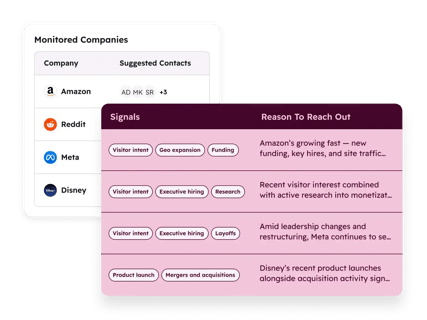
A new feature of Prospecting Agent replaces manual account list building with automatic identification of companies showing buying signals.
- Automatically source contacts from your CRM or connected providers when companies match certain signals like growth, hiring, or funding.
- Using signal-triggered company matches, create and enroll contacts in personalized email and phone tasks.
- Eligible customers get 28-day free access to test signal-powered prospecting before credits are required.

Deal Context in Gmail Extension
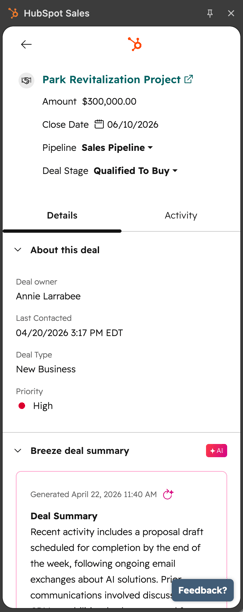
The HubSpot Gmail extension now allows sales reps to see key deal details such as Breeze summaries, recent activity, and associated records.
- Within Gmail, you can access deal properties, Breeze deal summaries, recent activities, and associated contacts, companies, and tasks.
- Edit deal properties inline while reading an email, keeping CRM data current without leaving your inbox.
- Configure which properties appear in the deal sidebar from HubSpot settings.

Manage Renewals and Changes with HubSpot Contracts
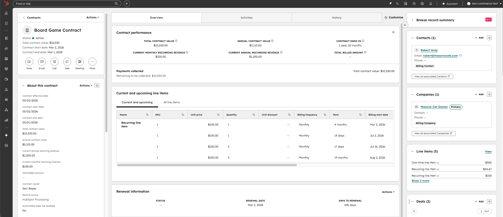
Manage contracts from first deal through every renewal in HubSpot, with automatic generation from accepted quotes and full tracking of mid-term changes.
- HubSpot automatically generates a contract when a buyer accepts a Commerce Hub quote.
- Manage mid-term upgrades, downgrades, and pricing adjustments through change quotes.
- You can import existing contracts via CSV to centralize your full contract history without having to enter them manually.

Writing Guidelines for Quote Templates
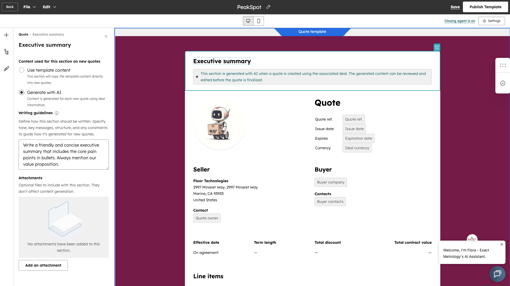
Admins can now add section-level writing instructions to quote templates to ensure Breeze generates consistent, on-brand content.
- Include instructions in any quote template section indicating what should be included, what should be avoided, and what tone should be used.
- When a quote is generated based on that template, Breeze applies your guidelines automatically.
- Reps can still refine AI-generated content while built-in guidance keeps every quote on-brand.

Cleanup Automation for Tickets
With the account cleanup tool, you can automatically remove outdated tickets, keeping your pipeline free of stale records.
- Set criteria such as time since last update to define which tickets are eligible, then enable automation.
- A ticket that meets your criteria will be removed immediately, and a ticket that meets your criteria will be removed every month on the first.
- Within 90 days, deleted tickets can be recovered from the recycle bin.

WhatsApp Home
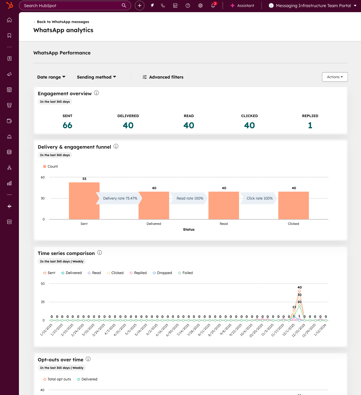
HubSpot now offers a dedicated WhatsApp Home for teams to manage messaging, templates, and performance tracking.
- You can filter WhatsApp message templates by message type, team, account, and status.
- A new reporting suite lets you track delivery, engagement, clicks, opt-outs, and messaging errors.
- In the left-hand panel, you can access WhatsApp Home.

Smarter Ticket Capacity Limits That Reflect Active Work
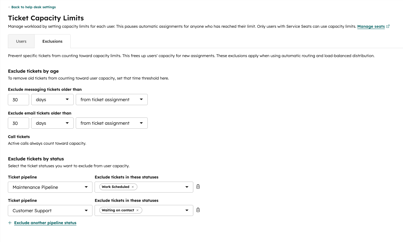
Ticket capacity limits now reflect what agents are currently working on, not just total open tickets, resulting in more accurate routing and more equitable workload distribution.
- With Help Desk Settings, you can specify which ticket stages or ages count toward capacity.
- Inactive tickets are less likely to block new tickets now that routing rules and skill-based assignment use updated capacity definitions.
- Agents can see real-time capacity status in their availability menu.

Create Calculation Properties using Breeze
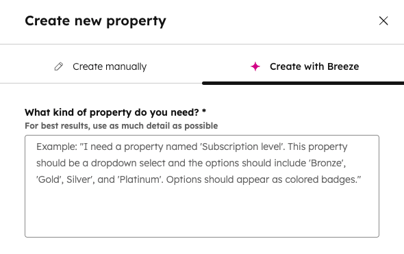
By describing a calculated property in plain language, Breeze generates the formula, removing the need to build complex expressions manually.
- You can review a formula Breeze proposes before saving it after you describe what you want to calculate.
- Provides custom equations and time-based formulas including Time since, Time until, and Time between.
- Review and edit the proposed formula before creating the property.
Duplicate Similarity Score
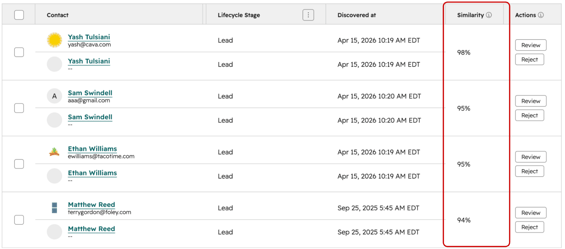
Duplicate management now provides admins with a similarity score for each potential duplicate, giving them insight into why records were flagged.
- Based on HubSpot's default detection model, a similarity score column appears in the duplicate management table.
- To find the highest-confidence matches first, filter the table to show only duplicates above a threshold.
- By default, duplicate contacts above 30% and companies above 80% are surfaced.

Multiple Stored Payment Methods
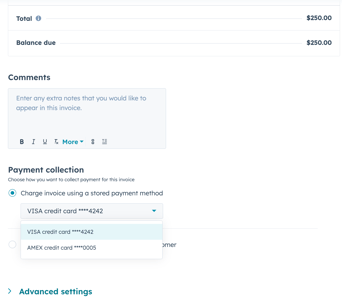
Multiple payment methods can now be stored in HubSpot, allowing you to choose the right card or ACH account for each invoice or subscription.
- In the Invoices or Subscriptions editors, you can select from all payment methods stored on a contact.
- The most recently added payment method is set as the default automatically.
- No migration is required. It is possible to add additional payment methods to existing contacts as needed.

Create Report with AI
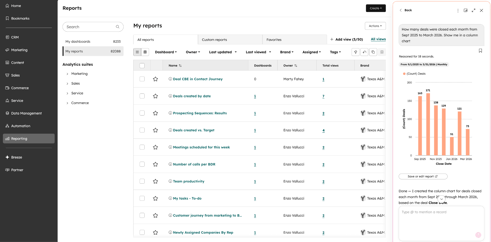
Reports can be created by chatting with Breeze Assistant directly from the Reporting page, replacing the previous AI report option.
- Create single or multi-object reports using natural language by selecting 'Create report with AI' on the Reporting page.
- The appropriate report builder can be used to open and save any report generated in Breeze Assistant.
Workflow CRM Property Data Restore
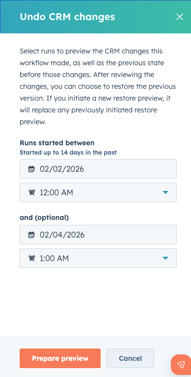
You can now preview and restore property changes from the past 14 days with HubSpot, regardless of whether they were made manually or by a workflow, saving hours of manual data cleanup.
- Changes can be filtered by source, property type, and date, followed by a preview so that you know exactly what will be restored.
- Restore targets only the property changes made by a specific workflow without undoing other recent work.
- Except for initial enrollment triggers, restored records will not re-enroll in workflows or lists.
Billing Cards on Contact and Company Records
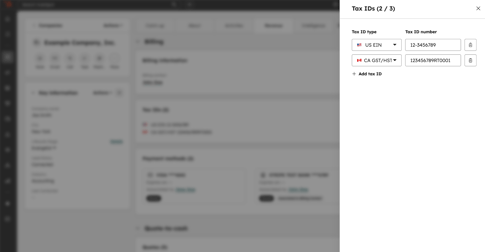
Revenue tab cards now display payment methods, tax IDs, and billing contacts directly on records.
- You can view all payment methods on any contact or company record; company records also show the designated billing contact.
- Utilize the Tax ID card to manage a company's tax identifiers, with commerce documents automatically populating the values.
- Company records show all three cards; contact records show the payment methods card as well.
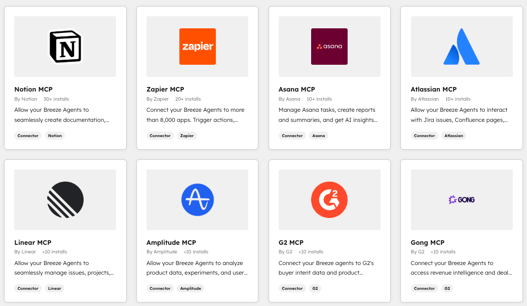
Connect Breeze Agents with G2, Linear, Gong and Amplitude
The Breeze Agent now supports MCP server connections for G2, Linear, Gong, and Amplitude, so your agents can read context and act on it.
- Connect G2 for competitive intelligence, Gong for customer conversations, and Amplitude for product analytics.
- With Linear, you can create, update, assign, and manage issues, projects, and sprints without leaving HubSpot.
- Under the MCP Servers tab of the Breeze Agent configuration, authenticate using OAuth.

Breeze Assistant in Slack
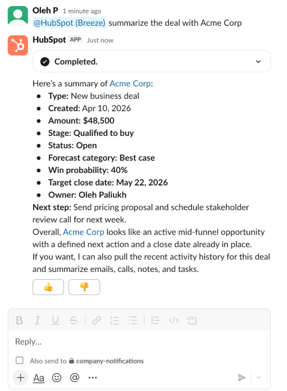
Using @-mention, Breeze Assistant allows you to query CRM data, summarize conversations, and create tasks without leaving Slack.
- With Slack threads, you can ask plain-language questions about CRM records, get instant deal summaries, and surface meeting context.
- With a simple @-mention, you can add tasks or notes to HubSpot from any Slack conversation.
- Channels are kept free of unnecessary notifications when Breeze responds only when explicitly invoked.
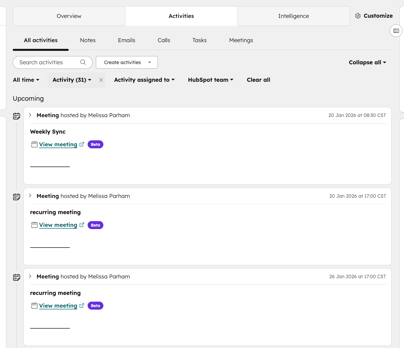
Sync Recurring Meetings to HubSpot
Your connected calendar now automatically syncs recurring meetings to HubSpot, giving you full CRM context for each instance.
- Up to a year in advance, HubSpot syncs the next 5 events in each recurring series and continues to add future events.
- Meetings that are scheduled on a recurring basis appear on CRM records, Meetings' index page, as well as the Schedule tab in Sales Workspace and Customer Success.
- No action needed if your calendar is already synced; existing series can be manually triggered with a single calendar edit.