Getting started with HubSpot CRM goes well when you settle four things before touching a setting: which outcomes the system must produce, what each lifecycle and deal stage means, who owns each record, and what HubSpot is the source of truth for, as opposed to the ERP. Then configure foundations, the data model, a small test import, the pipeline, and automation last. Skipping the decisions is what produces reports nobody trusts.
Key takeaways
- Name the two or three reports leadership needs on day 30, then define the properties and stages that feed them as facts someone can check.
- Import a test batch first, check associations and dates, then load the rest. Bring over history only where its dates and owners can be trusted.
- Keep the first quarter narrow: standard objects, one pipeline per genuinely different sales process, and a few automations your subscription actually includes.
- Decide what stays outside HubSpot. Orders and invoices usually belong in the ERP, with HubSpot reading from it.
What should you decide before you configure anything?
Four decisions, written down and signed off by sales, marketing and whoever runs the ERP, settle most setup arguments in advance.
Outcomes. Name the two or three things the system must produce within 90 days. Typical answers for a B2B team: every inbound lead gets a first response within one business day, the weekly pipeline review runs off one dashboard, and marketing can see which sources produce closed-won deals.
Definitions. Agree what a lead, a qualified lead and an opportunity mean in terms of events that happened. "Requested pricing" can be checked; "seems interested" cannot, and reports built on impressions disagree because the people entering them disagree.
Ownership. Decide who owns a contact, a company and a deal, and what happens to ownership when a deal closes or a rep leaves. Unowned records are the ones nobody follows up and nobody cleans.
Boundaries. Decide what HubSpot is the source of truth for. For most B2B companies HubSpot is where selling and marketing happen, and the ERP holds orders, invoices and credit terms. Without that line, reps start keying invoice data into deal properties and finance stops trusting both systems.
Before designing, check your subscription. The free CRM gives you one deal pipeline and no workflows. A second pipeline needs Starter or above. Workflows, and the action that rotates new leads between reps, need a Professional subscription. The duplicate management tool also needs Professional. Where your edition lacks a feature, plan a saved view with a named owner instead.
When is it the wrong time to set up HubSpot CRM?
Three situations justify a pause. The sales process is contested, with two managers describing different stages for the same deals, so any pipeline you build becomes the argument. The ERP or billing system is mid-migration, so customer ID mapping will need redoing. Or nobody inside the company will own HubSpot after launch, and an unowned CRM decays however well it was built.
In each case, start with what does not depend on the open question (users, domain, tracking, a clean contact import) and leave pipelines, lifecycle automation and integrations until it is settled.
What order should the setup follow?
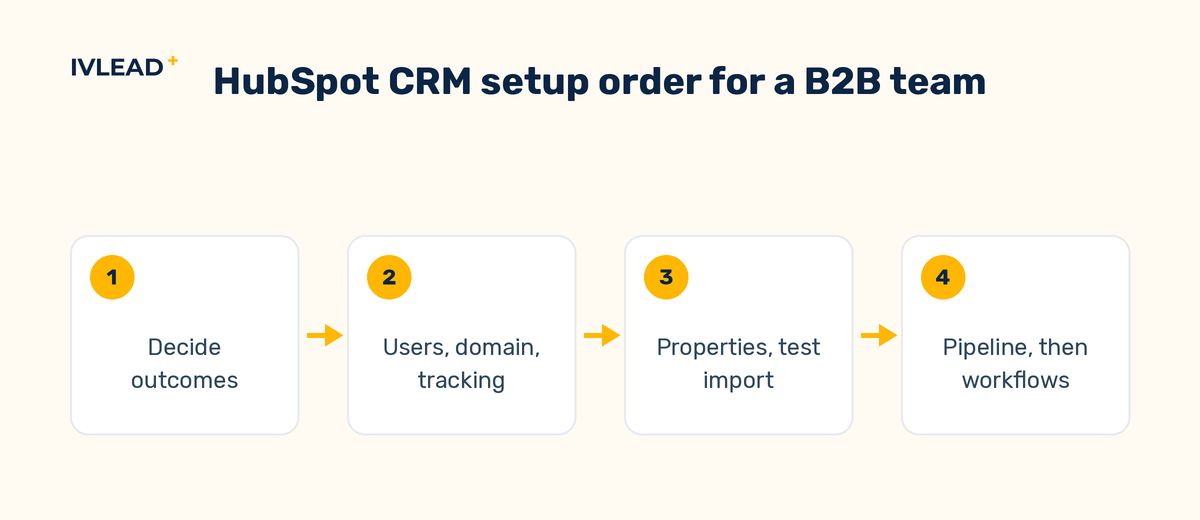
Foundations first
Add users and assign permissions before go-live, because permissions also decide what each person's reports and any AI feature can see. Connect the sending domain and set up SPF, DKIM and DMARC records with your DNS provider before any email leaves the system, because mailbox providers treat unauthenticated mail as suspect. Install website tracking and connect ad accounts early, because tracking only records visits after the code is installed.
Then the data model
Stay with the standard objects for contacts, companies, deals and tickets in the first quarter. Add custom properties only where a report or an automation will read them, and give every dropdown a fixed value list. A free-text "Industry" field produces nine spellings of the same industry and a report with nine bars. Decide now which property carries the ERP customer identifier, because every later integration keys on that one field.
Then a test import
Export from the old system, map every column to a property, and drop the columns nobody can explain. Import a small batch, open a dozen records and check what fails silently: contacts attached to the right companies, close dates that survived the date format, phone numbers with their country code, owners mapped to real users. Load the rest in increments only when the test batch passes.
Then inboxes, calendars and templates
Connect each rep's inbox and calendar so emails and meetings log against the right contact, add personal meeting links, and save templates for the answers reps write every week. Response-time and activity reports count only what was logged, so this step feeds reporting as well as adoption.
Then the pipeline
Build the deal stages with the reps who will move deals through them. Each stage needs an entry criterion that is a fact (a meeting held, a document attached, a purchase order received), and a pipeline rarely needs more than seven stages, because extra stages become places for deals to hide.
Automation last
Automate the unambiguous work: lifecycle stage changes triggered by events, lead assignment, a task when a deal sits in a stage too long. Check which automation your subscription includes before designing around it; on lower tiers some of these rules become manual views or reminders. Anything that needs judgement waits until the team trusts the basics. Test each workflow on test records first, or in a sandbox if your edition includes one, so the first run does not touch live deals.
Launch by role
Train by role: reps on deals and logging, marketers on lists and forms, managers on their dashboards. Set a go-live date after which the old system is read-only, and have the internal owner answer questions in one channel during the first week, because those early answers decide whether the team trusts the tool.
What does a realistic B2B setup look like?
Take a hypothetical company of around sixty people that makes industrial measurement equipment, selling in Israel and Europe through four direct reps and two distributors, with Priority as the ERP for orders and invoicing. A setup that serves that business could look like this.
Companies. A dropdown Industry with Pharma, Food and beverage, Semiconductor, Research, Other. A dropdown Region with Israel, Western Europe, Eastern Europe. A single-line text property Priority customer ID, filled after the first order and never typed by hand once the integration exists.
Contacts. Lifecycle stages defined as events: Lead when a form is submitted or a card is scanned at a trade fair; Marketing qualified lead when the contact requests pricing or a demo; Sales qualified lead when a discovery meeting has been held; Opportunity when an associated deal is created; Customer when an associated deal closes won. Because the company sells into the EU, it also decides before the import how consent and the lawful basis for processing are recorded for European contacts.
Deal properties. A dropdown Application with Quality control, Process monitoring, Lab research, Other, and a dropdown Lost reason with Price, Timing, Competitor, No decision, Not a fit.
Direct pipeline. Discovery booked (meeting scheduled), Discovery done (meeting held, Application filled in), Scoping done (specification agreed), Proposal sent (quote attached), Negotiation (customer replied with terms), Closed won (purchase order received), Closed lost (Lost reason required).
Distributor pipeline. Registered, Quoted, Closed won (order received from distributor), Closed lost. A second pipeline is justified because the process differs, and forcing distributor deals through discovery and scoping stages would make stage-duration reports meaningless.
Automation. Assign new leads round-robin to the reps covering the company's Region. Set Lifecycle stage to Opportunity when a deal is created and to Customer when it closes won, using the lifecycle stage automation in the contact object settings (Settings > Objects > Contacts > Lifecycle Stage > Automate). Create a task for the deal owner when a deal has been in Proposal sent for more than fourteen days. The rotation and the task need workflows, so this company is on a Professional subscription.
Reports on day 30. Time from lead creation to first logged activity, deals by stage and amount, and closed-won deals by original source and Region. These match the three outcomes from the first decision.
Which trade-offs matter most?
| Decision | Option | What it costs you |
|---|---|---|
| One pipeline or several | Several pipelines fit genuinely different processes | Pipelines created only to segment by product or region duplicate identical stages and split reports; segment with a deal property instead |
| Required properties at stage entry | Required fields guarantee reporting data | Every required field is a reason to leave a deal in the previous stage; require only what a report reads |
| Standard or custom objects | Custom objects model the business precisely | Each one needs its own associations, permissions and reports, which is a lot to maintain before the team has learned the basics |
What goes wrong, and how do you check?
These mistakes produce wrong numbers without any error message, which is why they survive for months. Each has a check you can run from a saved view, a list or a report.
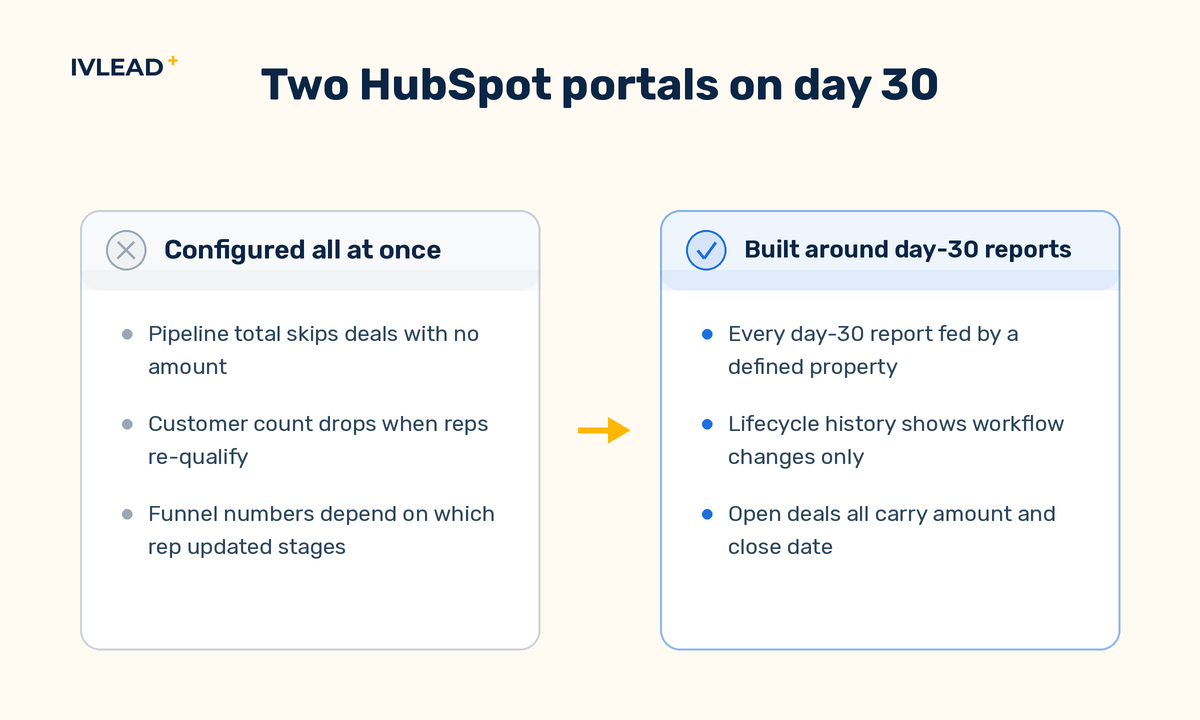
- Contacts without companies. Imports with a blank or inconsistently spelled company column leave contacts unattached, so reports by industry or region miss part of the database. Check: a list of contacts with no associated company, and companies with no contacts.
- Duplicates from email and domain variations. One person imported under two addresses, or one company under two domains, splits deal attribution. Check: sort companies by name after each import batch to spot near-matches, and on Professional use the duplicate management tool.
- Lifecycle stages moved by hand. A rep sets a customer back to lead to re-qualify them, and the customer count drops. Check: open the property history on a sample of customer records and see whether the last lifecycle change came from a workflow or a user.
- Deals without amount or close date. Pipeline totals and forecasts quietly leave them out. Check: a saved view of open deals missing either field, reviewed weekly.
- Stages used as a to-do list. A deal sits in Proposal sent for ninety days because nobody closes it lost. Check: average time in each stage; anything far above your sales cycle is a cleanup list.
Schedule these checks at day 30 and day 90 and give them to the internal owner. When a check fails, fix the configuration rather than the records.
How IV-Lead approaches this
We start from the reports, not the settings. If leadership cannot name the three views they want on day 30, a sensible default is to hold off on the pipeline editor, because every stage and property created would be a guess. Working backwards from reports keeps the first setup small, so reps have fewer required fields and stages to learn before the tool is useful to them.
We treat HubSpot as the system of engagement and the ERP as the system of record for anything invoiced. Priority or a similar ERP already holds the customer number and the order status, and HubSpot should receive those through an integration so reps never retype them.
Hold off on custom objects and extra pipelines in the first quarter unless a process genuinely differs, as in the distributor example, and launch with a few workflows that remove manual work. Plan the day-30 review as the first redesign, because that is when the pipeline changes most.
If your portal already exists and you want a second opinion on what to fix first, you can book a 30-minute portal audit and walk through the setup with us.
Frequently asked questions
How long does it take to get started with HubSpot CRM?
Configuration takes days for a single sales team. Most calendar time goes to agreeing definitions and cleaning the export. A single-team setup often fits inside a month; portals with several teams and an ERP integration take longer, mainly because the integration should wait for clean deal data.
Should we import all our historical data?
Import what you will report on and can trust. Contacts and companies usually come over in full. For deals, bring the open pipeline and a year or two of closed deals with reliable close dates and amounts, because older deals with gaps skew win rates and velocity. Archive the full export.
Should we migrate notes, emails and attachments from the old CRM?
Bring over what a rep will actually open: recent notes and key documents on open deals and active accounts. How activities import depends on the source system, so include some in the test batch and confirm they attach to the right records.
Can we turn on HubSpot's AI features during the initial setup?
HubSpot groups its AI features under the Breeze name, from an assistant that drafts emails and summarizes records to agents that act on their own. The assistant is low risk to enable early. Agents that answer customers or enrich records read the data and permissions you have just set up, so they are only as reliable as those. Agents also use HubSpot credits, so set a budget before you switch one on. Run the day-30 checks first, then pilot one agent with a measurable job.