Ask questions that leave you knowing four things: what the prospect is fixing and what it costs, who decides, whether a budget and a deadline exist, and the agreed next step. The 17 questions below are grouped by those outcomes, followed by how to store the answers as HubSpot deal properties so qualification shows up in the pipeline.
Key takeaways
- Decide the call's exit criteria before choosing questions: problem and cost, decision-maker, budget or deadline, and next step.
- Group the 17 questions by what they uncover and ask only the ones this conversation needs.
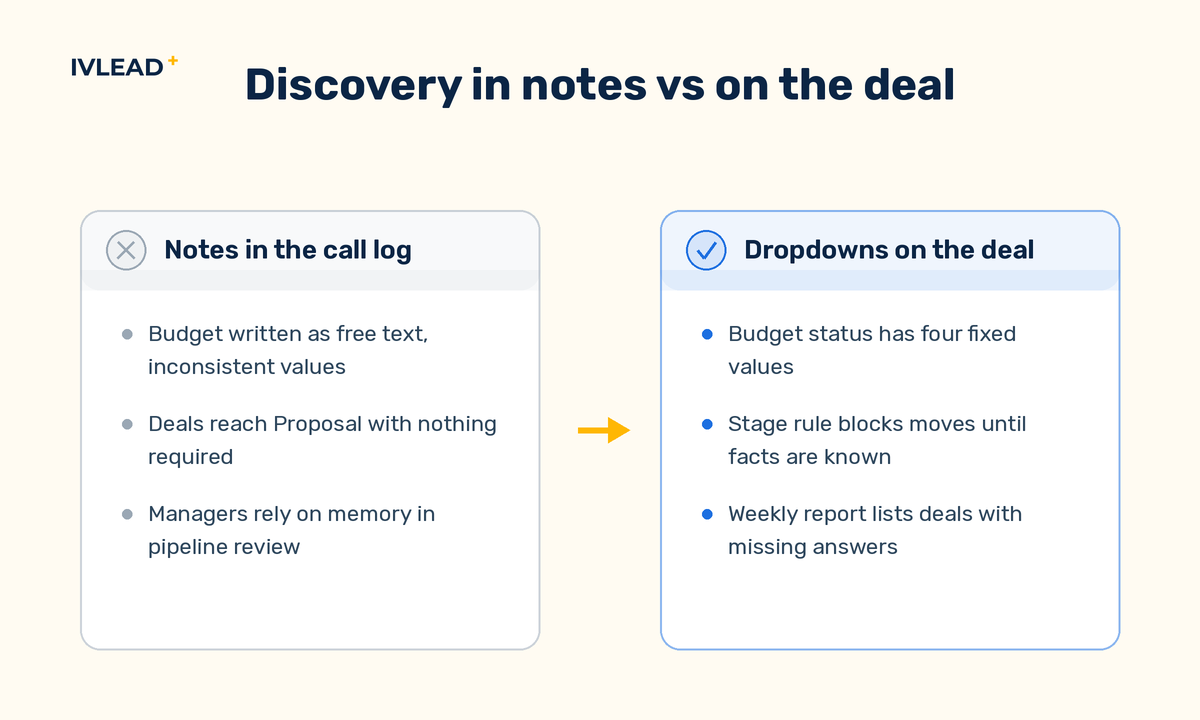
- Store answers as deal properties with fixed options. Free-text notes cannot be reported on consistently or used to gate a deal stage.
- HubSpot playbooks (Sales Hub or Service Hub Professional and Enterprise) put the script on the deal record. HubSpot lists questions that write straight to a property as Enterprise only.
What should you decide before you pick the questions?
A question list only helps once you have decided what the call must produce. Agree these points with the sales team first:
- Exit criteria. Which facts must be known before a deal moves on? Usually the four above. If one is still unknown after the call, the deal stays where it is or goes to nurture.
- What disqualifies. Decide whether no budget and no deadline means closed lost or a nurture stage, so every rep handles it the same way.
- Where the answers live. Qualification facts belong on the deal, because they describe this opportunity. A company can have several deals over time, and a budget status from two years ago says nothing about this one.
- Who reviews the answers. If a manager does not look at the qualification properties in pipeline review, reps will stop filling them in.
- What to look up beforehand. Company size, recent news and the caller's role are on the website and LinkedIn. Spend the call on what is not public.
With those decisions made, the 17 questions become a menu rather than a script. If your team already uses BANT, the four outcomes cover it: need, authority, budget and timeline, plus the next step.
Which questions uncover the real problem?
A prospect who cannot put a cost on the problem is often not ready to buy, and a prospect who has already tried two fixes is telling you what your proposal has to beat.
- What made you take this call now?
- What are you trying to fix, in your own words?
- What does that problem cost you, in hours or money?
- What have you already tried, and why did it not hold?
Listen for a trigger event in question 1, such as a new manager or a failed audit, and a number in question 3. "Reps lose about an hour a day re-keying orders into the ERP" is a quantified cost. "We figured we would look around" is curiosity, and should be recorded as such.
Which questions reveal who decides?
The person on the call is rarely the only person who signs. Deals stall later when a finance lead or an operations director was never consulted.
- Besides you, who else is involved in a decision like this?
- Who approves the spend?
- Is there agreement internally that this needs solving, or are you still making that case?
- What would make this an easy yes for the others involved?
Question 7 is easy to skip. If the champion is still building the internal case, your next step is helping them build it, and the deal should be forecast for a later period than they hope.
Which questions reveal budget and timeline?
A deal with no budget and no date is a conversation. It may become a deal later, but forecasting it for this quarter is how pipelines inflate. Asking directly saves both sides weeks of follow-up.
- Is there a budget set aside for this, or are we building the case for one?
- What is driving the timing? Is there a date this needs to be done by?
- What happens if nothing changes?
- How have you bought similar tools or services before?
Question 12 surfaces procurement and security review before they surprise you. If the last purchase of this size took four months and two legal rounds, your close date should reflect that. If the prospect declines to discuss budget, record exactly that: a "Declined to share" value tells a manager more than a guess.
Which questions set up the next step?
End the call by confirming fit and agreeing a concrete next action with a date.
- What does success look like six months after this is solved?
- What will you compare options on?
- What could stop this from going ahead?
- What is the right next step from here?
- Who should join that next conversation?
"A working session with you and your ops lead next Tuesday" is a next step. "I will send some information" is a follow-up you will chase. Record which one you got.
Should the questions live in a HubSpot playbook?
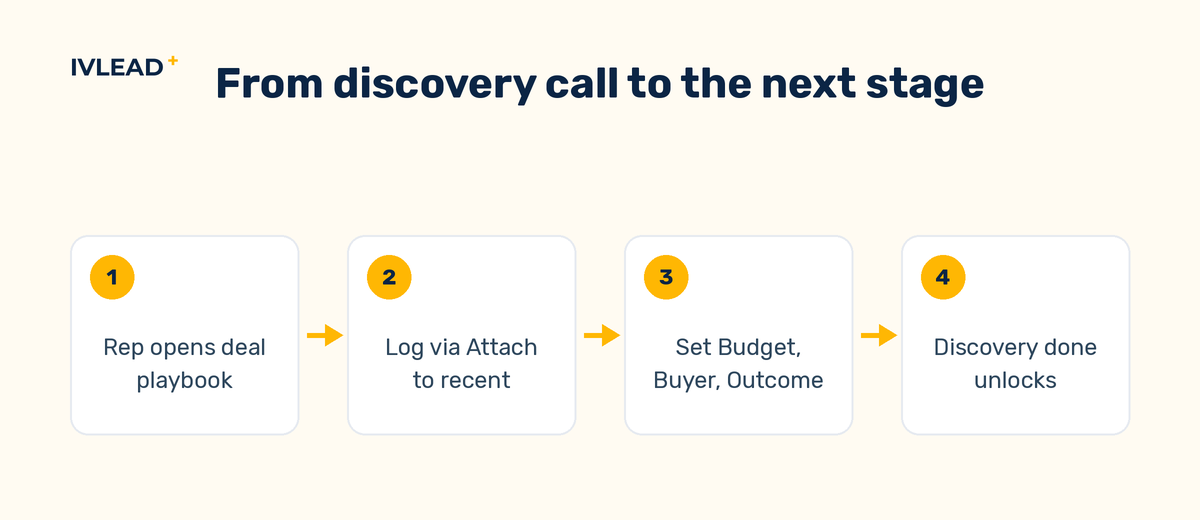
A HubSpot playbook is a call script that opens inside the deal (or contact, company or ticket) record, so a rep can type answers under each question during the call and log the whole thing as an engagement. Playbooks come with Sales Hub or Service Hub Professional and Enterprise, and each user needs an assigned Sales or Service seat. Two default playbooks, Discovery Call and Qualification, are already in the account and can be edited.
When is a playbook worth it?
When several reps need to capture the same facts on every deal. A recommendation rule can put the discovery playbook at the top of the list on deals in the discovery stage, and the Analyze tab shows views and logged playbooks per user. On Starter there are no playbooks, so keep the questions in a shared document and set the deal properties by hand. With one or two sellers who already qualify consistently, the properties still matter but the playbook is overhead.
The tier limit that matters
Playbook questions come in three answer types. Open text works on Professional and Enterprise. A list of answer options is Sales Hub Enterprise only. HubSpot's documentation lists the third, Update a property, as Sales Hub or Service Hub Enterprise only. So plan on Professional reps setting the qualification properties on the deal by hand after logging; required stage properties, covered below, make sure they do.
What does a discovery playbook that feeds the pipeline look like?
For example, a company that sells quality-management software to food manufacturers runs a deal pipeline that opens with Discovery scheduled, Discovery done and Proposal. It builds a playbook named Discovery call (new business) with a recommendation rule on the deal property Deal stage is any of Discovery scheduled, so it appears as Recommended on every deal in that stage.
The playbook includes all 17 questions as prompts. Six of them, plus one rep-judgement prompt at the end, are linked to deal properties, because those answers change a forecast or a stage decision.
| Question | Deal property | Field type | Options or format |
|---|---|---|---|
| 1. What made you take this call now? | Trigger event | Single-line text | Short phrase, e.g. "Failed BRC audit in September" |
| 3. What does the problem cost? | Problem cost | Dropdown | Not stated / Estimated verbally / Quantified |
| 5–6. Who else decides, who approves spend? | Economic buyer | Dropdown | On the call / Named, not met / Unknown |
| 9. Is there a budget? | Budget status | Dropdown | Allocated / Being built / None / Declined to share |
| 10. What is driving the timing? | Decision deadline | Date | Leave empty if no date exists |
| 16. What is the next step? | Agreed next step | Dropdown | Working session booked / Proposal requested / Follow-up only |
| Rep's judgement after the call | Discovery outcome | Dropdown | Qualified / Nurture / Disqualified |
On Enterprise, each of those seven prompts is an Update a property question, and the values write to the deal when the rep clicks Log call. On Professional, they are open-text prompts, and the rep sets the properties on the deal record straight after logging. Either way, Discovery outcome, Budget status and Economic buyer are required conditional stage properties on Discovery done in the pipeline settings, so a deal cannot move there without them.
Two reports then do the management work. The first lists deals in Proposal or later where Budget status is None or Economic buyer is Unknown; those are the deals to challenge in pipeline review. The second breaks down Discovery outcome by rep, which shows who is disqualifying and who is waving everything through. For the follow-up itself, the rep ticks Create a task to follow up when logging the playbook. A deal workflow that enrolls when Discovery outcome becomes Nurture handles the nurture case.
What breaks discovery data in HubSpot, and how do you check?
- Answers stored on the contact instead of the deal. The second deal with the same company inherits stale budget and decision-maker values, and deal views, stage rules and per-deal reports cannot use them. Check: the qualification properties exist on deals, not only on contacts.
- Free-text properties for things that should be dropdowns. A text field named Budget status collects "yes", "Yes", "probably Q2" and "ask Dana", none of which group cleanly in a report or satisfy a stage rule. Check: every qualification property is a dropdown, date or number field, not single-line text (Trigger event excepted).
- Two playbook questions linked to one property. If the record has no value yet and only the first question is answered, HubSpot uses only the last question's answer, so the first answer is lost. Check: one property per question.
- Playbook opened from the contact when the deal is the subject. The engagement logs on the record it was opened from, and appears on the deal only if one of the playbook's questions points at deals. Check: train reps to open discovery playbooks from the deal record.
- Duplicate call records. A call logged by the calling tool plus the playbook's own log double-counts in call reports. Check: log the playbook with Attach to recent, which appends it to an engagement from the last six hours.
- Stage gates that nobody enforces. Deals reach Proposal with every qualification property blank because the stage rule was never set. Check: open the pipeline settings and confirm the required conditional stage properties on
Discovery done.
How IV-Lead approaches this
Our view is that forecast quality is decided at discovery, so this is the one place in the pipeline where we argue for required properties even when reps push back. Every later stage depends on facts only the discovery call can produce, and a deal that enters Proposal without a known budget status is a forecast entry with nothing behind it.
We also keep the property set small. Five to seven dropdowns on the deal, each tied to a decision someone actually makes, have a fair chance of being filled in. Twenty half-filled fields are worse than none because they look like data.
On tier, we do not recommend moving to Enterprise only to get property-writing playbook questions. On Professional, required stage properties plus the habit of setting them straight after the call cover the same ground. Enterprise earns its cost when several other needs line up, answer-option lists among them. When we build this for a client we set the properties, the stage rules, the playbook and the two review reports together, because any one of them on its own tends to lapse.
If you want to see where your deals pass discovery without the facts to back it up, book a 30-minute portal audit and we will walk through your deal properties and stage rules with you. For the wider setup, see how we handle HubSpot implementation and automations.
Frequently asked questions
How many discovery questions should I ask on one call?
Enough to reach your exit criteria: problem and cost, decision-maker, budget or deadline, and next step. That is usually well short of all 17. Keep the rest as prompts for when a conversation needs them, and record only the answers that change a decision.
How do I ask about budget without putting the prospect off?
Frame it as a scoping question: "So I recommend the right size of solution, is there a budget set aside, or are we building the case for one together?" Both answers are useful, and the second tells you the deal belongs in a later forecast period.
Which HubSpot tier do I need for discovery playbooks?
Playbooks need Sales Hub or Service Hub Professional or Enterprise, plus an assigned seat. HubSpot lists questions that write answers straight into a record property as Enterprise only; on Professional the rep updates the properties after logging the call.
How do I know if discovery is actually happening?
Build a saved view of deals past the discovery stage where Discovery outcome or Budget status is empty. If it is not empty each week, either the stage rule is missing or reps are skipping the call.