
Another month, another wave of updates from HubSpot - and as usual, many of the most valuable improvements are the ones that quietly remove friction from everyday work.
This month’s updates focus heavily on automation, operational visibility, and smarter event management. From automatically registering contacts to marketing events through workflows to capturing buyer billing details directly inside quotes, HubSpot continues to reduce the manual steps that slow teams down.
In this month’s roundup, we’ve highlighted the most useful additions - including improvements to event management, personalization, CRM automation, and AI integrations - along with a full list of the latest updates now available across the platform.
Manage Participant States for Marketing Events
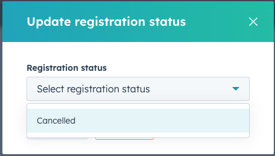
HubSpot now allows you to update contacts' registration and participation status for marketing events directly from their contact records, eliminating the need for manual imports.
- On any contact record, you can edit registration statuses (Registered, Canceled) and participant statuses (Attended) from the Marketing Events CRM card.
- Track real-time event attendance before, during, and after your events and segment your contacts accordingly.

New Workflow Action to Register a Contact to a Marketing Event
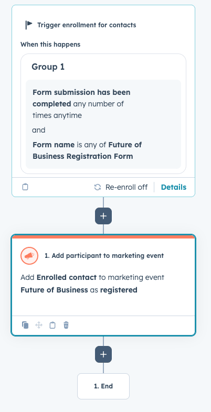
Teams can automatically register contacts to HubSpot Marketing Events based on workflow triggers, like form submissions, with the "Add participant to Marketing Event" workflow action.
- In any contact-based workflow, you can add the "Add participant to Marketing Event" action under the Marketing section to automatically register contacts (e.g., when a form is submitted).
- Automates the enrollment process by eliminating the need for manual data imports or custom API solutions.
Note: This action only works with events manually created in HubSpot. It cannot be used for events synced via third-party integrations.
Personalization App Supports Website Pages
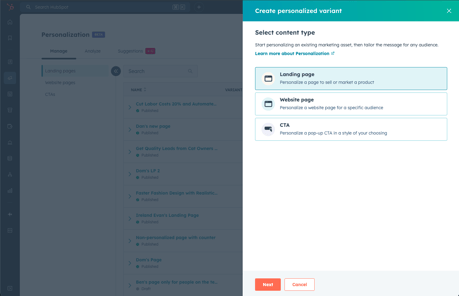
You can now create and manage audience-specific variants of website pages in the Personalization app.
- Use variants to create customized versions of website pages, either manually or with AI-assisted setup.
- Managing all personalized page experiences from a single location saves time and resources.
- Track how each page variant performs across audience segments by using the Analyze tab within Personalization.

Upgraded Social Analytics
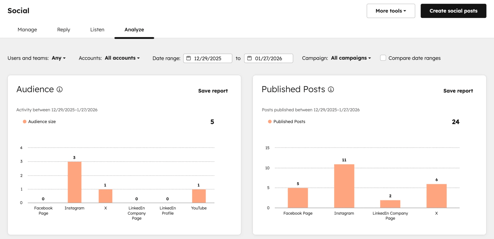
It's easier to understand and prove the ROI of your social media campaigns with the new Social Analyze tab, which offers ready-to-use reports organized into four performance categories.
- Get pre-built reports across four categories (Grow Your Brand, Drive Engagement, Track Leads from Social, and Optimize Your Content).
- Get the exact performance view you need by filtering all reports by social account, network, and time period.

Campaign Properties and Events Now Available in Workflows
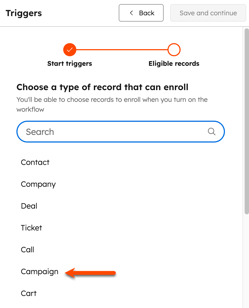
Workflows now allow you to trigger automations based on campaign-level data or when a contact is influenced by a campaign.
- Create budget overspend alerts that trigger a workflow when a campaign exceeds its budget, eliminating the need to monitor manually.
- As soon as a contact is attributed to a campaign, automatically enroll them in tailored follow-up sequences
Video capture: Record Videos Directly in HubSpot
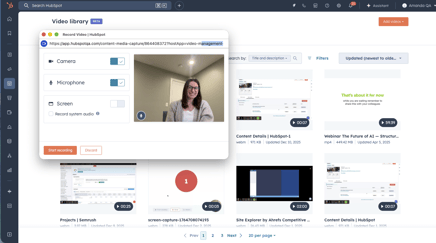
HubSpot now allows you to record webcam, screen, or screen-and-webcam videos natively and save them directly to your video library - no third-party apps needed.
- From within HubSpot, select your recording type (webcam, screen share, or overlay), select audio/camera inputs, and pause, stop, save, or delete your recording.
- Video recordings are saved directly to your HubSpot video library, keeping sensitive recordings off of personal devices.
Capture Buyer Details from Quotes
Billing fields such as Purchase Order # and Buyer Tax ID can now be added by sellers. You can add Billing Contact, and Billing Address directly to quotes, allowing buyers to edit these fields before accepting.
- Eliminate back-and-forth by collecting PO numbers, tax IDs, and billing details in the quote itself.
- At the template level, configure buyer edit permissions so defaults are applied to all quotes created from that template

Rotate Record to Owner Action in Conversation-based Workflows
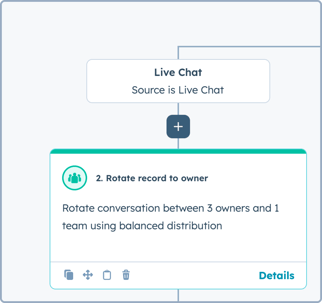
With the Rotate Owner action, conversation-based workflows move conversations to a target inbox and assign them to the appropriate team or user while respecting inbox permissions.
- Choose a target inbox and assignment method directly from the CRM action list in workflows to automate conversation handoffs.
- Conversations are only routed to users who have access to the target inbox, ensuring compliant and accurate ownership assignment.
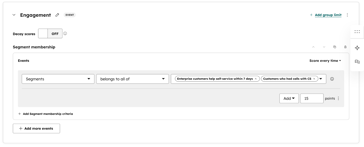
Segment Membership in Events for Health Scoring
Using Health Scoring's segment membership as an event scoring criterion, you can build advanced AND/OR logic across properties and events without relying solely on workflow enrollment.
- Combine segment membership with other event criteria using AND/OR logic across properties and events to create complex scoring rules.
- By treating integration events and property-based behaviors as segments within an event group, you can score them.
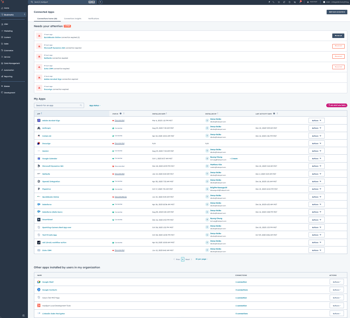
Connected Apps: New Connections Home & Connection Insights
Admins have access to a unified view of all app activity, health, API usage, and CRM record interactions through HubSpot's Connected Apps.
- Track API call usage across all private apps before hitting limits, and view 30 days of Record Insights showing which apps created, updated, deleted, or merged CRM records (from December 1, 2025 onwards).
- Reduce blind spots in your app ecosystem by seeing all apps installed by other users.
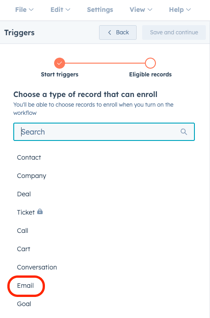
Email Object in Workflows
With HubSpot Workflows, teams can automate internal processes based on email creation events and properties by using the 1:1 Email object as a trigger and action source.
- When creating a workflow from scratch, select the Email object to trigger workflows directly from email events (e.g., when an email is created).
- Build repeatable internal email management processes using standard workflow actions after the trigger.
- In addition to standalone email workflows, the Email object can also be accessed within other object-based workflows.
HubSpot Connector for Claude: CRM Write Access and Engagement History
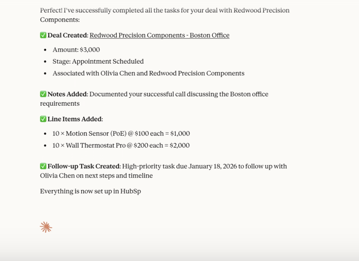
By connecting HubSpot to Claude, you can create and update CRM records, log activities, and surface insights from your full engagement history (emails, calls, meetings, tasks, and notes).
- Using natural language prompts, you can create contacts and deals, update deal stages, log call notes, and assign tasks without having to switch back to HubSpot.
- Allow Claude to provide context-aware recommendations based on your complete engagement history.
- In your HubSpot Audit Log, all create and update actions are attributed; Claude cannot delete records. Up to 10 records can be requested per bulk action.